Connecting a wiring harness for your car stereo is easier than you think—with the right tools and guidance. This guide walks you through every step to ensure a safe, clean, and professional installation.
Key Takeaways
- Use a vehicle-specific wiring harness: This ensures compatibility and avoids cutting factory wires.
- Match wire colors correctly: Most harnesses follow standard color codes for power, ground, and speakers.
- Secure connections with crimp connectors or solder: Loose wires can cause audio issues or electrical shorts.
- Test before final installation: Power up the stereo to check sound and functions before tucking wires away.
- Use electrical tape or heat shrink tubing: Protect connections from moisture and vibration.
- Refer to your stereo and car manuals: They provide essential wiring diagrams and safety tips.
- Take your time and stay organized: Rushing leads to mistakes—label wires if needed.
How to Connect Wiring Harness Car Stereo Step by Step
Upgrading your car stereo can transform your driving experience—better sound, Bluetooth, navigation, and more. But before you enjoy those features, you need to connect the wiring harness properly. Don’t worry—it’s not as scary as it sounds. With the right tools, a little patience, and this step-by-step guide, you’ll have your new stereo up and running in no time.
In this guide, you’ll learn how to connect a wiring harness for your car stereo safely and correctly. We’ll cover everything from gathering tools to testing your system. Whether you’re a DIY beginner or a weekend mechanic, these instructions will help you avoid common mistakes and get professional results.
What Is a Car Stereo Wiring Harness?
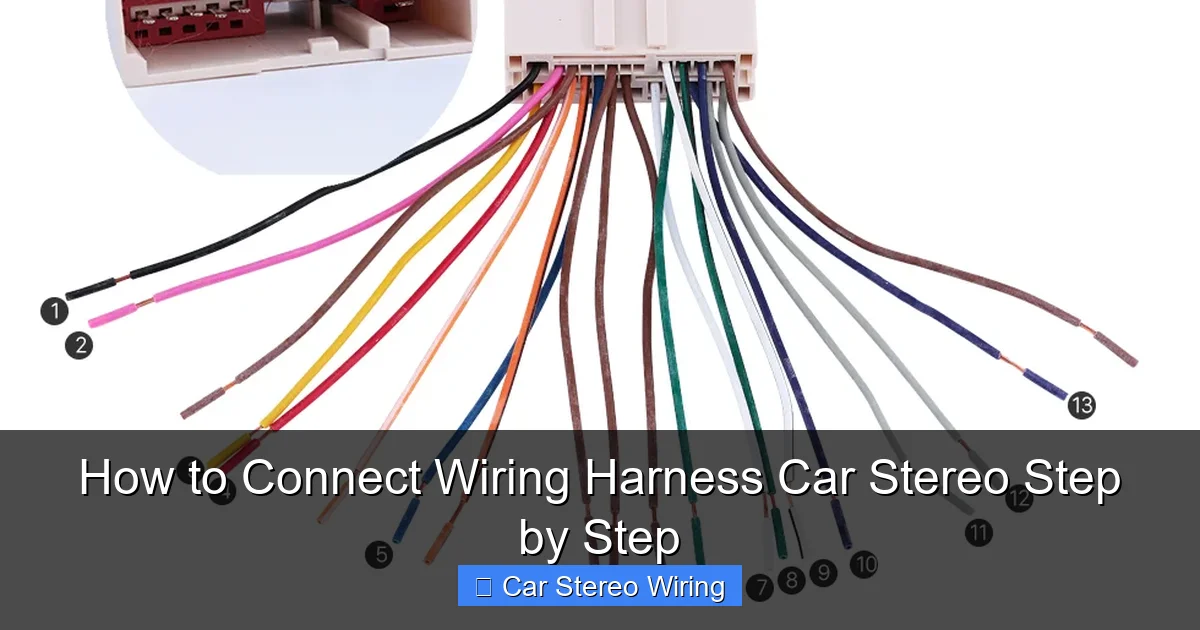
Visual guide about How to Connect Wiring Harness Car Stereo Step by Step
Image source: seicane.com
A wiring harness is a set of wires that connects your new car stereo to your vehicle’s electrical system. Instead of cutting and splicing factory wires, a harness plugs into your car’s existing connector, making installation cleaner and reversible.
Most aftermarket stereos come with their own harness, and you’ll need a separate vehicle-specific harness that matches your car’s make, model, and year. These two harnesses are connected together, creating a bridge between your stereo and the car.
Using a harness protects your car’s wiring, reduces the risk of electrical damage, and makes future upgrades or removals much easier.
Tools and Materials You’ll Need
Before you start, gather these essentials:
- Vehicle-specific wiring harness
- Aftermarket stereo wiring harness (usually included with the stereo)
- Wire strippers
- Crimping tool or soldering iron
- Electrical tape or heat shrink tubing
- Wire connectors (butt connectors, spade connectors)
- Multimeter (optional, for testing)
- Screwdrivers (Phillips and flathead)
- Panel removal tools (plastic pry tools)
- Zip ties (for cable management)
Having everything ready saves time and prevents frustration mid-install.
Step 1: Disconnect the Car Battery
Safety first! Always disconnect the negative terminal of your car battery before working on electrical systems. This prevents short circuits, blown fuses, or damage to your stereo.
How to Disconnect the Battery
- Open the hood and locate the battery.
- Use a wrench to loosen the nut on the negative (–) terminal.
- Remove the cable and tuck it away so it doesn’t touch the terminal.
- Wait at least 5 minutes before proceeding.
This simple step protects you and your equipment.
Step 2: Remove the Old Stereo
Now it’s time to take out the factory stereo. The method varies by vehicle, but here’s a general approach.
Using a Panel Removal Tool
- Use a plastic pry tool to gently remove the trim panel around the stereo.
- Look for screws or clips holding the stereo in place.
- Unscrew or unclip the stereo and carefully pull it out.
- Disconnect the factory wiring harness and antenna cable.
Some cars use a special removal key—check your owner’s manual or search online for your model.
Tip: Take Photos
Snap a picture of the wiring before disconnecting. This helps if you need to reference the setup later.
Step 3: Identify the Wiring Harnesses
You’ll now have two harnesses:
- Factory harness: Comes from your car.
- Aftermarket harness: Comes with your new stereo.
Your goal is to connect these two using the vehicle-specific adapter harness.
Match the Wires
Most harnesses use standard color codes. Here’s a quick reference:
- Red: 12V ignition/switched power (turns on with the key)
- Yellow: 12V constant power (battery, for memory)
- Black: Ground
- Orange: Illumination/dimmer (lights up the display)
- Blue/White: Antenna power or amplifier remote
- Speaker wires: White, gray, green, purple (and their black stripes for negative)
Always double-check your stereo’s manual—some brands may vary slightly.
Step 4: Connect the Wiring Harness
Now for the main event: connecting the wires.
Strip the Wire Ends
Use wire strippers to remove about 1/2 inch of insulation from each wire. Be careful not to cut the copper strands.
Match and Connect Wires
Pair the wires from the aftermarket harness to the vehicle harness by color. For example:
- Red to red (ignition)
- Yellow to yellow (constant power)
- Black to black (ground)
- Speaker wires: white to white, gray to gray, etc.
Secure the Connections
You have two main options:
Option 1: Crimp Connectors
- Twist the matching wires together.
- Insert them into a butt connector.
- Crimp firmly with a crimping tool.
Option 2: Soldering
- Twist the wires together.
- Solder the joint for a strong, permanent connection.
- Cover with heat shrink tubing and apply heat to seal.
Soldering is more durable, but crimping works well if done properly.
Insulate the Connections
Wrap each connection with electrical tape or use heat shrink tubing. This prevents shorts and protects against moisture.
Tip: Label Wires
If you’re unsure, label wires with tape and a marker. For example, “Front Left +” or “AMP Remote.”
Step 5: Connect the Antenna and Accessories
Don’t forget these important connections:
Antenna Cable
Plug the factory antenna cable into the back of your new stereo. Some stereos have a standard Motorola-style connector.
Steering Wheel Controls (If Applicable)
If your car has steering wheel audio controls, you may need a separate adapter harness. Connect it according to the instructions.
Amplifier or Subwoofer (Optional)
If you’re adding an external amp, connect the blue/white “remote” wire from the stereo to the amp’s remote terminal. This tells the amp when to turn on.
Step 6: Test the Stereo Before Final Installation
Before you tuck everything away, test the system.
Reconnect the Battery
Reattach the negative battery terminal.
Turn on the Stereo
Insert the key and turn it to the “ACC” or “ON” position. The stereo should power up.
Check All Functions
Test:
- Power on/off
- Volume and sound from all speakers
- Radio reception
- Bluetooth or USB (if applicable)
- Illumination (does the display light up with the headlights?)
If something isn’t working, don’t panic—check your connections.
Troubleshooting Common Issues
Even with careful work, problems can happen. Here’s how to fix the most common ones.
No Power
- Check if the fuse in the stereo or car is blown.
- Verify the red (ignition) and yellow (constant) wires are connected.
- Use a multimeter to test for 12V at the harness.
No Sound from Speakers
- Double-check speaker wire connections.
- Ensure polarity is correct (+ to +, – to –).
- Test each speaker individually.
Static or Poor Reception
- Make sure the antenna is fully plugged in.
- Check if the antenna power wire (blue/white) is connected.
Stereo Turns Off When Headlights Are On
This usually means the illumination wire (orange) is connected to a power source instead of a dimmer circuit. Recheck your wiring diagram.
Step 7: Secure and Reinstall the Stereo
Once everything works, it’s time to put it all back together.
Tidy Up the Wiring
Use zip ties to bundle wires neatly. Avoid pinching them behind the stereo.
Slide the Stereo Into the Dash
Carefully push the stereo into the mounting sleeve. Don’t force it.
Reattach Trim Panels
Snap or screw the trim pieces back into place.
Final Check
Turn the stereo on one more time to confirm everything still works.
Tips for a Professional-Looking Installation
- Keep wires short: Trim excess length to reduce clutter.
- Use cable management: Route wires away from moving parts.
- Avoid sharp edges: Use grommets or tape to protect wires.
- Test before sealing: Always test before closing everything up.
A clean install not only looks better but also lasts longer.
Conclusion
Connecting a wiring harness for your car stereo might seem tricky at first, but it’s a straightforward process once you know the steps. By using a vehicle-specific harness, matching wire colors, and securing connections properly, you can install your new stereo safely and correctly.
Remember to disconnect the battery, test before finalizing, and take your time. With this guide, you’re well on your way to enjoying better sound, modern features, and a stereo that feels like it came straight from the factory.
Whether you’re upgrading for sound quality, smartphone integration, or just a fresh look, a proper wiring harness connection ensures your system works reliably for years to come.
🎥 Related Video: car sterio wiring diagram #sony #music#xplod #youtube #android #speaker #cars #Dolby #wiring
📺 Kunal Auto

