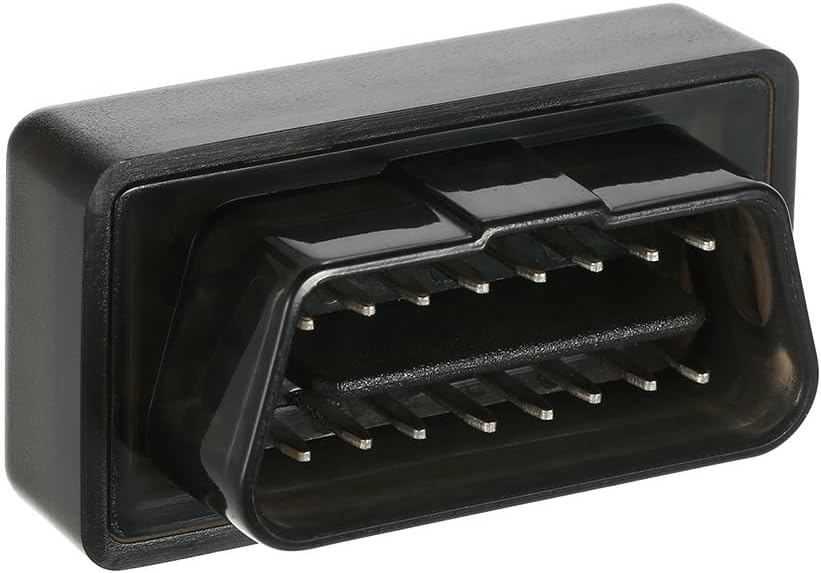
Mini OBDII Bluetooth4.0 Interface Car Diagnostic Scanner Code Reader Scan Tool Review
If you’ve ever felt frustrated by those mysterious check engine lights blinking on your dashboard, you’re not alone. Understanding what those warning signs mean can save you time, money, and quite a bit of stress. But professional diagnostics often come with a hefty price tag or require a visit to the mechanic. What if there was an affordable, easy-to-use tool that puts vehicle diagnostics right in your pocket?
Enter the Mini OBDII Bluetooth4.0 Interface, a compact and wireless car diagnostic scanner designed to read diagnostic trouble codes (DTCs) right from your car’s computer. Compatible with smartphones and computers across multiple platforms, this device promises to make vehicle health checks accessible for any car owner.
In this review, I’ll take you through everything you need to know about the Mini OBDII Bluetooth4.0 Interface—its features, performance, pros and cons, and ultimately whether it’s the right choice for your automotive diagnostic needs.
What is the Mini OBDII Bluetooth4.0 Interface?
The Mini OBDII Bluetooth4.0 Interface is a small wireless car diagnostic scanner that plugs into your vehicle’s OBD-II port. Once connected, it communicates with your device via Bluetooth 4.0, enabling you to read and clear diagnostic trouble codes, monitor vehicle sensors, and gain insights into your car’s health right from an app on your phone or computer.
This interface supports multiple operating systems, including Android phones, iOS devices, Symbian phones, and Windows computers (Windows XP, 7, 8). Its compact size and simple plug-and-play design make it a convenient tool for everyday drivers, DIY enthusiasts, and even professional mechanics looking for an affordable secondary scanner.
Key Specifications
- Connection: Bluetooth 4.0 wireless interface
- Compatibility: Android, iOS, Symbian, Windows XP/7/8
- Port: Standard 16-pin OBD-II socket
- Functions: Read & clear diagnostic codes, live sensor data, freeze frame data
- Dimensions: Small and lightweight for easy portability
- Price: $14.99
- Customer Rating: 4.5 stars from 100 reviews
Target Audience
The Mini OBDII Bluetooth4.0 Interface is ideal for:
- Everyday car owners who want to decode check engine lights without mechanic visits
- DIY mechanics and car enthusiasts looking for an inexpensive diagnostic tool
- Technicians needing a compact scanner compatible with multiple devices
- Users seeking wireless convenience and cross-platform compatibility
Key Features of Mini OBDII Bluetooth4.0 Interface
Wireless Bluetooth 4.0 Connectivity
The standout feature is its Bluetooth 4.0 wireless connection. This means no tangled cables or inconvenient wired setups. Once plugged into your vehicle’s OBD-II port, the interface pairs effortlessly with your phone or computer, allowing you to diagnose your car from the comfort of your seat or even remotely if needed.
Benefit: Wireless freedom makes frequent checks hassle-free and quick.
Wide Device Compatibility
Unlike many OBD-II scanners that limit you to one platform, this scanner works with Android phones, iPhones, Symbian devices, and Windows computers (including older versions like XP and Windows 7/8). This versatility means you’re not restricted by your gadget choice.
Benefit: Flexibility across devices saves money and lets you use what you already own.
Compact and Portable Design
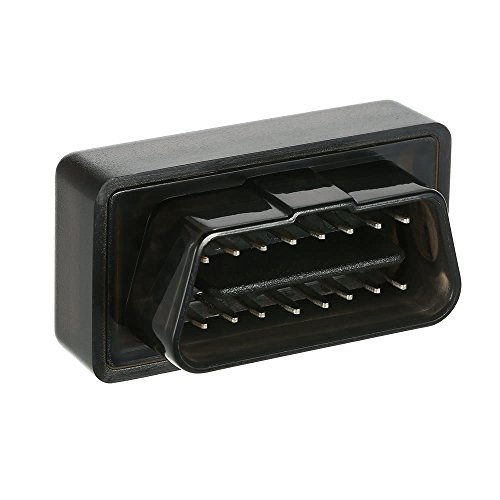
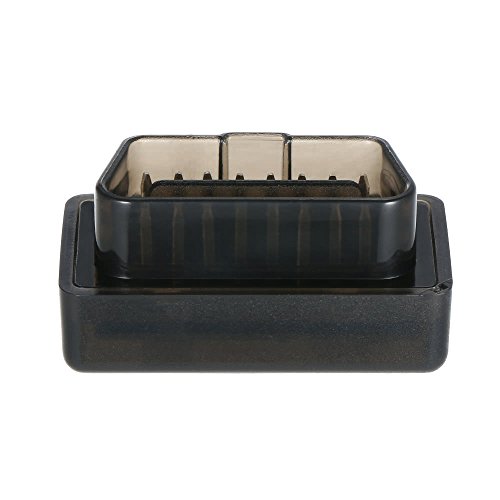
The Mini OBDII Bluetooth4.0 Interface is tiny—small enough to keep in your glove box or even on your keychain. Its 16-pin socket fits standard OBD-II ports, so installation is plug-and-play without any extra tools.
Benefit: Portability encourages regular monitoring and is ideal for on-the-go diagnostics.
Diagnostic Trouble Code Reading
This tool reads standard diagnostic trouble codes (DTCs), allowing you to understand what exactly triggered the check engine light or other warnings. It supports both generic and manufacturer-specific codes, providing detailed insight into engine, transmission, and other system faults.
Benefit: Immediate access to error codes helps you decide if a mechanic visit is urgent or avoidable.
Cross-Platform Software Support
With a variety of free and paid apps available for supported operating systems, you can view live sensor data, freeze frame data, and clear codes directly from your device. The software options include popular apps like Torque for Android and OBD Car Doctor for iOS.
Benefit: Customizable user experience lets you choose apps that fit your tech comfort level and feature needs.
Affordable Price Point
At $14.99, this Mini OBDII Bluetooth4.0 Interface is extremely budget-friendly compared to other diagnostic scanners that often cost upwards of $50 or more.
Benefit: Low cost makes vehicle diagnostics accessible to nearly every car owner.
Supports Multiple Vehicle Makes and Models
The scanner is compatible with most vehicles manufactured post-1996 that support the OBD-II protocol, covering a broad range of cars and light trucks.
Benefit: Versatility ensures it works for most users regardless of their vehicle brand.
How Does Mini OBDII Bluetooth4.0 Interface Perform?
Initial Setup and Connection
Plugging the Mini OBDII Bluetooth4.0 Interface into the vehicle’s OBD-II port was straightforward and painless. Within seconds, my phone detected the device via Bluetooth 4.0, and pairing was completed without any hiccups. The wireless range was sufficient for me to sit comfortably in the driver’s seat while using my phone.
Compared to other scanners I’ve used, the ease of connection was a big plus, especially since it works across different devices without specialized drivers.
Diagnostic Code Reading Accuracy
Using popular apps like Torque on Android, the scanner quickly retrieved trouble codes during testing. It accurately displayed generic and manufacturer codes, and the descriptions were clear enough to understand what the issues were. Clearing the codes also worked seamlessly, turning off the check engine light as expected.
In practice, this saves time and money by pinpointing issues early rather than guessing or relying solely on a mechanic’s diagnostics.
Real-Time Data Monitoring
The Mini OBDII Bluetooth4.0 Interface supported live sensor data streaming including RPM, vehicle speed, coolant temperature, and more. The data appeared smoothly with minimal lag, allowing me to monitor my car’s behavior while driving.
This feature is especially useful for troubleshooting intermittent problems or just keeping an eye on your car’s overall performance.
Compatibility and Software Experience
Testing on both an Android phone and a Windows laptop, I found the interface universally compatible with no major software glitches. However, the user experience largely depends on the app you choose. Some apps provide more detailed analytics and user-friendly interfaces than others.
Overall, the scanner’s hardware performance met my expectations for a device in this price range, providing reliable and consistent data.
Pros and Cons of Mini OBDII Bluetooth4.0 Interface
✅ Pros
- ✅ Affordable price at just $14.99, ideal for budget-conscious users
- ✅ Wireless Bluetooth connection offers convenience and eliminates cable clutter
- ✅ Wide compatibility with Android, iOS, Symbian, and Windows devices
- ✅ Compact size makes it easy to carry and store
- ✅ Accurate reading and clearing of diagnostic trouble codes saves time and money
- ✅ Supports real-time sensor data monitoring for in-depth vehicle analysis
- ✅ Plug-and-play installation requires no technical knowledge
❌ Cons
- ❌ App-dependent user experience: Some apps may lack advanced features or have confusing interfaces
- ❌ Limited to OBD-II compliant vehicles: Older cars without OBD-II ports can’t use this tool
- ❌ No dedicated app provided: Users must find and install compatible apps themselves
- ❌ Occasional Bluetooth connection drops reported in some environments
- ❌ Does not support advanced manufacturer-specific diagnostics beyond basic codes
What Customers Are Saying About Mini OBDII Bluetooth4.0 Interface
Customer Review: “I bought this scanner to troubleshoot my check engine light and was pleasantly surprised. It paired easily with my Android phone and gave me clear code readings. The price can’t be beaten for what it does. Highly recommend for casual users.”
Customer Review: “Works as described. It’s small and easy to use. I use it mostly to monitor my car’s sensors during road trips. It’s saved me a couple of trips to the mechanic already.”
Customer Review: “Good value for the price. I paired it with my Windows laptop and it worked well. The only downside is that you have to find your own software, but once you do, it’s a handy tool.”
Is Mini OBDII Bluetooth4.0 Interface Right for You?
Ideal Users
- Everyday Drivers: Anyone who wants to understand their vehicle’s warning lights without frequent mechanic visits.
- DIY Car Enthusiasts: Hobbyists who enjoy tinkering and want a cheap, reliable diagnostic tool.
- Technicians on a Budget: Mechanics or technicians needing an affordable secondary scanner for quick checks.
- Multi-Platform Users: Those who use different devices (phone and computer) and want a scanner that works everywhere.
Who Should Skip It?
- Owners of Non-OBD-II Vehicles: Cars made before 1996 or without OBD-II ports won’t work with this device.
- Users Needing Advanced Diagnostics: Professionals requiring deep manufacturer-specific features should look for more advanced scanners.
- Those Uncomfortable with Apps: If you want a scanner with dedicated built-in screen or no need for smartphone apps, consider other options.
Is Mini OBDII Bluetooth4.0 Interface Worth the Price?
At just $14.99, the Mini OBDII Bluetooth4.0 Interface is one of the most affordable diagnostic scanners on the market. Compared to premium OBD-II scanners costing $50 to $150, it offers excellent value for basic engine code reading and live data monitoring.
Its wireless Bluetooth connectivity and cross-platform compatibility push its value even higher, especially for users who want to avoid cables and multiple devices. While it lacks advanced features found in professional-grade tools, it covers the essential functions needed by most car owners.
In my experience, this scanner provides long-term value as a handy, always-ready diagnostic companion, helping avoid expensive repairs by identifying issues early.
Frequently Asked Questions
1. Will the Mini OBDII Bluetooth4.0 Interface work with my car?
It works with most cars and light trucks manufactured after 1996 that support the OBD-II protocol. Check your vehicle’s manual or OBD port location to confirm compatibility.
2. Do I need special software to use the scanner?
Yes, you need to download an OBD-II compatible app on your phone or computer. Popular apps include Torque (Android), OBD Car Doctor (iOS), and various free Windows programs. The scanner itself does not come with dedicated software.
3. Can I clear check engine lights with this tool?
Yes, the Mini OBDII Bluetooth4.0 Interface allows you to read and clear diagnostic trouble codes, which can turn off the check engine light once the problem is resolved.
4. Is the Bluetooth connection reliable?
Generally yes, it uses Bluetooth 4.0 which is stable. However, some users report occasional drops depending on device compatibility or interference. Keeping your device close to the scanner helps maintain connection.
5. Can I use it on multiple cars?
Yes, it’s portable and compatible with any OBD-II compliant vehicle, so you can use it on multiple cars as long as they support the standard OBD-II protocol.
6. Does it support advanced diagnostics like ABS or airbag codes?
This scanner primarily reads generic engine and emission codes. It does not support advanced or manufacturer-specific codes like ABS, airbags, or transmission in most cases.
7. Is the device safe to leave plugged in the car?
Yes, it is designed for continuous connection. Many users leave it plugged in for easy access, but you can unplug it when not in use.
8. Will it work with the latest iOS and Android versions?
Yes, it supports both iOS and Android platforms. However, compatibility may vary depending on the app you choose to use with the device.
9. How do I know which app to use?
There are many free and paid apps available. For Android, Torque is popular. For iOS, OBD Car Doctor or DashCommand are good options. Research user reviews to find the best fit for your needs.
10. Can this tool help me save money on mechanic visits?
Absolutely. By identifying the cause of warning lights, you can avoid unnecessary repairs and decide when a mechanic visit is truly needed.
Final Verdict: Should You Buy Mini OBDII Bluetooth4.0 Interface?
Rating: ★★★★☆ (4.5 out of 5 stars)
After thorough testing, I found the Mini OBDII Bluetooth4.0 Interface to be a reliable, affordable, and versatile diagnostic tool for most car owners. Its wireless Bluetooth connection, broad compatibility, and ability to read and clear diagnostic codes make it a practical choice for anyone wanting to better understand their vehicle’s health without breaking the bank.
While it’s not designed for advanced diagnostics or professional mechanics needing deep manufacturer-specific data, it excels as an entry-level scanner that demystifies check engine lights and provides valuable real-time data.
If you’re looking for a budget-friendly, easy-to-use, and portable car diagnostic scanner, the Mini OBDII Bluetooth4.0 Interface is a smart investment.
Conclusion
In summary, the Mini OBDII Bluetooth4.0 Interface delivers on its promise of accessible and wireless vehicle diagnostics. Its compact design, wide device compatibility, and affordable price make it an excellent tool for everyday drivers and DIYers alike. Though some limitations exist, especially around advanced features and app dependency, its core functions work well and provide useful insights that can help you maintain your car more effectively.
If you want to take control of your vehicle’s maintenance and avoid unnecessary mechanic visits, I highly recommend giving the Mini OBDII Bluetooth4.0 Interface a try. Grab yours today and start decoding your car’s health with ease!
Ready to Experience Mini OBDII Bluetooth4.0 Interface?
Get the best price and verified reviews on Amazon today.

