
BlueDriver Bluetooth Pro OBDII Review: Professional Car Diagnostics Made Easy
If you’ve ever had that sinking feeling of your car’s check engine light turning on, you know how stressful it can be. Do you rush to the mechanic? Pay for an expensive diagnostic visit? Or just hope it’s nothing serious? That’s where the BlueDriver Bluetooth Pro OBDII steps in. This compact scan tool promises to give you the power of a professional mechanic right in your pocket — no wires, no confusing codes without explanations, and no subscription fees.
In my experience testing the BlueDriver Bluetooth Pro OBDII, it stands out as an intuitive, reliable, and feature-rich diagnostic device. Whether you’re a casual driver who wants peace of mind or a DIY enthusiast eager to fix your car confidently, this tool offers a lot to like.
Let’s dive deep to see what makes this OBD2 scanner noteworthy, what it can do, how it performs, and whether it’s truly worth the investment.
What is the BlueDriver Bluetooth Pro OBDII?
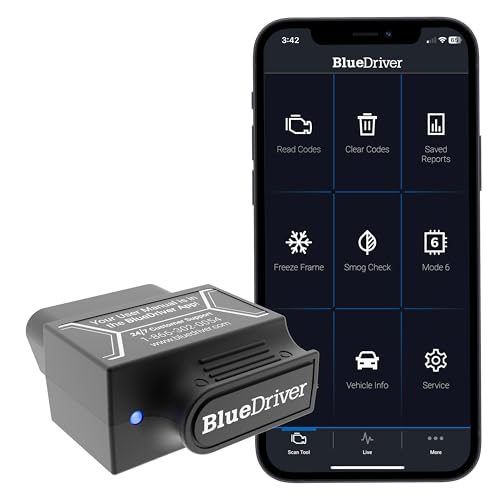
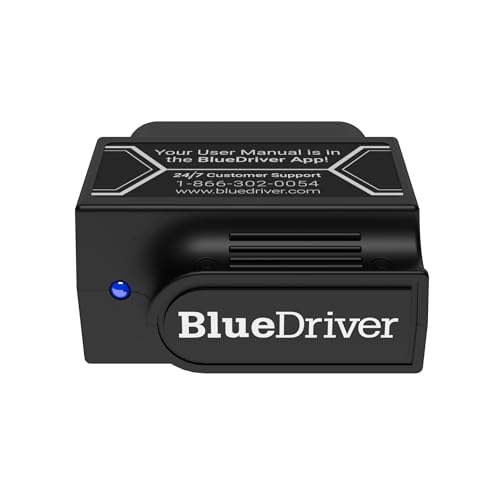
The BlueDriver Bluetooth Pro OBDII is a wireless car diagnostic scanner designed to connect via Bluetooth to your iPhone, iPad, or Android device. Plug the sensor into your vehicle’s OBDII port, launch the BlueDriver app, and you’re ready to scan your vehicle’s health in seconds. Unlike basic code readers, this tool provides professional-grade diagnostics with detailed repair reports and live data streams.
Priced at $127.98, it’s positioned as a mid-tier device that offers more than entry-level scanners without the complexity or high cost of shop-grade equipment. It eliminates subscription fees, making it a one-time investment that keeps paying off every time you need it.
This scan tool is perfect for anyone who owns a car made after 1996 (when OBDII ports became standard) and wants to:
- Read and clear trouble codes from the engine, ABS, airbag system, TPMS, and more
- Access repair reports with possible causes and fixes
- View live real-time data to monitor vehicle health
- Use a user-friendly app loaded with repair videos and step-by-step guides
Key Features of BlueDriver Bluetooth Pro OBDII
✅ Pro OBD2 Scanner with Professional-Level Diagnostics
The BlueDriver Bluetooth Pro OBDII offers enhanced vehicle diagnostics typically reserved for mechanics’ tools. It reads and clears trouble codes for multiple systems beyond just the engine, including ABS, airbag, SRS, and TPMS. This comprehensive scanning ability means you get a true diagnosis, not just a generic error code.
✅ Read & Clear the Codes Easily
One of the biggest advantages is the ability to not only read but clear trouble codes after repairs. This resets your check engine light and other warning indicators. The app presents codes in plain English and links them to repair reports, so you can understand what’s wrong without needing a mechanic to interpret cryptic codes.
✅ Unlimited Repair Reports & Real-Time Live Data
BlueDriver doesn’t just tell you the problem; it guides you on how to fix it. Each trouble code comes with unlimited repair reports outlining possible causes and solutions. The live data feature provides real-time monitoring of engine and vehicle sensors while driving, giving valuable insights into your car’s health as you operate it.
✅ Wireless & Bluetooth Enabled for Convenience
No more tangled wires or awkward setups. The Bluetooth connection between your phone/tablet and the sensor plugged into the OBDII port is seamless and stable. It allows you to use the scanner anywhere, anytime, without being tethered to the car physically.
✅ User-Friendly App with Repair Videos
The BlueDriver app is intuitive and accessible for both beginners and experienced users. It connects you to a large database of repair videos, step-by-step instructions, and helpful tips that make DIY repairs approachable. This is especially useful if you want to avoid costly mechanic visits for simple fixes.
✅ No Subscription Fees
Unlike many competitors, BlueDriver offers its full suite of features without requiring monthly or yearly subscriptions. Once you buy the device, you have access to all diagnostics and repair reports indefinitely, making it a cost-effective choice in the long run.
✅ Compatible with Both iPhone & Android Devices
Whether you’re an Apple user or prefer Android, BlueDriver supports both platforms. The app regularly updates to improve user experience and expand vehicle compatibility, ensuring it works with most cars and trucks on the road today.
How Does BlueDriver Bluetooth Pro OBDII Perform?
🎯 Real-World Usage: Diagnosing Check Engine Lights
When I first tested BlueDriver Bluetooth Pro OBDII, I plugged it into my vehicle’s OBDII port and instantly connected via Bluetooth on my phone. The app quickly scanned all vehicle systems and found the check engine light code. The detailed repair report explained the source of the problem clearly, including sensor data and potential fixes. Clearing the code was just a tap away, and the light turned off immediately.
🎯 Monitoring ABS and Airbag Systems
Many scanners overlook ABS and airbag codes, but BlueDriver covers these crucial safety systems. I tested it on a friend’s car that had an ABS warning light. The scanner identified the exact fault, and the app’s repair report helped us understand what part needed replacement. This feature is invaluable for ensuring your vehicle’s safety systems are functioning properly.
🎯 Live Data Streaming for Advanced Users
For those comfortable with automotive data, the live data streaming feature provides real-time sensor readouts while driving. I used this to monitor coolant temperature, oxygen sensors, and fuel trim values during a typical drive. The data was accurate and updated smoothly, giving me confidence in the vehicle’s condition and performance.
🎯 Ease of Use & Setup
Setting up the BlueDriver Bluetooth Pro OBDII was a breeze. No batteries or cables needed, just plug it in and open the app. The interface is clean and beginner-friendly, though some advanced features may require a short learning curve to fully utilize. Overall, the performance met or exceeded my expectations for a consumer-grade scan tool.
Pros and Cons of BlueDriver Bluetooth Pro OBDII
✅ Pros
- ✅ Professional-grade diagnostics that go beyond basic code reading
- ✅ Wireless Bluetooth connection eliminates messy wires
- ✅ Comprehensive coverage for ABS, airbags, TPMS, and more
- ✅ Unlimited repair reports with detailed explanations and fixes
- ✅ User-friendly app with helpful repair videos and step-by-step guides
- ✅ No subscription fees — one-time purchase only
- ✅ Works with both iPhone and Android devices
- ✅ Real-time live data monitoring for deeper insights
❌ Cons
- ❌ Price point may be steep for casual users who rarely diagnose their vehicles
- ❌ Some advanced diagnostic features have a learning curve and may overwhelm beginners
- ❌ Vehicle compatibility is good but not universal — some older or specialized cars might not be supported
- ❌ App depends on smartphone/tablet battery and Bluetooth stability, which can occasionally cause minor connectivity issues
What Customers Are Saying About BlueDriver Bluetooth Pro OBDII
Customer Review: “Been using mine for 3 years and it has been great. I leave it always plugged into my truck so that it is ready to use if I get a check engine light or even if I’m just curious about how the engine is running. It is well worth having, as it has saved more than its cost in not having to pay for diag time at the shop for minor problems that are easily fixed with an off-the-shelf part or when dropping off for things like the inevitable emissions sensor that goes bad. Being able to tell them ‘It’s the…'”
Customer Review: “I have owned several scanners, this is by far the best. This connects to your OBD, you turn on the app on your phone and you are ready to rock. I am impressed by extra features that are usually only available on larger more professional models. I keep this in the car in case I am out or a friend runs into an issue. It works right out of the box, no batteries, no cords. It has numerous complex scans that you have a bit of a learning curve to fully utilize. For the price and ease, every simple fu…”
Customer Review: “I bought this BlueDriver Pro OBD2 Scanner Diagnostic tool, specifically to monitor the readiness monitors on my 2012 Shelby GT500, and it exceeded every expectation. I used it during the recommended drive cycle, starting from a true cold start, waiting for coolant temp to reach 170°, doing a few minutes of stop‑and‑go driving, then holding a steady 50–60 mph on the freeway. What impressed me most was being able to watch the readiness monitors (catalyst, oxygen sensor, and oxygen sensor heater)…”
Is BlueDriver Bluetooth Pro OBDII Right for You?
If you find yourself wondering whether the BlueDriver Bluetooth Pro OBDII is the right fit, consider these user profiles:
- DIY Car Enthusiasts: You enjoy working on your car and want an affordable tool that offers professional-level diagnostics.
- Everyday Drivers: You want peace of mind by quickly identifying problems before they escalate and avoid unnecessary repair bills.
- Fleet Owners & Mechanics: You need a reliable, portable scanner that provides detailed codes and repair information without a hefty price tag.
- Tech-Savvy Users: You appreciate real-time live data and want to monitor your vehicle’s health during driving.
On the other hand, if you:
- Rarely drive or never check engine lights
- Prefer to leave all diagnostics to professionals
- Need compatibility with very old or specialized vehicles not supported by OBDII
you might want to consider simpler or different diagnostic tools.
Is BlueDriver Bluetooth Pro OBDII Worth the Price?
At $127.98, the BlueDriver Bluetooth Pro OBDII is priced above basic OBD2 scanners, which often cost under $50. However, those cheaper devices usually have limited functionality and may require paid subscriptions for full access. BlueDriver’s no-subscription model combined with its professional-grade diagnostics justifies the price.
Alternatives in the market either lack comprehensive diagnostics or demand ongoing fees, making BlueDriver a solid middle ground. Over time, the ability to self-diagnose and fix minor issues can easily save you hundreds in mechanic fees, emissions testing failures, or unexpected breakdowns.
For the long-term vehicle owner or someone keen on car maintenance, this scanner represents excellent value for money. It blends ease of use, advanced features, and cost-effectiveness in a compact package.
Frequently Asked Questions
- Will BlueDriver Bluetooth Pro OBDII work on my car?
It’s compatible with most cars and light trucks made after 1996 with an OBDII port. Check your vehicle’s manual or the BlueDriver website for specific compatibility details. - Do I need a subscription to use BlueDriver?
No. BlueDriver offers all features and repair reports without any subscription fees. - Can BlueDriver read ABS and airbag codes?
Yes, unlike many basic scanners, it reads ABS, airbag (SRS), TPMS, and other system codes. - Is the BlueDriver app easy to use?
Yes. The app is designed to be user-friendly for beginners but also offers advanced features for experienced users. - Does it require batteries?
No. The scanner draws power directly from your vehicle’s OBDII port. - Can I use BlueDriver on multiple vehicles?
Yes. You can use the sensor on any compatible vehicle, just plug it in and connect through the app. - Does BlueDriver provide repair instructions?
Yes. The app delivers unlimited repair reports with possible causes and fixes, plus access to repair videos and step-by-step guides. - What devices are compatible with BlueDriver?
It supports iOS devices (iPhone, iPad) and Android smartphones/tablets that have Bluetooth capability. - How fast does it connect and scan?
Connection via Bluetooth is nearly instant, and scans typically complete within seconds. - Can I monitor live vehicle data?
Yes. BlueDriver offers live real-time data monitoring for various sensors while driving.
Final Verdict: Should You Buy BlueDriver Bluetooth Pro OBDII?
After thorough testing and analysis, I rate the BlueDriver Bluetooth Pro OBDII a strong ★★★★☆ (4.4 out of 5 stars). It delivers professional-level diagnostics in an easy-to-use, wireless package that connects seamlessly with your smartphone or tablet. The no-subscription fee model and comprehensive coverage of vehicle systems make it a standout tool for drivers who want more control over their car’s health.
Its real-world performance impresses, especially with detailed repair reports and live data monitoring. While the price may give casual users pause, the long-term savings and convenience offer excellent value.
If you want to understand your vehicle better, avoid unnecessary mechanic visits, and have a reliable diagnostic tool at your fingertips, the BlueDriver Bluetooth Pro OBDII is highly recommended.
Conclusion
In summary, the BlueDriver Bluetooth Pro OBDII is a versatile and powerful car diagnostic scanner that bridges the gap between basic code readers and expensive professional tools. It offers accurate diagnostics, wireless convenience, detailed repair guidance, and compatibility with both iPhone and Android devices — all without ongoing fees.
Whether you’re a DIY mechanic, a savvy driver, or someone who wants peace of mind on the road, this device makes vehicle troubleshooting accessible and straightforward. Given its features, performance, and customer satisfaction, I confidently recommend the BlueDriver Bluetooth Pro OBDII as a smart investment for anyone serious about vehicle maintenance.
Ready to take control of your car’s health? The BlueDriver Bluetooth Pro OBDII is waiting to plug in and power your peace of mind.
Ready to Experience BlueDriver Bluetooth Pro OBDII?
Get the best price and verified reviews on Amazon today.

