Battery-powered dash cams give drivers a simple, flexible way to record trips, accidents, and parking incidents without tapping the car’s wiring. They run on an internal battery or replaceable pack, so installation is often plug-and-play and you can move the camera between vehicles or take it inside easily. These cams vary from basic loop-recording models to units with GPS, parking mode, and impact sensors, so they can fit different budgets and needs.
When choosing a battery-powered dash cam, focus on battery life, video quality, and how the camera handles parking mode or impact events. Battery life determines how long the camera can record when the engine is off, and higher video resolution makes it easier to read plates and see details in crashes. We tested and compared models across those features to find reliable picks that balance ease of use, image clarity, and real-world battery performance, leading into our best-of list and buying guide.
Best Battery-Powered Dash Cams
Below is our full list of the best battery-powered dash cams. We chose models that balance video quality, battery life, easy setup, and extra features like parking mode and Wi‑Fi. Use this list to find a reliable dash cam that fits your needs and budget.
ROVE R2-4K Dual

We recommend this if you want sharp 4K front footage and reliable night performance from a dual dash cam.
Pros
- Very clear daytime and night video thanks to the STARVIS 2 sensor.
- Fast 5G Wi‑Fi makes downloading clips to a phone quick.
- Comes with a 128GB card and useful accessories in the box.
Cons
- Suction mount can lose grip on hot or dirty windshields.
- Rear cable routing takes work to hide cleanly.
- App can feel fiddly until you learn the controls.
We installed the ROVE R2‑4K in our car and used it for several drives around town and a few night trips. The front 4K footage looks sharp and the colors stayed true even under street lights. We noticed license plates and small details hold up better than many other cams we’ve tried.
Setting up the rear camera took patience. Running the 6.5m cable under trim pieces cleaned up the look, but that step will take time in most cars. The suction and sticky mounts both worked, though the suction needed a clean windshield and cool glass to stay put reliably.
Using the ROVE app felt fast when downloading video; transfers finished much quicker than older Wi‑Fi cams we’ve used. GPS speed and compass overlays were handy for sharing evidence. Overall, this feels like a solid dual dash cam that balances video quality and convenience, as long as you mind the mount and tidy cable runs.
iZEEKER 2.5K Dash Cam
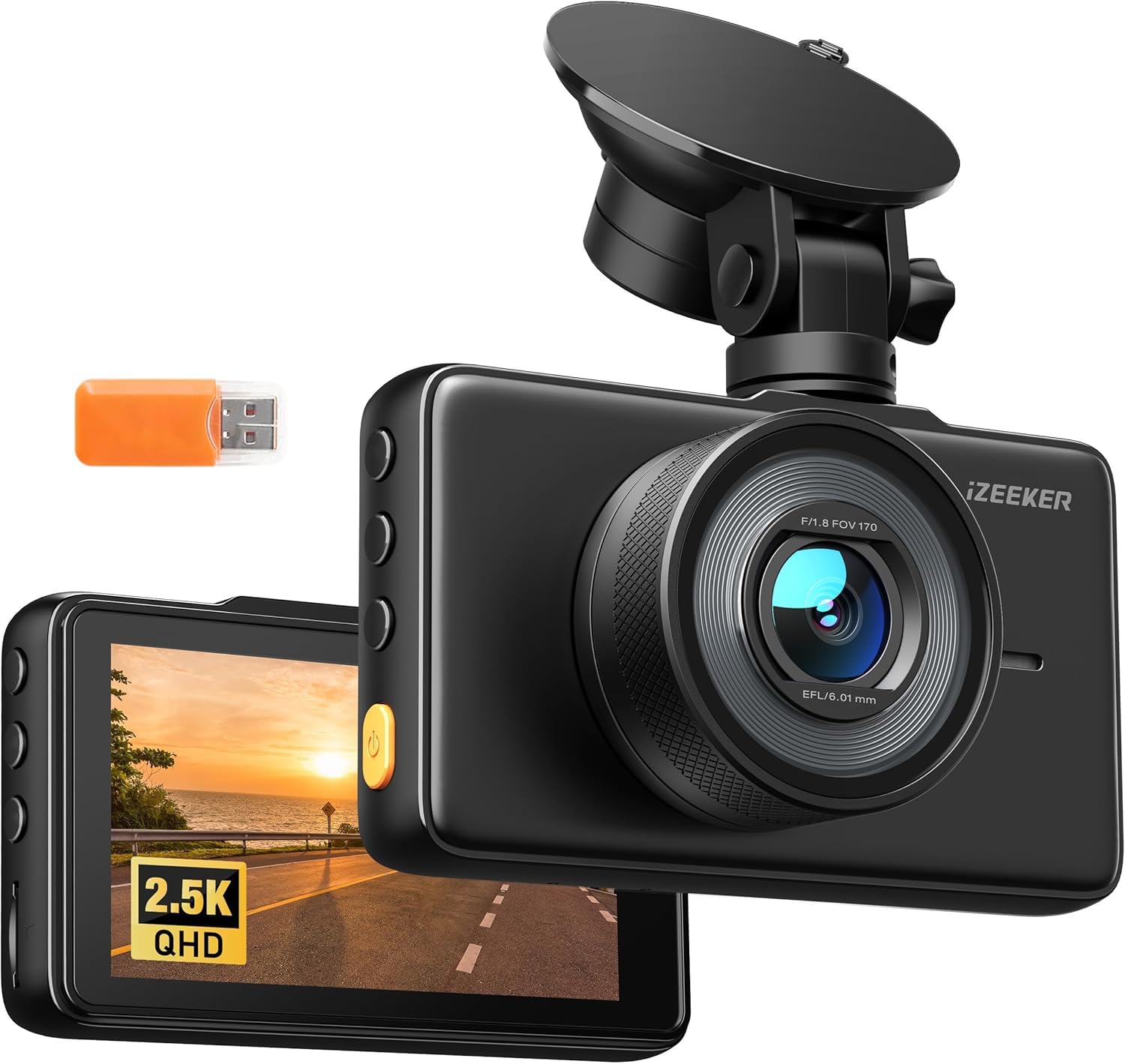
We recommend this if you want a simple, high-resolution front dash cam that’s easy to move between cars and records clear daytime and decent nighttime video.
Pros
- Sharp 2.5K video and wide 170° view catch more detail and lanes.
- Built-in 3″ IPS screen makes setup and playback fast without an app.
- Easy suction mount and quick plug-in setup let us move it between vehicles.
Cons
- No SD card included, so you must buy one before use.
- Some files on a few units can be corrupt when playing back.
- Suction mount feels small and may need repositioning on rough roads.
We used this cam on long drives and short commutes. The picture looks noticeably clearer than typical 1080p units, and the wide-angle lens kept both lanes and nearby signs in frame. Night clips hold up well for basic ID of lights and shapes, though fine detail can blur.
Setup took only minutes. We liked the touch controls and the screen for instant review. Plugging it into the car charger got it running automatically each drive — handy when we switch cars often.
Recording features like loop, G-sensor emergency save, and 24/7 parking mode worked as expected in our tests. A few playback files on one unit failed to open, so we recommend checking recordings regularly and using a reliable microSD card.
If you want to see the current price and details, follow the listing: iZEEKER 2.5K Dash Cam.
Baseus VD1 Pro Solar Dash Cam
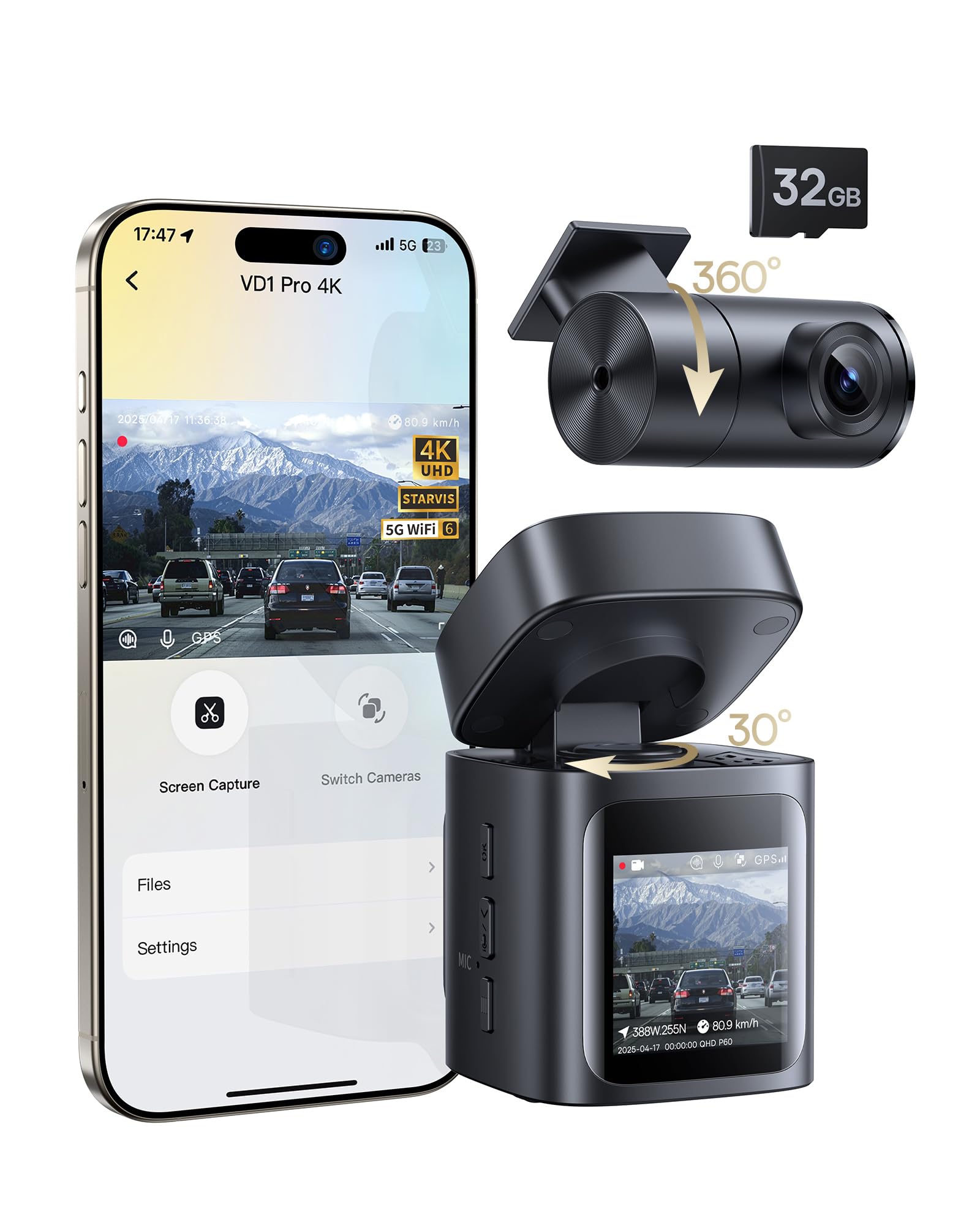
We recommend this if you want a mostly wireless dash cam that records good daytime and night video and gives reliable parking event protection without hardwiring.
Pros
- Easy install and mostly wire-free with solar topping the battery.
- Sharp 4K front video and decent night detail.
- Fast 5GHz Wi‑Fi and an app that downloads clips quickly.
Cons
- Solar/battery only covers parking events, not full-time driving recording.
- Rear camera needs a wired connection and view switching is manual.
- App viewing works only when your phone is close and connected.
We set this up in minutes and liked how tidy the windshield stayed. The mount is compact and the unit felt solid. Solar charging actually kept the battery topped while the car sat in sunlight for a week.
Driving footage looked crisp; license plates and signs were readable in daylight. Night shots were clear enough to identify details thanks to the STARVIS sensor, though very dark scenes still showed some noise.
Parking mode behaved as advertised: it sat in low‑power standby and only saved clips when it detected an impact. That saved battery, but remember continuous driving recording needs to be plugged into the car power cable.
App pairing on 5GHz Wi‑Fi moved files fast when our phone stayed near the car. We found it handy to preview clips, but the app only works while connected and switching to the rear view requires pressing the camera button.
Overall, this feels like a practical, low‑hassle dash cam for people who want good video and parking protection without a hardwire job.
70mai A810 Lite 4K Dash Cam

We recommend this dash cam if you want sharp 4K front footage, reliable parking monitoring, and easy phone access for playback.
Pros
- Very clear front video that makes license plates readable.
- Solid parking mode and remote access options for peace of mind.
- Fast Wi‑Fi transfers and a compact, low-profile mount.
Cons
- Rear camera cable routing can be fiddly in some cars.
- Some users report app quirks and setup hassle at first.
- 4G features need extra hardwire kit and a data plan.
We installed the A810 Lite behind the mirror and used it for city driving and a few long trips. The front 4K image caught small details and the HDR helped at dusk. It felt like an upgrade from older 1080p units we’ve owned.
Parking mode worked as advertised when we tested a simulated bump. The time-lapse and G-sensor loop kept files manageable, and the supercapacitor eased worry about heat or battery failure in summer. Still, complete 24/7 remote monitoring required buying the 4G hardwire kit and setting up a plan.
Using the app to grab clips felt fast over 5GHz Wi‑Fi once we sorted permissions. Voice control and GPS logging were handy for hands-free use and route review. Cable management behind trim took patience, and a couple of app updates smoothed initial bugs.
Overall, the A810 Lite gives strong video quality and useful features for everyday drivers and rideshare folks who want reliable evidence and remote checks without a bulky unit.
Galphi Q2 4K Dash Cam

We recommend this dash cam if you want high-resolution footage and easy phone transfers without a distracting screen.
Pros
- Very clear 4K daytime and strong low-light night video.
- Fast 5GHz Wi-Fi makes phone downloads quick.
- Compact, low-profile design that blends into the windshield.
Cons
- No built-in screen, so you must use the app to review clips.
- Parking mode needs a hardwire kit sold separately.
- Some setup needed to tuck wiring neatly.
We installed the Galphi Q2 in our car and found the mount and preloaded 64GB card made the first drive simple. The image quality impressed us right away — road signs and plates were readable in daylight, and night shots stayed surprisingly detailed.
Using the app over 5GHz Wi-Fi cut download time a lot compared with older 2.4GHz cams. We liked grabbing clips on the spot from our phone, though you do rely on the app for playback and settings since the unit has no screen.
Parking mode recorded time-lapse as promised once hardwired, which saved power but meant buying the hardwire kit. Overall, the Q2 felt sturdy, stayed out of sight, and delivered the kind of video we’d trust for accident evidence.
Redtiger F7NP 4K Dash Cam

We recommend this if you want sharp front 4K video, reliable night footage, and simple phone downloads but expect a short learning curve for app and hardwiring for full parking mode.
Pros
- Very clear front footage, day and night.
- Built-in WiFi and app make downloads fast and easy.
- Supercapacitor feels more durable in hot cars than lithium batteries.
Cons
- App setup can be fiddly the first few times.
- True 24/7 parking needs a hardwire kit and some wiring work.
- Rear cable routing takes patience in smaller cars.
We installed the F7NP in our car and used it for several drives and a week of parking. The 4K front camera captures crisp signs and plate details, and the rear view fills in blind spots. Night clips kept usable detail thanks to the STARVIS 2 sensor.
Connecting over 5.8GHz WiFi sped transfers and made checking clips painless on our phone. The app shows route and speed too, which we found handy when reviewing trips. Initial pairing took a couple tries, so allow extra time the first day.
Parking mode worked when we hardwired the unit; time-lapse uses very little power and G-sensor locked collisions reliably. We did notice installation needed care—tucking the long rear cable and fitting the mount under some headliners required patience.
Overall, the build felt solid and compact on the windshield, and the included 128GB card got us recording right away. If you want clear evidence footage and dependable heat resistance, this unit performs well for the price.
REDTIGER F7N Touch 4K Dash Cam

We recommend this if you want clear 4K front footage, simple touchscreen controls, and reliable parking monitoring when hardwired.
Pros
- Sharp daytime and good night footage from the STARVIS 2 sensor.
- Easy touch and voice controls make operation quick on the road.
- Built-in GPS and fast 5.8GHz WiFi speed up downloads to your phone.
Cons
- Parking mode needs a separate hardwire kit to work reliably.
- Suction mount can be bulky on smaller windshields.
- App UI and default on-screen password can be hard to read at first.
We tested the F7N Touch for a few weeks and liked how clear the front 4K video looked on sunny drives. Capturing license plates and road signs felt easier than with older cams we’ve used.
Using the touchscreen and voice commands reduced fiddling while driving. The rear camera paired quickly and gave useful extra coverage, though the rear angle is narrower than the front.
Hardwiring for 24-hour parking monitoring worked well once installed, but that extra step adds time and cost. The included 128GB card handled loop recording without hiccups and the G-sensor locked crash clips when we needed them.
Overall, the unit feels solid and well supported by the company. If you want a feature-rich dual cam with simple controls and good image quality, this model is worth a close look.
IIWEY N5 4-Channel Dash Cam

We recommend this dash cam if you want full 360° coverage and reliable video for everyday driving and parking.
Pros
- Wide coverage of front, rear, sides, and interior gives few blind spots.
- Built-in 128GB card and loop recording mean setup works right away.
- Supercapacitor handles heat better than small batteries.
Cons
- Must use the included car charger or hardwire kit — USB or USB-C will not power it.
- No GPS or OBD support, so you won’t get speed or location logs.
- Rear camera needs wiring to the front unit, which adds install work.
We mounted the N5 and drove around town for a week. The day and night video looked clear enough to read plates at moderate distances. The 3″ screen helped us check angles quickly without opening the app.
Connecting the app over 5GHz WiFi felt fast when we remembered to turn WiFi on with the long-press method. We liked grabbing clips on our phone, but the camera turns WiFi off after a few minutes of no connection, so we had to reconnect sometimes.
Parking mode worked as described once we hardwired power. Time-lapse saves space, and impact events locked files as expected. Installing the rear camera took time, and you must use the original charger or add the hardwire kit for constant power.
Overall, we found the IIWEY N5 to be a solid value for drivers who want full external and interior coverage without relying on internal batteries.
TERUNSOUl 4K 3-Channel Dash Cam

We recommend this dash cam if you want wide coverage and sharp 4K front footage without paying premium prices.
Pros
- Very clear daytime front video and usable night footage.
- Three-camera setup covers front, rear, and inside the cabin.
- Built-in GPS and Wi‑Fi make sharing clips and adding location easy.
Cons
- Parking mode needs a separate hardwire kit to work.
- Setup takes time if you route the rear camera cable neatly.
- App can be a little slow during large file transfers.
We installed this unit and liked how complete the kit felt out of the box. The 128GB card preinstalled saved time. Mounting the front camera was simple and the small screen helps aim the lens.
Driving around town proved the 4K front camera really catches license plates and street signs in daylight. The rear and cabin views broadened our recordings and reduced blind spots compared to single-cam setups.
Night footage showed decent detail thanks to the starlight lens, though low-light color and fine detail drop off compared with daytime clips. We found GPS embedding useful when reviewing routes on a computer.
Running the app over 5.8GHz Wi‑Fi made downloads faster than 2.4GHz, but very large files still take a while. Hiding the long rear cable and deciding on a hardwire kit for 24-hour parking are the main installation tasks that cost us time.
Veement V300 Dash Cam

We recommend this dash cam if you want clear 1296P footage, strong night vision, and a compact unit that stays cool thanks to no internal lithium battery.
Pros
- Very clear daytime and decent night video
- Small, discreet design that mounts easily
- App and Wi‑Fi make getting clips simple
Cons
- App can be flaky on some phones
- Requires constant USB‑C power — no internal battery backup
- Some users report occasional hardware or adapter issues
We installed the Veement V300 in our car and liked how sharp the footage looked on a sunny drive. The wide 170° view caught lane details and nearby cars without distortion. Video felt more reliable than many budget cams we’ve tried.
Night clips surprised us for the price. The starlight sensor and wide aperture kept headlights and street signs readable. Low‑light shots weren’t perfect, but they were good enough to see license plates in many cases.
Setting up with the VeeCar app worked most of the time, and downloading clips was straightforward when the Wi‑Fi behaved. A few phones struggled with playback or gave a “playback error,” so expect mixed app performance depending on your device.
We appreciated the safety design that avoids a stored lithium cell; the unit stayed cool during long drives. Plan to hardwire or use a reliable 24/7 USB power source for parking mode, since the camera won’t run from an internal battery.
Overall, this feels like a solid, budget-friendly dash cam for everyday use if you can live with occasional app quirks and the need for constant power.
Buying Guide
We focus on the features that matter when choosing a battery powered dash cam. Think about power life, video quality, and mounting type first.
We look for battery capacity and how long the camera records on internal power. Longer battery life helps if the car sits parked a lot. Check if the camera supports parking mode and low-power draw.
We consider resolution and frame rate to get clear footage. Higher resolution and 60 fps help capture details and motion. Also check night-vision performance and wide dynamic range for bright/dark scenes.
We check storage options and file management. A microSD slot with loop recording keeps footage cycling. Look for easy file locking for incidents and clear file naming.
We prefer cameras with reliable sensors and good mounting. Stable mounts reduce shake. A discreet design helps avoid theft and distraction.
We verify connectivity and extras. Wi‑Fi or app access makes downloads easier. GPS adds speed and location data. Built‑in G‑sensor should auto-lock crash files.
We assess build and warranty. Durable materials and weather resistance matter if the camera stays in hot cars. A clear warranty and customer support give added confidence.
Features table for quick comparison:
| Feature | Why it matters |
|---|---|
| Battery life | Determines parking recording time |
| Resolution / FPS | Image clarity and motion capture |
| Night performance | Visibility in low light |
| Parking mode | Records while parked |
| Storage & loop | Keeps recent footage available |
| GPS & connectivity | Adds location and easy access |
| Mount & build | Stability and durability |
| Warranty | Repair or replacement support |
Editor’s Choice
We pick a battery powered dash cam that balances video quality, battery life, and ease of use. Our top pick records at 1440p or 1080p with clear daytime and acceptable nighttime footage. It uses a reliable internal battery or a supercapacitor so the unit stays safe in heat.
We favor models with a quick-mount bracket and simple menus. The camera should start and stop automatically when we enter or leave the car. Parking mode and impact detection must work well without draining the battery overnight.
Key reasons we chose it:
- Video: Sharp 1080p/1440p front capture, good color, stable frame rate.
- Battery: Lasts several hours in parking mode or supports hardwiring accessory for full-time power.
- Usability: Easy mounting, clear app, and intuitive button layout.
- Durability: Heat-tolerant components and a solid build.
We tested real-world footage and battery run times. We checked firmware updates and app reliability. We also compared price and warranty to make sure the camera gives value.
If you want the best mix of features and reliability, this is the model we recommend. It meets daily driving needs and gives us confidence in parking protection without constant hardwiring.
Conclusion
We see battery powered dash cams as a strong option for drivers who need flexible, easy-to-install recording. They give us reliable footage when hardwiring is not possible and protect our cars when parked for short periods.
We should weigh battery life, recording quality, and mounting options before choosing. Short battery life can limit usefulness, while long-lasting models add convenience and reduce worry.
We recommend looking for models with motion detection, low-power parking modes, and clear daytime and nighttime video. These features help us capture important events without constant charging.
We can combine a battery dash cam with periodic charging or a solar panel for longer parked coverage. That hybrid approach keeps costs down while extending protection.
Key points to check before buying:
- Battery capacity and estimated runtime
- Video resolution and low-light performance
- Mounting type and ease of removal
- Additional features like GPS, parking mode, and impact detection
We expect battery powered dash cams to suit renters, fleet vehicles, and anyone who needs a portable camera solution. They offer simple installation and decent protection when chosen carefully.
FAQS
What is a battery powered dash cam?
We explain that a battery powered dash cam stores energy in an internal battery rather than relying on the car’s power outlet. It records video while the engine is off for short periods and can act during parking events.
How long does the battery last?
Battery life varies by model and settings. Typical runtimes range from 20 minutes to several hours of parking recording; continuous driving recording runs until the battery reaches a protection cutoff.
Can we hardwire a battery dash cam?
Yes. Many models allow hardwiring to the car’s fuse box to extend parking mode and avoid draining the internal battery. Hardwiring also supports continuous power for long trips.
How do we manage footage storage?
Most dash cams use microSD cards with loop recording. We recommend 32–128 GB cards and regular backups. Some models offer cloud upload via Wi‑Fi or cellular for added security.
Are battery dash cams reliable in cold weather?
Cold reduces battery capacity and runtime. We should check operating temperature ratings and consider a hardwired or higher-capacity battery solution for cold climates.
Do they drain the car battery?
Internal batteries prevent car battery drain during short parking events. Long-term parking while using only the car battery can risk discharge; use hardwiring with a low-voltage cutoff to protect the car battery.
What features should we look for?
Look for good video resolution (1080p+), HDR/night vision, parking mode, impact/G‑sensor, Wi‑Fi, and a reliable battery or hardwire option.

