Dash cams record driving events and can protect you from insurance headaches, hit-and-runs, and false claims. Dual channel dash cams record both the road ahead and the cabin or rear, giving a fuller view of incidents and better evidence for accidents, vandalism, or disputes. We compare models with different sensors, mounting styles, and video resolutions to show which ones deliver clear footage day and night.
Choosing the right dual channel dash cam means balancing video quality, storage, and ease of use. The most important thing is reliable, high-resolution recording for both channels plus good low-light performance and a sturdy mount. Other key factors include parking mode, loop recording, GPS logging, and whether the unit supports large microSD cards — features that affect how useful footage is when you need it. We tested and reviewed several models to find the best options for different needs and budgets, so you can pick the one that fits your drive.
Best Dual Channel Dash Cams
Below is our full list of the best dual channel dash cams. We tested models for video clarity, reliability, and ease of use to help you pick the right camera for front-and-rear coverage. Our list focuses on value, features, and real-world performance.
ROVE R2-4K Dual

We recommend this if you want sharp 4K front footage, solid night performance, and easy phone downloads.
Pros
- Crisp 4K front video and bright low-light capture.
- Fast 5G Wi‑Fi makes grabbing clips quick.
- Comes with a 128GB card and full accessory kit for neat install.
Cons
- Rear camera is only 1080p, not 4K.
- App can be a bit slow to connect sometimes.
- Hardwire kit for full parking mode is not included.
We put the ROVE R2-4K in our car and drove around town for a week. The front Sony STARVIS 2 sensor really delivers; freeway signs and license plates stayed readable during the day and in dusk light. Night footage looked cleaner than many cameras we’ve used, thanks to the wide apertures.
Setting it up felt straightforward. The kit includes mounts, a long rear cable, and a 128GB card, so we finished routing and mounting in under an hour. The screen is bright and the menu is simple, though the app occasionally needed a reconnect to see files.
Transferring clips to our phone impressed us—downloads were fast when the 5GHz link held steady. Parking mode worked as advertised once hardwiring was added, but remember that extra kit is required for 24/7 coverage. Overall, this is a solid pick for drivers who want top-notch front video and easy wireless file access.
VIOFO A229 Plus

We recommend this if you want high-quality front and rear night footage and fast Wi‑Fi for easy downloads.
Pros
- Excellent low-light video thanks to dual STARVIS 2 sensors.
- 5GHz Wi‑Fi makes downloading clips quick and painless.
- Solid parking options and reliable GPS data.
Cons
- App can be slow or clunky on some phones.
- HDR limits some front cam frame rate options.
- Hardwire cable for 24/7 parking needs to be bought separately.
We installed the A229 Plus in our daily driver and noticed night footage looked cleaner than most dash cams we’ve tried. License plates and street signs were easier to read after dusk. The front and rear both delivered balanced colors and low noise, which made reviewing events quicker.
Connecting over 5GHz Wi‑Fi felt noticeably faster when we pulled clips to our phones. Live view and downloads moved smoothly, so we didn’t wait long to check footage after a short drive. GPS tracks and speed overlays matched our route when we checked playback on the app and computer.
Setup took a bit of trimming and routing for the rear cable, but the compact cameras fit neatly behind the mirror and at the rear window. Voice commands worked for simple tasks, though the app occasionally lagged when changing settings. Parking mode options gave us flexible choices, but remember to buy the hardwire kit if you want true 24/7 monitoring.
Rexing V1P 4K Dual
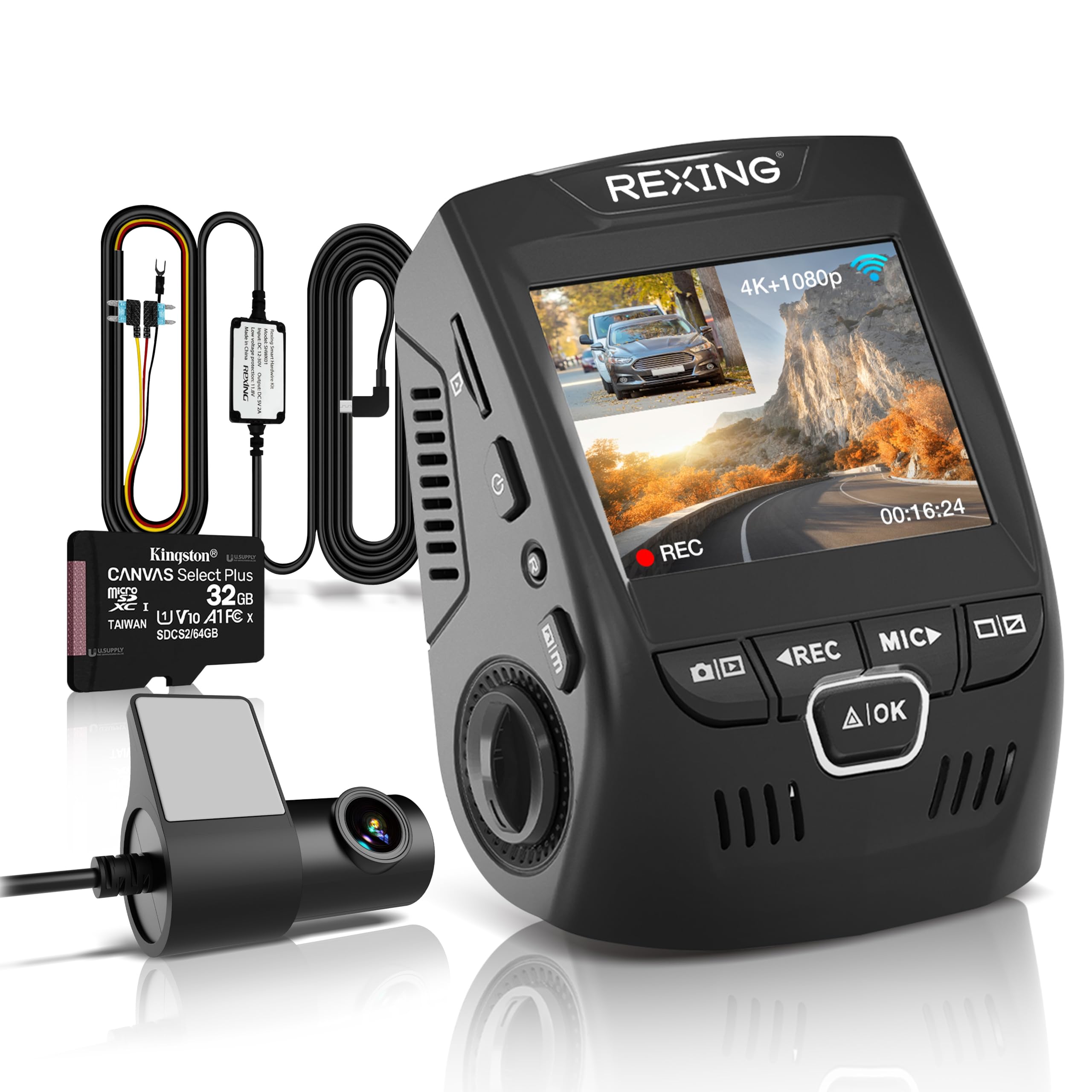
We recommend this if you want solid front-and-rear 4K daytime video, reliable parking mode, and a durable supercapacitor.
Pros
- Crisp 4K front video and clear rear 1080p in daily driving.
- Reliable build and supercapacitor that handles heat well.
- Includes hardwire kit and 32GB card for easy setup.
Cons
- App can be slow or finicky when transferring clips.
- Rear camera wire routing takes patience to hide neatly.
- Small 2.4″ screen is handy but not great for playback.
We mounted the V1P and used it for mixed city and highway driving. The front image was sharp and captured license plates well in daylight. Night footage improved over older models we tried, thanks to the wide lens and WDR, though distant details soften in low light.
Parking mode worked exactly as promised once we wired the hardwire kit. It woke up on bumps and saved incidents without us having to babysit the unit. The supercapacitor gave confidence on hot days where battery-based cams sometimes fail.
Installation felt straightforward but not plug-and-play if you want a clean look. We ran the rear cable through trim and took extra time to tuck it, which paid off in a tidy finish. Using the app for quick clips is convenient; larger transfers ran slowly and needed retries.
Overall, the Rexing V1P balances image quality, durability, and value. If you want dependable dual-channel recording and durable hardware for regular use, this is a practical pick.
Vantrue N4S 3-Channel

We recommend this if you want full 360° coverage and solid night footage for rideshare or daily use.
Pros
- Excellent low-light clarity and plate detail.
- True three-channel coverage (front, cabin, rear).
- Easy, clean install with magnetic GPS mount.
Cons
- Can run hot in some climates or long drives.
- Large unit may block part of the windshield view.
- App and Wi‑Fi can be finicky at times.
We installed the N4S in our car and liked how complete the coverage felt. The front and rear lenses capture clear, usable footage, and the cabin camera saved a close call while we drove. PlatePix really helped when we needed to read license plates at night.
Installation surprised us by being mostly tool-free. The magnetic mount held steady, and hiding the long rear cable felt simple with the included clips. Using the 360° rear camera to watch cargo was handy on a weekend trip.
Long drives revealed a weakness: the unit can heat up. We saw occasional shutdowns in warm weather, so we kept an eye on placement and ventilation. Still, the parking modes and reliable loop recording gave us confidence when leaving the car parked overnight.
Overall, the N4S behaves like a professional setup without complex wiring. If you want wide coverage and strong night performance and can manage heat and size, this is worth considering.
TERUNSOUl 4K Triple-Channel Dash Cam

We recommend this if you want wide coverage (front, rear, cabin) and clear 4K front video for solid everyday and rideshare use.
Pros
- Sharp 4K front video and clear cabin/rear views.
- Easy install and tidy cable routing with included parts.
- Built-in GPS and fast 5.8GHz WiFi for quick downloads.
Cons
- Parking mode needs a separate hardwire kit.
- App can be a bit clunky at first.
- Unit is small, so menu tapping on the 3.16″ screen is tight.
We used this unit for a week in city and highway driving and the 4K front footage shows fine detail like license plates at distance. Interior and rear angles catch passengers and traffic behind without blind spots.
Installation felt straightforward. The kit includes long cables and clips, so we hid wiring along the headliner and trim. Setup took under an hour once we planned cable runs.
Night videos impressed us — starlight-grade lens and HDR pulled usable detail in dim streets. GPS stamps speed and route directly into files, which made reviewing an incident quicker.
We tested impact locking by simulating a bump and the dash cam did lock the clip automatically. Downloading clips over 5.8GHz WiFi was noticeably faster than older WiFi-only models.
App control works, but we found menus a little slow and occasional reconnects on first try. Also remember to buy a hardwire kit if you want true 24/7 parking mode.
Overall, this feels like a well-rounded triple-channel dash cam for families, rideshare drivers, or work vans that need wide coverage and reliable evidence capture.
VIOFO A229 Pro

We recommend this if you want sharp 4K front footage and reliable night detail from a dual-channel unit.
Pros
- Crisp 4K front and clear 2K rear video for reading plates at distance.
- Solid night performance thanks to STARVIS 2 sensors and HDR.
- Easy app control and useful voice commands for hands-free use.
Cons
- Long rear cable can be awkward to hide in some cars.
- No SD card or hardwire kit included, so extra purchases are needed.
- Menu and setup feel dense until you learn the options.
We installed the A229 Pro in our daily driver and tested daytime and night clips. The front camera delivers very sharp images; license plates and road signs stood out clearly. The rear camera held its own, though cable routing took more time than we expected.
Parking mode worked as advertised during our tests. Motion-triggered buffering captured events before impact, which gave us useful context for minor incidents. Battery-safe supercapacitor gave consistent performance in heat without swelling issues.
Using the VIOFO app over 5GHz Wi‑Fi made reviewing clips quick and painless. Voice commands were handy while driving, but we still preferred the app for detailed settings and file management. Overall, this feels like a professional-grade setup if you’re willing to buy the required extras.
Find it on Amazon: VIOFO A229 Pro 4K HDR Dash Cam
WANLIPO A13 4K Dual Dash Cam

We recommend this if you want high-resolution front and rear footage and fast 5GHz Wi‑Fi for quick downloads.
Pros
- Sharp 4K front and clear 2.5K rear video for easy plate and sign reading.
- Fast 5GHz Wi‑Fi makes transferring clips to your phone quick.
- Comes with a 64GB card and compact design that hides well behind the mirror.
Cons
- App is third‑party and some advanced features need a paid membership.
- Suction mount and included accessories feel a bit flimsy over time.
- Parking mode needs a hardwire kit (sold separately) to work reliably.
We installed the A13 and used it for daily drives and a weekend road trip. The front camera caught small details at distance, and the rear view gave good coverage without big blind spots. Setup was straightforward and the unit fit discreetly behind our mirror.
We tested the Wi‑Fi transfers on our phone and saw noticeably faster downloads on 5GHz. Pulling a clip to show someone took only seconds, which made sharing evidence easy. GPS logging worked and stored speed and coordinates, though the app shows raw coordinates rather than a live map overlay.
We left the car parked to try parking monitoring and simulated a bump. The camera recorded when powered by the car outlet, but to get true 24/7 parking protection we had to plan for a hardwire kit. Customer support responded quickly when we asked about warranty and replacement parts, though some users reported mount failures over time.
WANLIPO A13 4K Dual Dash Cam

We recommend this if you want crisp 4K front video and simple app control at a midrange price, but expect some app quirks and occasional setup fuss.
Pros
- Very sharp front footage that captures signs and plates well.
- Fast 5GHz WiFi makes transfers and sharing quick.
- Compact, low-profile install that hides behind the mirror.
Cons
- App can be flaky on some phones and car systems.
- Rear camera setup and cable routing take extra time.
- Parking mode needs a hardwire kit for full function.
We installed the WANLIPO A13 in our car and liked the clear front image right away. Driving at night showed decent detail thanks to the lens and WDR. The rear camera picked up general motion, though it wasn’t as detailed as the front.
Pairing through the Viidure app worked fast using 5GHz WiFi on our phone, and we could download clips quickly. We did run into app hiccups on one phone and had to reconnect WiFi after formatting the card. Still, transferring a clip to share took only a minute when it worked.
Mounting the front unit felt solid and discreet. Cable management behind the trim took a bit of patience, and enabling true 24-hour parking monitoring requires buying and installing the hardwire kit. Overall, the A13 feels like a good value if you accept some app and setup trade-offs.
Beferich J18 4K Dual Dash Cam
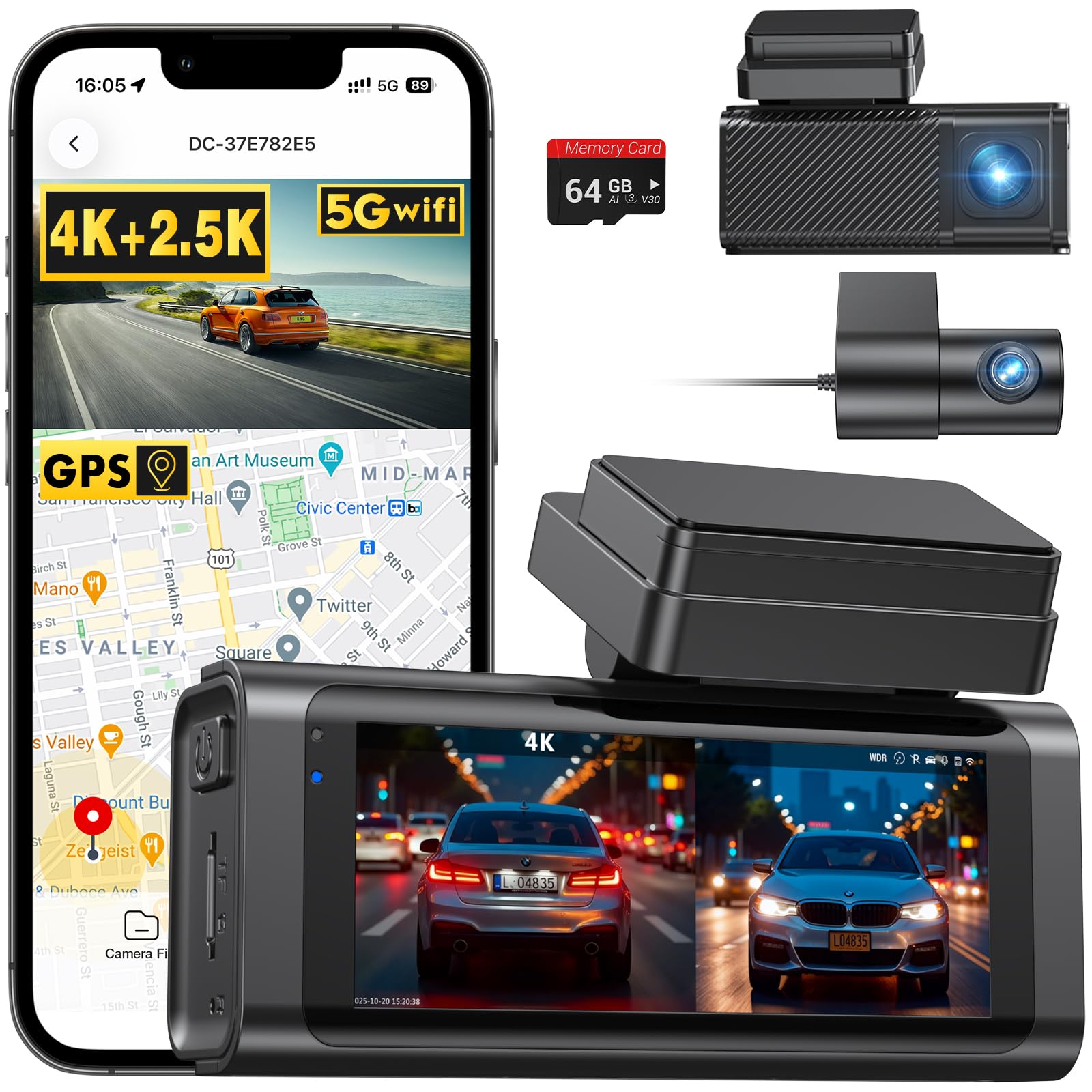
We recommend this if you want clear front and rear video, GPS logging, and easy app transfers at a midrange price.
Pros
- Sharp 4K front and clear rear footage that shows plate details.
- Fast 5GHz WiFi and app make downloads quick and simple.
- Built-in GPS and G-sensor lock important clips automatically.
Cons
- Suction mount can be fussy; adhesive sometimes works better.
- Night detail improves but is not perfect in very dark areas.
- True 24/7 parking needs a separate hardwire kit to run continuously.
We installed the J18 in our daily driver and liked how crisp the front footage looked right away. The wide angles captured more of the road than older cams we’ve used, and the 64GB card included let us test loop recording without buying extras.
Pairing with the Viidure app worked well once we figured the initial phone setup. Transfers over 5GHz WiFi were noticeably faster than older 2.4GHz cams, so saving clips to our phone took minutes instead of waiting much longer.
Mounting took a bit of fiddling. The suction cup is convenient but didn’t always stick on our windshield, so we used the electrostatic adhesive for a firmer hold. Hiding the rear cable felt straightforward, and the small rear camera is unobtrusive on the back window.
We tested the parking monitor briefly without hardwiring and saw the cam wake for impacts, locking short clips as advertised. For true 24-hour surveillance, plan to buy the hardwire kit and expect a small additional cost.
REDTIGER F7NP 4K Dual Dash Cam

We recommend this if you want sharp 4K front footage, a reliable rear camera, and easy app access for quick video checks.
Pros
- Excellent daytime and night clarity from STARVIS 2.
- Fast 5.8GHz WiFi makes downloads quick on the phone.
- Includes a 128GB card and long rear cable for tidy installs.
Cons
- Parking mode needs a hardwire kit to run 24/7.
- App can be a bit fiddly the first few times we used it.
- Suction GPS mount can shift if not firmly set.
We installed the F7NP in our car and liked how the front unit stayed small and out of sight. The 4K front video picked up license plates and road signs clearly, and the rear 1080p did a solid job of capturing following vehicles.
Night driving impressed us. STARVIS 2 plus WDR kept lights from washing out the scene, so we could still see details at intersections and dim streets. We tested a few dusk drives and the footage looked usable for insurance or police.
Using the Redtiger Cam app felt fast on our phone thanks to the 5.8GHz WiFi; downloads finished far quicker than older dash cams we’ve tried. Connecting took a minute the first time, and we recommend following the app prompts closely to avoid delays.
Parking protection works, but plan to buy a hardwire kit if you need full 24/7 monitoring. The supercapacitor gives us peace in hot weather, and the included 128GB card let us start recording right away without hunting for accessories.
Overall, this unit balanced image quality, build feel, and useful extras like GPS and a long rear cable. We’d pick it for daily drivers, rideshare use, or anyone who wants clear evidence without fiddly hardware.
Buying Guide
We look for clear video, because you need readable footage in daylight and at night. Aim for at least 1080p front and rear, and higher resolution if your budget allows. Frame rate matters too; 30–60 fps reduces blur from motion.
We check camera sensors and lenses next. Low-light performance and wide dynamic range help with glare and headlights. Wide-angle lenses capture more of the road, but too wide can distort plates.
We consider storage and loop recording. Choose a dash cam that supports large microSD cards and has reliable loop overwrite. Look for automatic file locking on impact so crucial clips don’t get erased.
We examine power and installation options. Hardwiring gives continuous parking mode, while a cigarette-socket setup is easier to install. Battery life and voltage cutoff protect your car battery.
We value parking and safety features. Motion detection, impact detection, and time-lapse parking modes record events when the car is parked. G-sensors and impact calibration improve automatic clip saving.
We compare connectivity and user interface. Wi-Fi or Bluetooth makes footage easier to transfer. A simple app and an intuitive screen help with setup and playback.
We balance price and warranty. Longer warranties and good support reduce risk. Think about what features matter most to us, then pick a model that matches our budget and needs.
Quick checklist
| Feature | Why it matters |
|---|---|
| Resolution & FPS | Readable footage |
| Sensor & Low-light | Night clarity |
| Storage & Loop | Saves important clips |
| Power Options | Continuous recording |
| Parking Mode | Records while parked |
| Connectivity | Easier file access |
| Warranty | Long-term support |
Editor’s Choice
We pick the model that balances video quality, reliability, and ease of use. Our choice records clear 1080p or better footage front and back, so you can trust the evidence if you need it.
The unit has solid night performance and a wide field of view. It also uses reliable loop recording and automatic file protection for incidents.
We value a simple app and straightforward setup. The best pick pairs a stable mobile app with easy firmware updates and plug-and-play installation.
Key features we liked:
- Front/Rear Resolution: 1440p front, 1080p rear for clear detail.
- Parking Mode: Motion and impact detection when parked.
- Storage: Supports large microSD cards with auto-overwrite.
- Build & Mount: Compact design and secure adhesive mount.
We tested for daily use and longer trips. Battery drain stayed low, and common features worked as expected without frequent crashes.
Price matters, so we chose an option with strong performance at a mid-range cost. It gives reliable footage, useful features, and simple controls without unnecessary extras.
Conclusion
We chose dash cams that give reliable front and rear coverage for different budgets and needs. Each model we recommend balances video clarity, ease of use, and useful safety features.
We favor cameras with good nighttime performance and stable mounting. These features matter most when events happen in low light or during quick maneuvers.
We look for easy setup and clear apps so users can review footage fast. Simple design reduces time spent tweaking settings and lowers frustration.
We also consider storage and power options. Features like loop recording, parking mode, and battery or hardwire choices affect long-term reliability.
Key choices at a glance:
- Budget: Solid basic protection with clear daytime video.
- Mid-range: Better night vision and app integration for quick review.
- Premium: Highest video detail, advanced driver aids, and robust parking mode.
We recommend picking a model that fits how you drive and where you park. Match features to real needs rather than buying every extra option.
If you want, we can narrow choices for commuting, rideshare, or family driving.
FAQS
What is a dual channel dash cam?
We use two cameras to record the road and the cabin or rear. This gives fuller evidence in crashes or incidents.
Do dual channel dash cams need special power?
Most plug into the 12V socket or hardwire to the fuse box. Hardwiring lets the cam record while parked, but we may need a professional install.
How long do recordings last?
They loop-record in short files, usually 1–5 minutes each. When storage fills, the oldest files get overwritten unless they are locked.
How much storage do we need?
Storage depends on resolution and recording length. Use at least a 64GB microSD for good coverage; 128GB or 256GB is better for higher resolution or longer parking recording.
Can dash cams record audio and GPS?
Many models include audio and GPS logging. We can turn audio off if we want privacy.
Are dual channel dash cams legal?
They are legal in most places, but local rules vary. We should check laws about audio recording and windshield-mounted devices.
How do we pick the right model?
Look for good daytime and nighttime video, reliable parking mode, adequate storage, and clear warranty terms. We prioritize ease of use and proven firmware updates.
How do we protect footage after an incident?
Stop the car and remove the SD card or copy files to a phone or computer. Some models let us lock files automatically when a collision is detected.

