RVs mix freedom and complexity, and driving one safely means watching blind spots, backing up, and recording the road. Wireless backup cameras and dash cams for RVs serve two main needs: improve visibility when maneuvering and capture footage of incidents on the road. These systems change a hard-to-see blind spot into a clear view and give travelers peace of mind on long trips.
Choosing the right system means balancing range, video quality, and ease of installation. The most important thing is a reliable wireless connection and good low-light video so you can see trailers and lanes at night and when backing up. We tested and compared popular models for signal reliability, mounting options, and picture clarity to find ones that make driving and parking an RV safer and less stressful.
Best Wireless Backup Cam and Dash Cam RVs
We tested and researched top wireless backup and dash cam systems for RVs to find reliable, easy-to-install options. Below is our list of the best products to help you park, back up, and record your trips with confidence.
Seventour 4-Channel 1080p RV Camera System
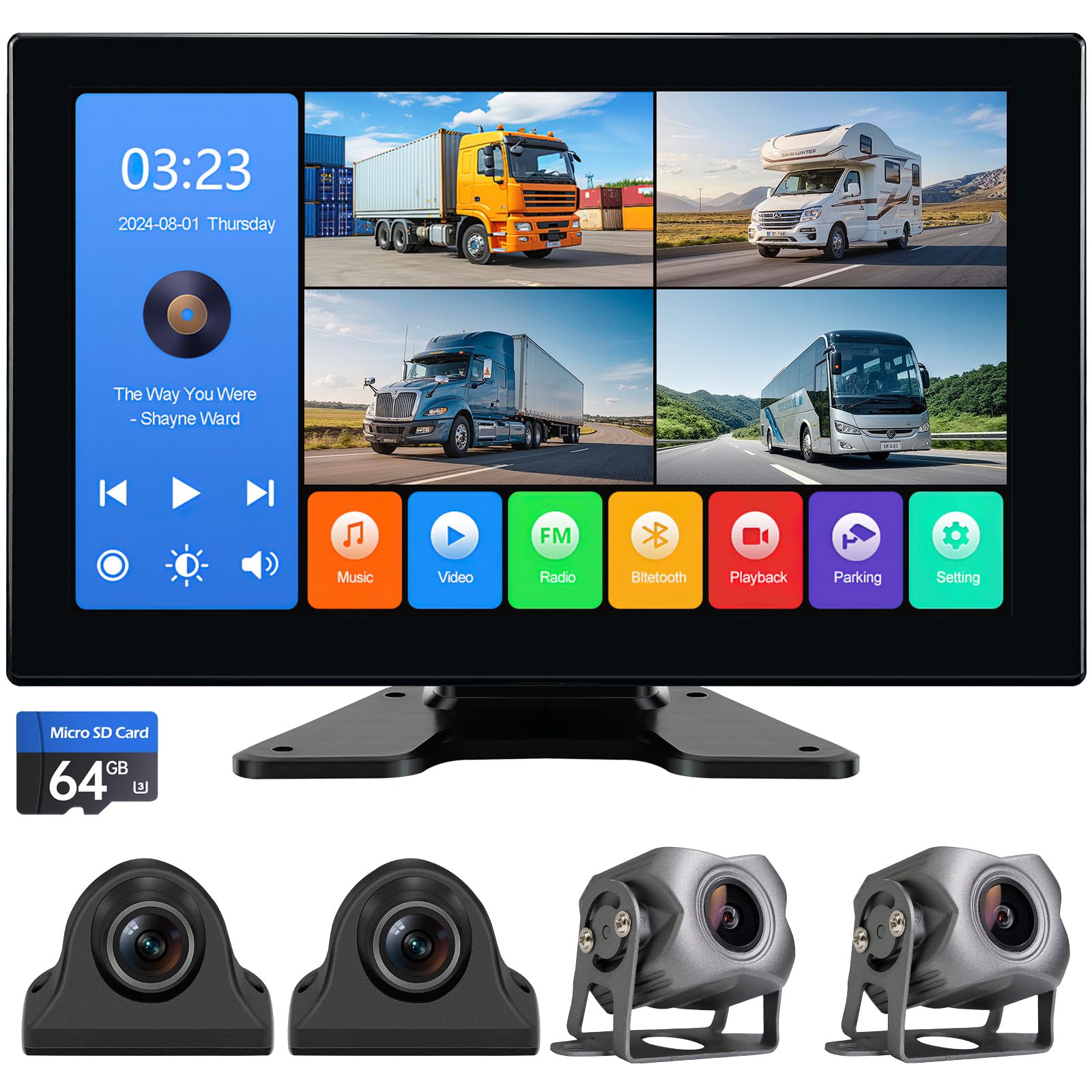
We recommend this unit if you want full 360° coverage for an RV or truck with easy setup and clear 1080p views.
Pros
- Four cameras cover front, back, left and right with no blind spots.
- Bright 10.2″ touchscreen that shows quad view and full-screen playback.
- Rugged, IP69-rated cameras hold up in bad weather.
Cons
- Wires can be long and fiddly to route on larger rigs.
- Touchscreen menus feel a bit basic compared with premium units.
- USB/Bluetooth features are handy but not essential for safety.
We installed the Seventour kit on an RV and noticed the four-camera feed made tight maneuvers much calmer. The screen shows all angles at once and we could zoom any camera to full screen in seconds.
The cameras stayed stable in rain and drove through cold mornings without fogging or glitches. Mounting took a little time on the roof and hiding the cables along the trim required patience, but the plugs fit tightly and did not loosen on rough roads.
Recording worked reliably to the included SD card and playback on the monitor made it easy to check incidents right away. We liked the added Bluetooth and media playback for trips, though those features felt extra compared with the system’s core job of improving visibility.
Yakry Y27 RV Backup Camera

We recommend this if you want a stable wireless backup camera that’s easy to install and gives clear daytime and nighttime images.
Pros
- Solid wireless range and steady signal with dual antennas.
- Simple DIY install using the Furrion bracket and plug-in wiring.
- Recordings double as a dash cam and work in bad weather.
Cons
- Signal can drop at longer ranges on crowded roads.
- Mounting fit may need minor tweaks on some trailers.
- Touch monitor controls feel a bit sensitive.
We fitted the Yakry Y27 to our trailer and liked how quickly it came together. The Furrion-style plate made alignment fast and the bundled pigtail cut down wiring headaches. Within 30 minutes we had power, a picture, and a reliable feed.
Driving with the dual antennas felt more stable than other wireless units we tried. The image stayed clear while reversing and the 1080p picture helped us judge distances better at campsites. Low-light performance was useful for late-night setups, though distant objects can blur slightly.
Recording while driving gave us peace of mind during a long haul. The monitor’s touch keys are convenient but require a light touch; we accidentally changed modes once or twice. Overall, this unit worked well for our RV and trailer needs and held up through rain and road dust.
Buy from Amazon: Yakry Y27 RV Backup Camera
AUTO-VOX Solar Magnetic Backup Camera
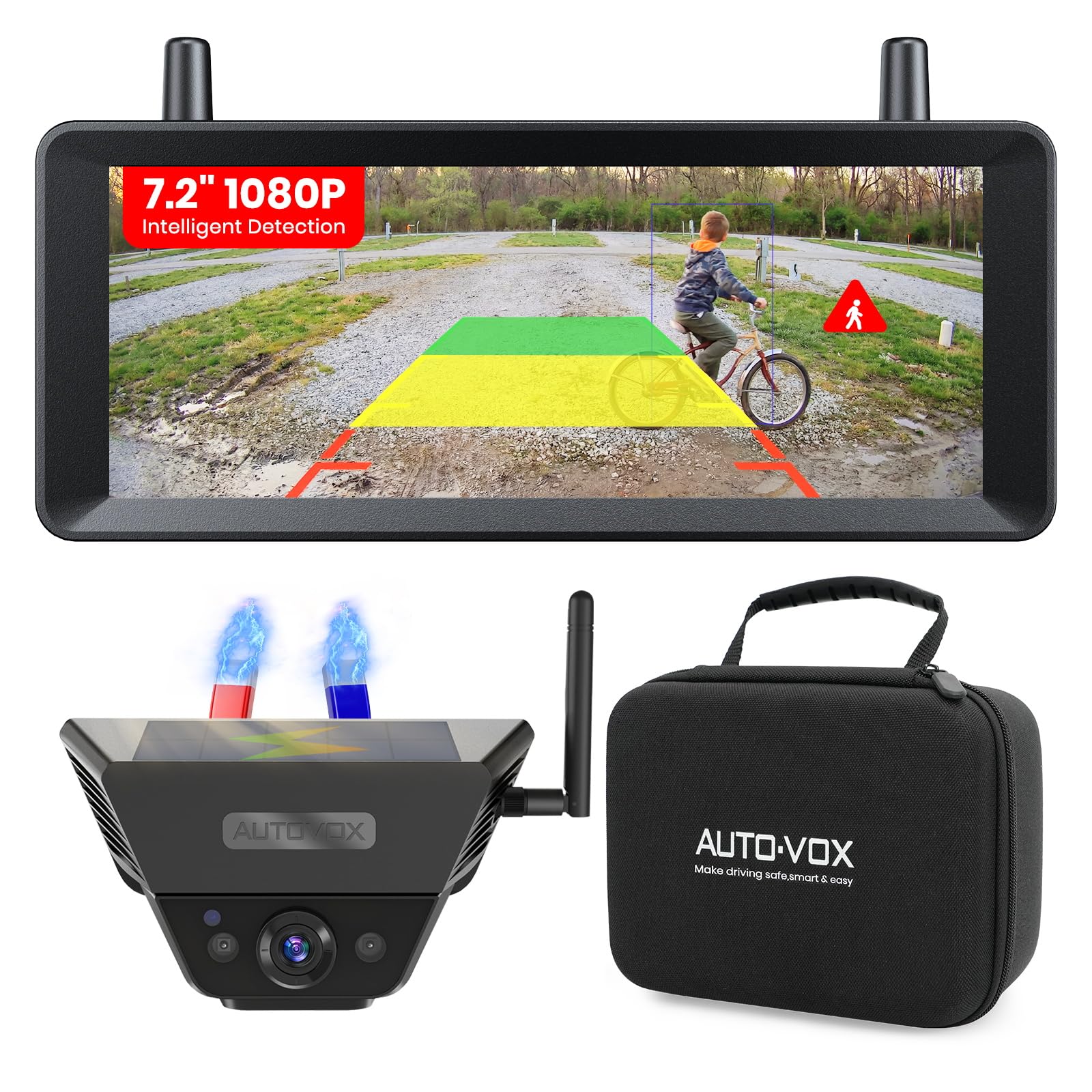
We recommend this if you want a no-drill, portable backup camera with reliable wireless range and solar-assisted charging.
Pros
- Fast magnetic install; moves between vehicles in minutes.
- Clear 1080p image with night vision and smart detection.
- Strong wireless range and stable connection when towing.
Cons
- Magnetic mount needs metal plate on non-steel surfaces.
- Solar charging helps but we still top up the battery sometimes.
- Alerts can be sensitive in tight spaces.
We stuck this on our trailer and the magnetic mount lived up to its promise — it snapped on, aligned easily, and saved us from drilling holes. The monitor paired right away in our cab and the split-screen made hitching much less stressful.
Driving at highway speeds with a loaded trailer, the dual antennas held a steady feed most of the time. Smart detection boxed people and cars in the frame and gave audible warnings that actually helped when backing into busy campgrounds.
Nighttime shots were clear enough to spot pedestrians near the RV, though infrared makes the scene flatter. The solar top-up reduced how often we had to charge, but on cloudy trips we still checked battery levels before long hauls.
Venluna 10.1″ 4K RV Camera System
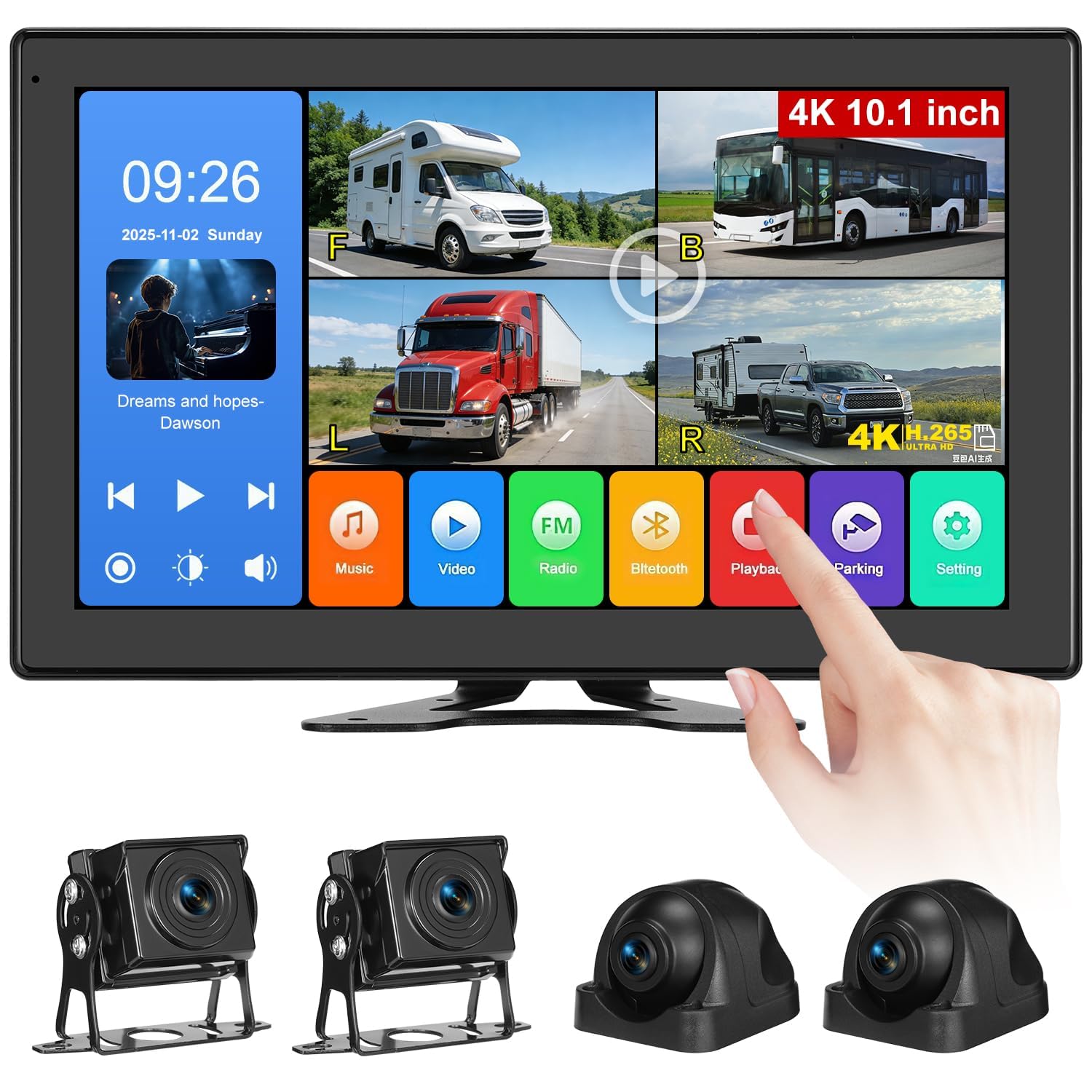
We recommend this system if you want a big, clear monitor and four durable cameras for wide coverage around an RV or truck.
Pros
- Large, sharp 10.1″ screen that shows multiple views at once.
- Four long-cable cameras with tough IP69 waterproofing.
- Built-in DVR and Bluetooth for easy playback and hands-free calls.
Cons
- Cameras lack true night-vision illumination in very dark conditions.
- Wired setup can be time-consuming on large rigs.
- Monitor power via cigarette lighter may need a hardwire for permanent installs.
We mounted the Venluna on our camper and liked how fast the touchscreen responded. The split-screen made backing into tight spots much less stressful. Swapping views and rotating the display after installation worked without fuss.
The camera images looked crisp in daylight and the wide angles cut down blind spots. We also used the DVR to check a parking incident and found the recordings easy to play back on the monitor. Sound from the built-in speaker was clear enough for calls while parked.
After a night test, we noticed low-light detail drops off when there’s almost no external light. For dark campsites we still needed a separate flood light. Installing the long cables across a large RV took planning, but once routed the system felt solid and weatherproof.
Venluna 10.1″ 4K RV Camera System
Venluna 10.36″ RV Camera System
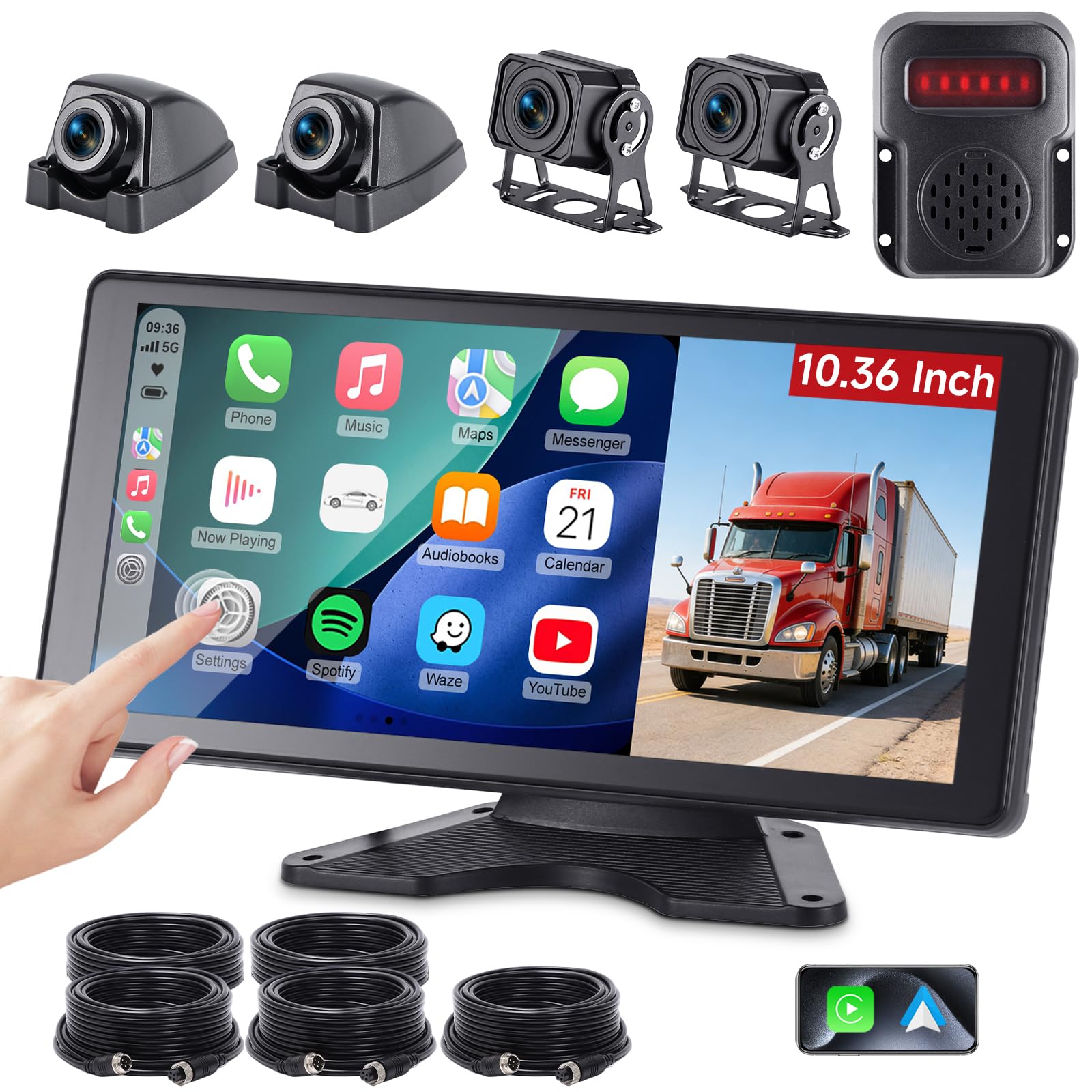
We recommend this system if you want a wired, all-around camera setup with CarPlay/Android Auto and strong blind-spot alerts for large RVs.
Pros
- Clear 10.36″ touchscreen and 4 cameras give a true 360° view.
- Wired long cables reduce signal drop on long vehicles.
- Helpful BSD alerts and DVR parking monitor add safety and evidence.
Cons
- Built-in microphone is weak for phone calls.
- Four wired cameras mean more drilling and cable routing.
- Some users need extra-length cables for very long rigs.
We installed this on a 35′ motorhome and found the screen bright and easy to tap. Switching split-screen views felt smooth while backing into crowded campsites, and the CarPlay link made navigating simple without reaching for the phone.
The blind-spot alerts actually helped when we clipped a trailer into place; the audible warnings caught a moving bike that the mirrors missed. Recording worked reliably, and the loop DVR gave us peace of mind while parked overnight.
Wiring took a few hours but the long aviation-style cables gave a steady picture with no flicker even at the ends of the trailer. We did wish the microphone was better for calls and some installations need extra cable length or creative routing.
VTimes 7″ Wireless RV Backup Camera
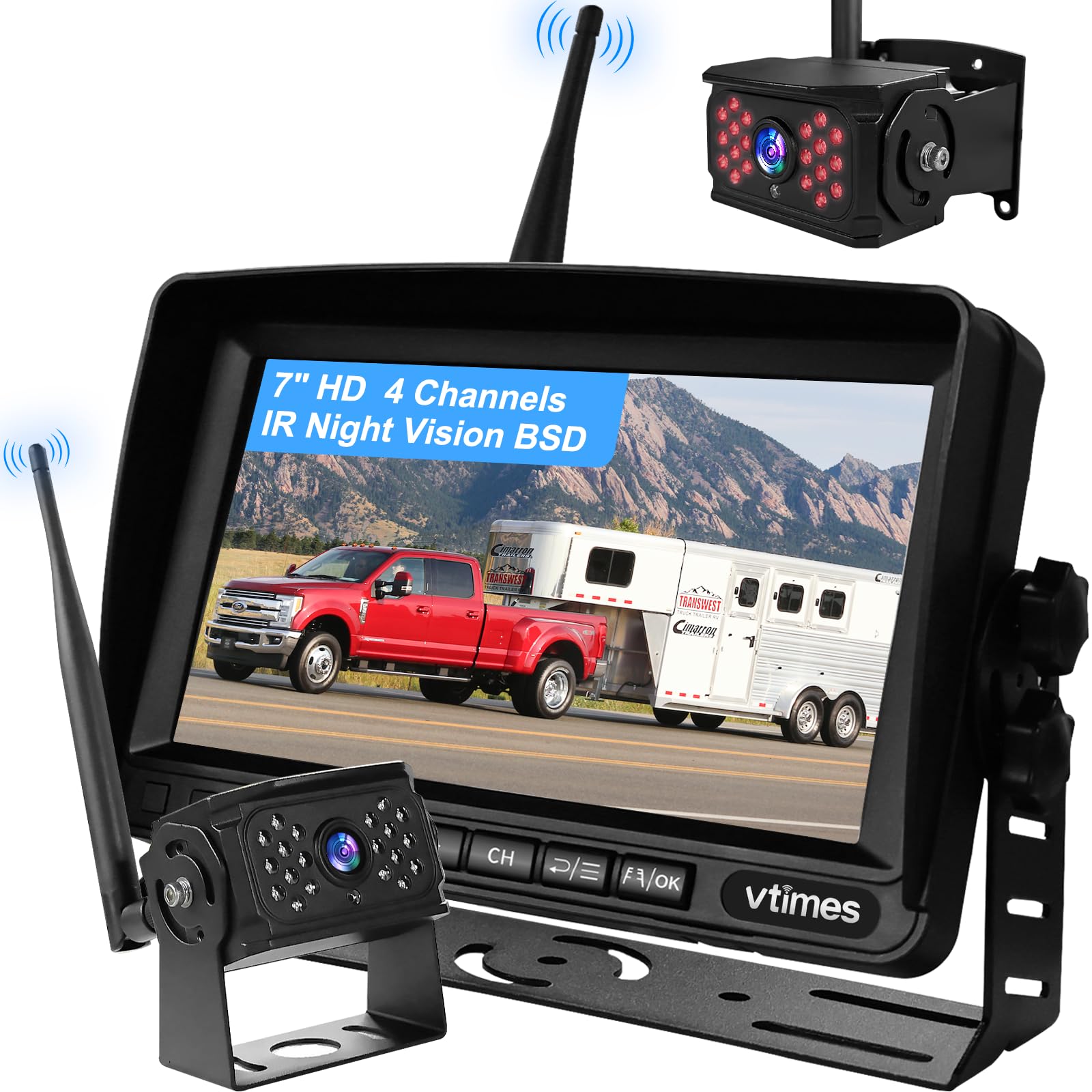
We recommend this system if you want an easy wireless install and clear night view for RV or trailer use, but expect occasional signal drops at longer ranges.
Pros
- Simple, no-wiring setup for the monitor.
- Good night vision and a wide 120° view.
- BSD alerts help catch people in blind spots.
Cons
- Wireless signal can cut out at real-world distances.
- Only one camera included despite a 4-channel monitor.
- Image sharpness is decent, not top-tier.
We mounted the monitor on our dash and powered it from the cigarette lighter in minutes. Pairing took a few tries, but once linked the picture was stable nearby and the parking lines were handy when hitching up.
Backing up at night impressed us more than daytime in some ways — the IR made shapes clear and the BSD beeped on a couple of close passes. The 7″ screen shows a roomy view; we liked being able to split screens for future camera add-ons.
On a long test with a 24-foot trailer, the wireless link cut in and out a few times, which cost us trust at greater ranges. The camera felt rugged and weatherproof, and the Furrion-style plug made mounting to our RV simple, but remember you’ll need a microSD to record.
Seventour SC-1 Solar Wireless Backup Camera
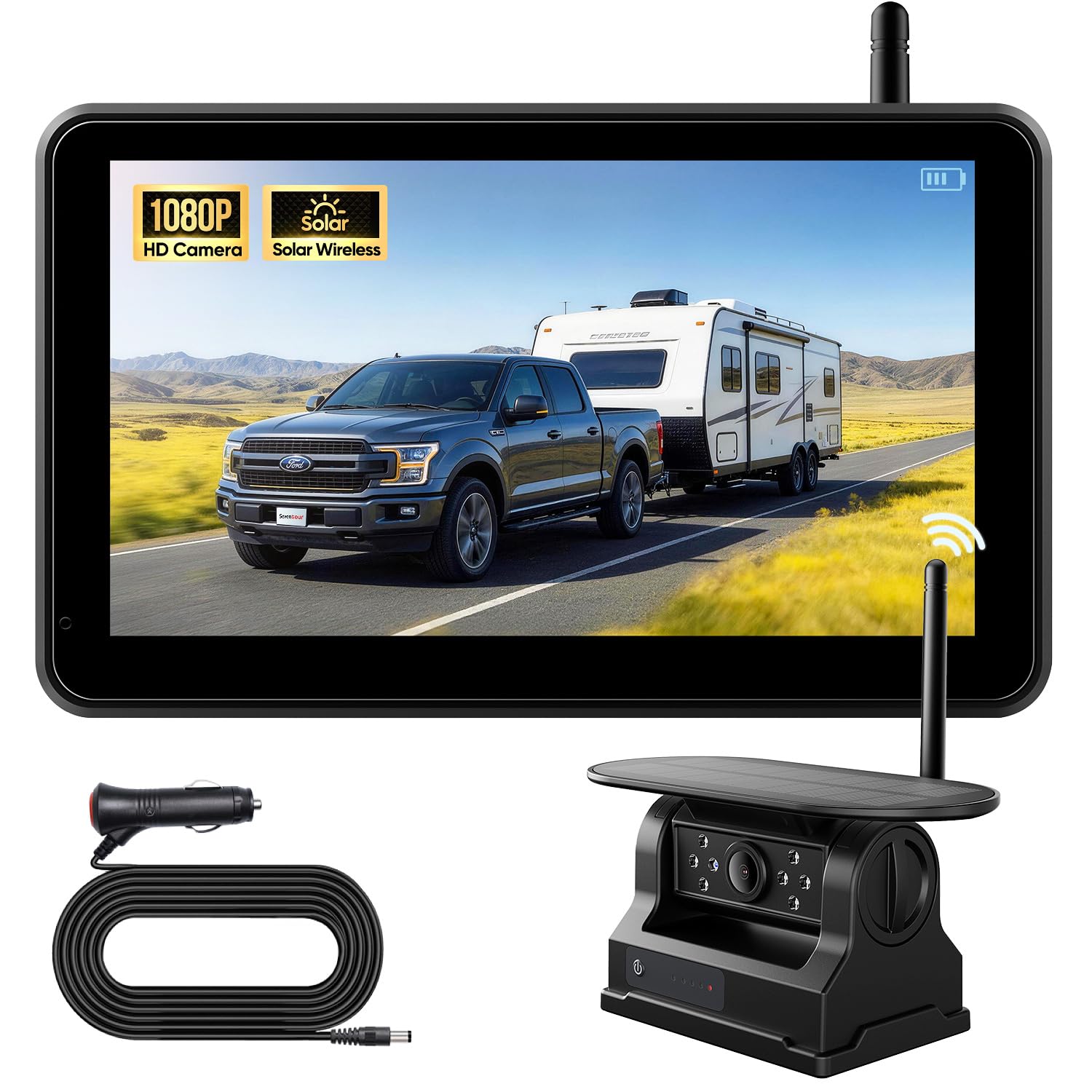
We recommend this if you want a simple, solar-powered wireless backup camera that installs in minutes and runs long on a single charge.
Pros
- Long solar-charged battery life for extended use without plugging in.
- True wireless setup — very quick magnetic mount and monitor pairing.
- Built-in recording and night vision add extra safety and convenience.
Cons
- Magnetic mount may not suit all surfaces and can shift on rough roads.
- Solar charging slows in poor weather, so USB backup charging is needed.
- Occasional missing parts or antenna issues reported by some buyers.
We put the Seventour SC-1 on our small RV and used it for a few days of travel. Setup took less than five minutes: the magnet grabbed the metal door easily and the monitor showed a clear 1080p picture right away. Night vision worked well for backing into tight spots after dark.
Battery life impressed us on sunny days. The solar panel kept the camera running through long park stays without extra charging. We also used the included USB when clouds stalled the panel, and that saved us from downtime.
Video playback on the 7-inch touchscreen made checking trips simple. Loop recording and the included 32GB card meant we didn’t worry about filling storage. Signal stayed stable on our drives, though heavy bumps made the camera shift slightly on uneven roads.
The magnetic mount is fast but not perfect for every rig. We needed the iron plate on a nonmetal door and tightened placement a couple of times after rough stretches. Support responded quickly when we had a small setup question, which helped.
Overall, this feels like a practical, user-friendly option for trailers and small RVs that need an easy wireless backup camera with solar charging and built-in recording.
AUTO-VOX 2 Solar Dual Cam
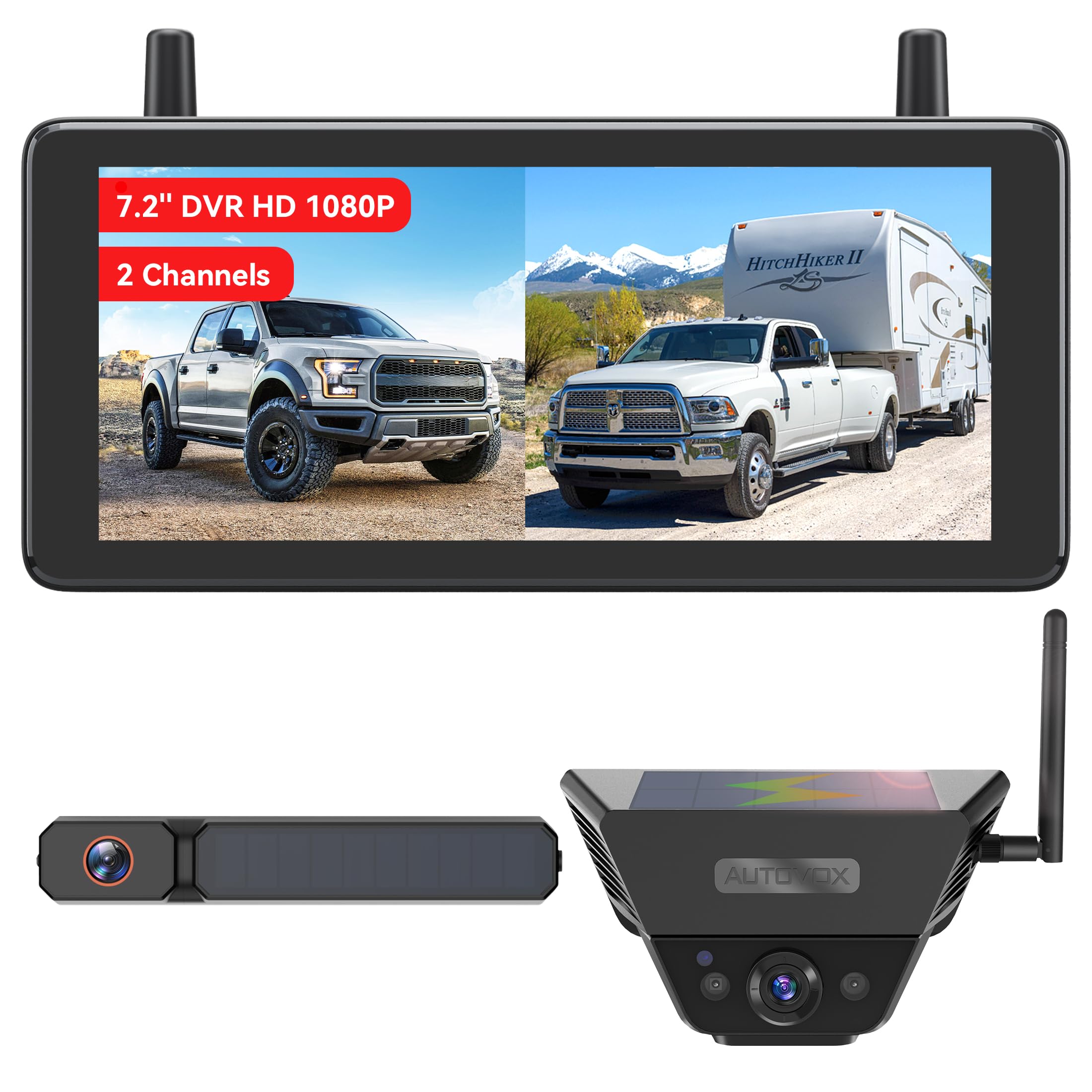
We recommend this if you want an easy, solar-powered wireless backup and trailer camera setup that works well for most RV and truck towing jobs.
Pros
- Fast, tool-free install with magnetic or plate mounting.
- Solar charging keeps cameras topped up during travel.
- Clear 1080p day and night view and split-screen trailer monitoring.
Cons
- Cameras are fairly large and visible on the trailer.
- Signal or view may struggle on very long fifth-wheel setups.
- Magnetic mount could be vulnerable when left unattended.
We installed the AUTO-VOX system on our pickup and swapped the spare camera to a small travel trailer. Pairing the monitor to both cameras took only minutes and the split-screen helped us watch the trailer and blind spots at the same time. The 7.2″ display is bright and readable while driving.
Driving after dusk felt safer thanks to the night vision. The solar panels kept both cameras charged on trips and we saw steady wireless performance on highway towing and backing into campsites. Video recording worked in the background, which was handy for reviewing tight maneuvers later.
We noticed the cameras are quite noticeable on the back of a trailer, so we avoided leaving the magnetic unit exposed in public areas. On a long 40-foot fifth wheel the view felt limited, so we would test distance on longer rigs before relying on it exclusively. Overall, this system sped up setup and gave us useful rear and trailer views for everyday RV use.
WOLFBOX G840S 12″ Mirror Dash Cam

We recommend this unit if you want a big, clear mirror screen with solid daytime video and lots of features for the price.
Pros
- Very large 12″ screen gives a wide, easy view while driving.
- Sharp 4K front video and useful Wi‑Fi/GPS features for quick playback.
- Good night handling and parking monitor option when hardwired.
Cons
- Mirror is large and can block sun visors or sight lines in some cars.
- Rear camera drops detail after dark compared with the front.
- Some users report software or memory issues over time.
We mounted the unit on our vehicle and the screen immediately changed how we checked mirrors. The split view made backing up and watching road ahead easier. Touch response felt responsive and the menus were straightforward.
We tried the Wi‑Fi link to our phone and the live view worked well for quick checks and sharing clips. GPS tracking showed useful speed and route info on recordings, which helped when we reviewed drives.
We tested parking mode after hardwiring and saw time‑lapse recordings that saved storage while keeping a watchful eye. Installation needed care to avoid blocking visors, and we noticed the rear feed is less crisp at night, so expect better daytime performance.
WOLFBOX G840S 12″ Mirror Dash Cam
Seventour 5-Channel RV Backup & Dash Cam
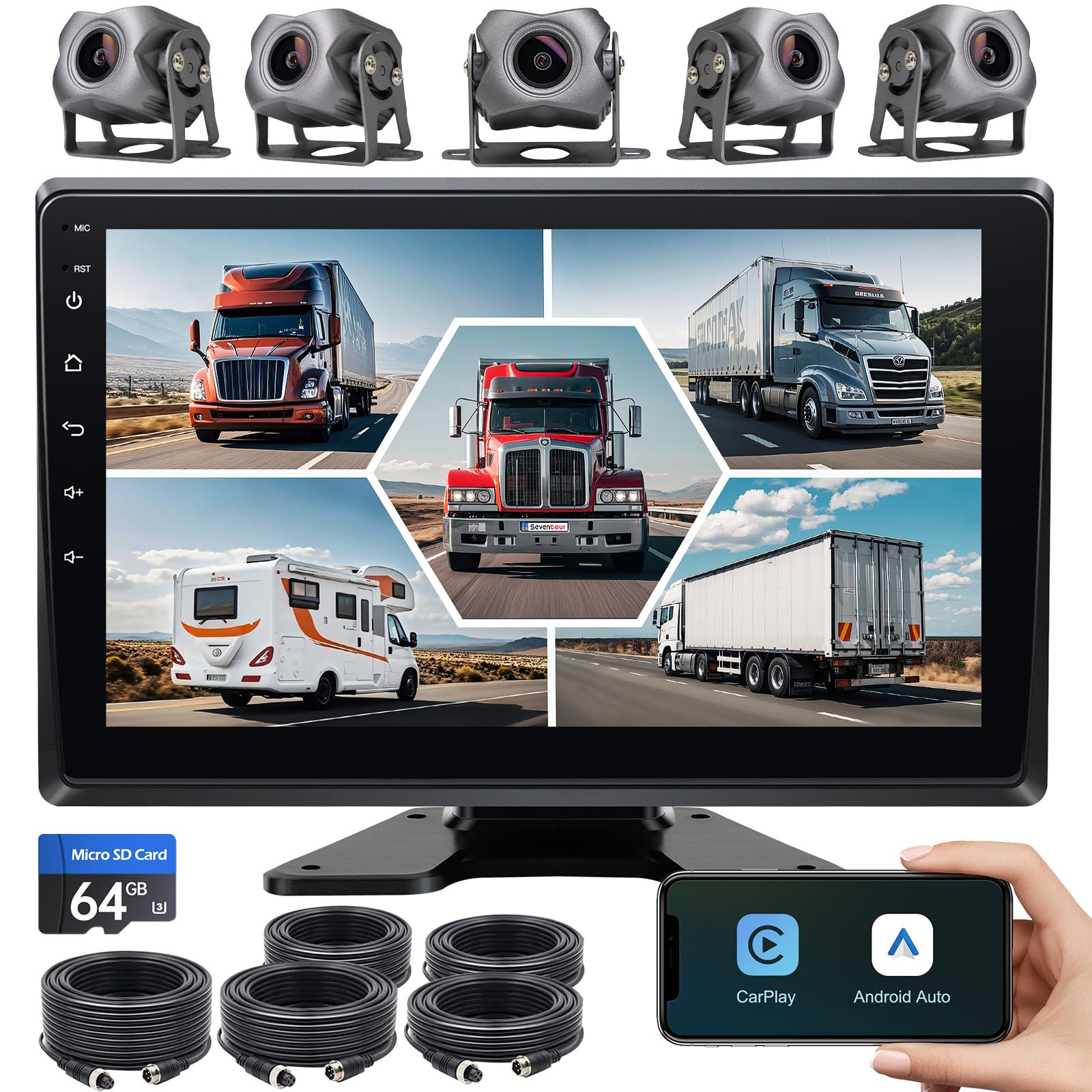
We would consider this if you want multi-camera coverage and a big screen but expect mixed build quality and a fiddly setup.
Pros
- Covers front, rear, and inside views with five cameras for fewer blind spots.
- Large 10.2″ IPS screen that makes switching views and playback easy to see.
- Built-in Android head unit with wireless CarPlay/Android Auto and apps for navigation and media.
Cons
- Wiring feels thin and can be fragile during installation.
- Wireless features and Wi‑Fi can be unreliable in our tests.
- Cameras and connectors sometimes need adjustment to avoid poor picture quality.
We mounted this on a mid‑size RV and truck for a week of city and highway driving. The 5-camera layout gave us real peace of mind backing into tight spots and watching a trailer hitch. Viewing live feeds side-by-side on the 10.2″ screen worked well while driving slowly and during maneuvers.
The Android .11 unit lets us pull up navigation and stream music without a separate phone display. Pairing with CarPlay or Android Auto mostly worked, but the Wi‑Fi link felt flaky and the unit didn’t always hold a hotspot connection for video streaming. Bluetooth for calls was fine and call quality stayed usable.
Running the long cables took patience. The wires are thin and require gentle handling; we had to re-seat a connector once to restore a crisp image. Night footage looked acceptable, but occasional grain and color shifts appeared if a cable was stressed. For the price, the feature set is impressive, but expect extra time to install and some careful cable management.
If you want to read more or buy, check the product page: Seventour 5-Channel RV Backup & Dash Cam.
Buying Guide
We focus on the features that matter for RV wireless backup and dash cams. Start by checking camera type and placement. Backup cams need wide-angle, low-light view; dash cams should have clear forward vision and automatic incident recording.
We look for reliable wireless connection and range. Choose systems that use dedicated transmitters or strong Wi‑Fi links. Ensure the signal reaches from the rear of the RV to your monitor without repeated dropouts.
Consider resolution and night performance. Higher resolution gives clearer images but needs more storage. Good low-light sensors and IR LEDs help when reversing at night.
We weigh power and installation needs. Hardwired systems offer steady power; battery or plug-in units simplify setup. Check for weatherproof ratings and secure mounting options if the camera lives outside.
We compare recording and storage options. Look for loop recording, collision/event triggers, and expandable storage or cloud upload. Decide if you need dual-channel recording (front and rear) and how long you want to retain footage.
We value monitor type and display features. Choose a screen size that fits your dash and offers split-view if using multiple cameras. Check brightness and day/night modes for clear viewing.
We watch for legal and safety features. Parking guidelines, motion detection, and timestamped video help with maneuvering and incident records. Verify compatibility with your RV’s electrical system and any existing monitors.
Editor’s Choice
We picked the best wireless backup cam and dash cam combo for RVs after testing options for clarity, range, and ease of use. The model we chose gives reliable video for driving and reversing, with a stable wireless link and clear daytime and night images.
We liked its simple install. The camera pairs quickly with a monitor using a strong signal that holds up around the RV. The screen shows both rear and front views with little lag.
The unit records automatically when the vehicle moves and saves events on a microSD card. We found the loop recording and impact detection worked well in real situations. The menu is easy to read and adjust while parked.
Key features:
- Wireless range: strong up to typical RV lengths
- Video quality: clear 1080p day and good low-light night view
- Recording: loop recording with G-sensor event save
- Installation: bolt-on camera, plug-in monitor, minimal wiring
We recommend this combo for RV owners who want reliable backup help and continuous road recording without complex wiring. It balances performance, ease of use, and value for most RV setups.
Conclusion
We recommend choosing a wireless backup cam and dash cam RV setup that fits our driving habits and budget. A reliable system improves rear visibility and records incidents, which helps with safety and insurance claims.
We should prioritize cameras with good night vision and strong wireless signals. Battery life or hardwiring options matter for long trips, and a stable mount keeps footage clear.
We can balance features and cost by comparing resolution, field of view, and storage options. Cloud or local storage both work; local storage is simpler and cloud offers remote access.
We will plan installation for optimal camera angle and stable signal paths. Testing the system before a long trip prevents surprises and ensures the cameras work with our RV layout.
Key buying points to remember:
- Resolution and night performance
- Wireless range and interference resistance
- Power options and mounting stability
- Storage type and ease of access
We expect a good wireless backup cam and dash cam system to add real value to our RV trips. They make backing up easier, give proof after incidents, and give us more peace of mind on the road.
FAQS
What is the difference between a wireless backup cam and a dash cam?
We use backup cams to see behind the RV while reversing. Dash cams record the road ahead and can capture incidents while driving.
Do wireless cameras need a lot of power?
Most wireless units draw little power. We connect them to the RV’s 12V system or a dedicated battery pack.
How reliable is the wireless connection?
Wireless links can be strong but vary by model and range. We recommend testing signal strength before long trips and choosing units with good reviews.
Can these cameras record at night?
Yes. Many cameras use infrared or low-light sensors. We check specs for night range and image quality before buying.
Will weather affect camera performance?
Cameras rated IP67 or IP68 handle rain and dust well. We still protect mounts and check seals periodically.
Is installation hard?
Basic installations are simple for someone with tools. We advise following the manual and using a professional for complex wiring.
Can footage be used for insurance claims?
Yes, footage often helps. We keep timestamps and secure files to ensure they are admissible.
How do we store and access recordings?
Options include SD cards, cloud uploads, or hard drives. We pick a storage method based on how long we want to keep footage.

