Dash cams record what happens on the road so drivers have clear footage for accidents, insurance claims, and safety checks. They range from tiny single-lens units to multi-camera systems with features like night vision, GPS, and parking mode. For people on a budget, the goal is to get reliable video and essential features without paying for extras we won’t use.
The most important thing to look for is consistent, clear video quality—day and night—so incidents are captured reliably. Other key factors are a stable mount, easy file access, and dependable loop recording and parking features; good battery or hardwiring options also matter. We tested and compared budget models to find units that balance image clarity, reliability, and simple features at low cost.
Best Budget Dash Cams
We tested and compared affordable dash cams to find models that give good video, easy setup, and reliable recording without a high price. Below is our list of the best budget dash cams to help you pick one that fits your car and needs.
ROVE R2-4K Dual

We recommend this dash cam for buyers who want sharp 4K front footage and reliable night performance without spending a lot.
Pros
- Very clear daytime and night video from the front Sony STARVIS 2 sensor.
- Dual-channel recording captures front and rear views at once.
- Fast 5G WiFi makes pulling clips to your phone quick.
Cons
- Rear camera wiring can be fiddly to hide during install.
- File downloads need patience if you rely on slower phones.
- Parking mode needs a hardwire kit for full 24/7 protection.
We used the ROVE R2-4K on daily drives and road trips. Front video looked noticeably sharper than budget cams we tried before. Night scenes kept usable detail and color thanks to the Sony sensor and wide apertures.
Mounting felt straightforward, and the 3″ screen made angle checks easy. Routing the long rear cable took some time in our car; you might want basic trim tools. Once set up, dual recording ran smoothly and saved both front and rear clips reliably.
The app download speed impressed us when we used a modern phone on 5GHz WiFi. Older phones moved slower, so plan to transfer big files on a laptop if needed. Overall, this gave us solid evidence quality at a price that still felt fair.
Pelsee P1 Duo 4K

We recommend this model if you want a solid front-and-rear dash cam with clear 4K front video and easy app control at a budget price.
Pros
- Sharp 4K front footage that captures plate-level detail.
- Includes rear camera and 64GB card for a true dual setup out of the box.
- App and voice control let us manage clips without fiddling with the unit.
Cons
- Small 1.5″ screen makes on-device playback awkward.
- Parking mode needs a hardwire kit for full 24H use.
- App can be a bit slow when downloading large 4K files.
We mounted the Pelsee P1 Duo and found setup quick. The front image looked crisp during daytime drives, and the wide view caught lane activity without distortion. The rear camera gave usable backup coverage and the cable length reached across our larger vehicle with no extra work.
Using the app felt handy for checking clips on the phone. We could grab footage right after an event and lock important files with voice commands. Big 4K clips took longer to transfer, so patience helps when saving long recordings.
Night shots held up better than we expected. Street signs and nearby plates stayed readable under urban lighting, though extreme low light softened distant detail. Overall, this dash cam gave reliable daily recording and felt like a strong value for the money.
REDTIGER F7NP 4K Dash Cam

We recommend this if you want solid 4K front footage, reliable night performance, and easy app downloads for a modest price.
Pros
- Very sharp 4K front video and usable 1080p rear footage.
- Fast 5.8GHz WiFi makes pulling clips to our phone quick.
- Supercapacitor and included 128GB card mean safer, ready-to-go use.
Cons
- App can be a bit clunky at first and needs time to connect.
- Parking mode needs a hardwire kit for full 24/7 use.
- Suction GPS mount can be bulky and blocks a small part of the view.
We mounted this in our car and the front camera captured tiny license-plate detail at highway speeds. Daytime footage looked crisp and colors stayed natural. The rear camera surprised us with clear angles for close hits.
Night driving felt secure thanks to the STARVIS 2 sensor and WDR. Shadows and bright headlights balanced well. Low-light signs and plates were readable more often than not.
Using the Redtiger app, we downloaded clips fast over 5.8GHz WiFi. Setup took a few tries, and the app interface felt basic, but transfers were noticeably quicker than 2.4GHz models.
Installation was straightforward with the included cables and clips. The unit stayed put and the supercapacitor reduced heat worries on hot days. For full parking coverage we bought a hardwire kit and it worked as expected.
Overall, this feels like a well-made budget dual cam that captures dependable evidence without costing a lot. If you want 4K front recording, decent night vision, and a ready-to-use kit, this is a strong pick.
Galphi Q2 4K Dash Cam

We recommend this if you want a compact 4K dash cam with fast 5GHz Wi‑Fi and solid night performance at a budget price.
Pros
- Very sharp daytime and night footage.
- Fast 5GHz Wi‑Fi makes downloads quick.
- Small, discreet design that hides well on the windshield.
Cons
- No built‑in screen, so you need the app to review clips.
- Parking mode needs a separate hardwire kit.
- Some setup needed to tuck cables neatly.
We installed the Q2 in minutes and liked how light and discreet it sat behind the rearview mirror. The adhesive pad held tight and the included cable clips helped hide the power lead without fuss.
Driving around town, the 4K video looked crisp. License plates and signs stood out during the day, and the low‑light images were useful on dim streets. We pulled clips to our phone fast thanks to the 5GHz Wi‑Fi — transfers felt noticeably quicker than older 2.4GHz cams.
Without a screen, we relied on the app to check clips and change settings. That kept the dash uncluttered, but it meant extra steps when we wanted to preview footage quickly. Parking mode worked as promised once hardwired, saving power with time‑lapse capture during long stops.
Overall, this felt like a dependable, budget friendly option for daily drivers, rideshare use, or families who want clear video without a big camera on the dash.
SUVCON J06 Triple Dash Cam
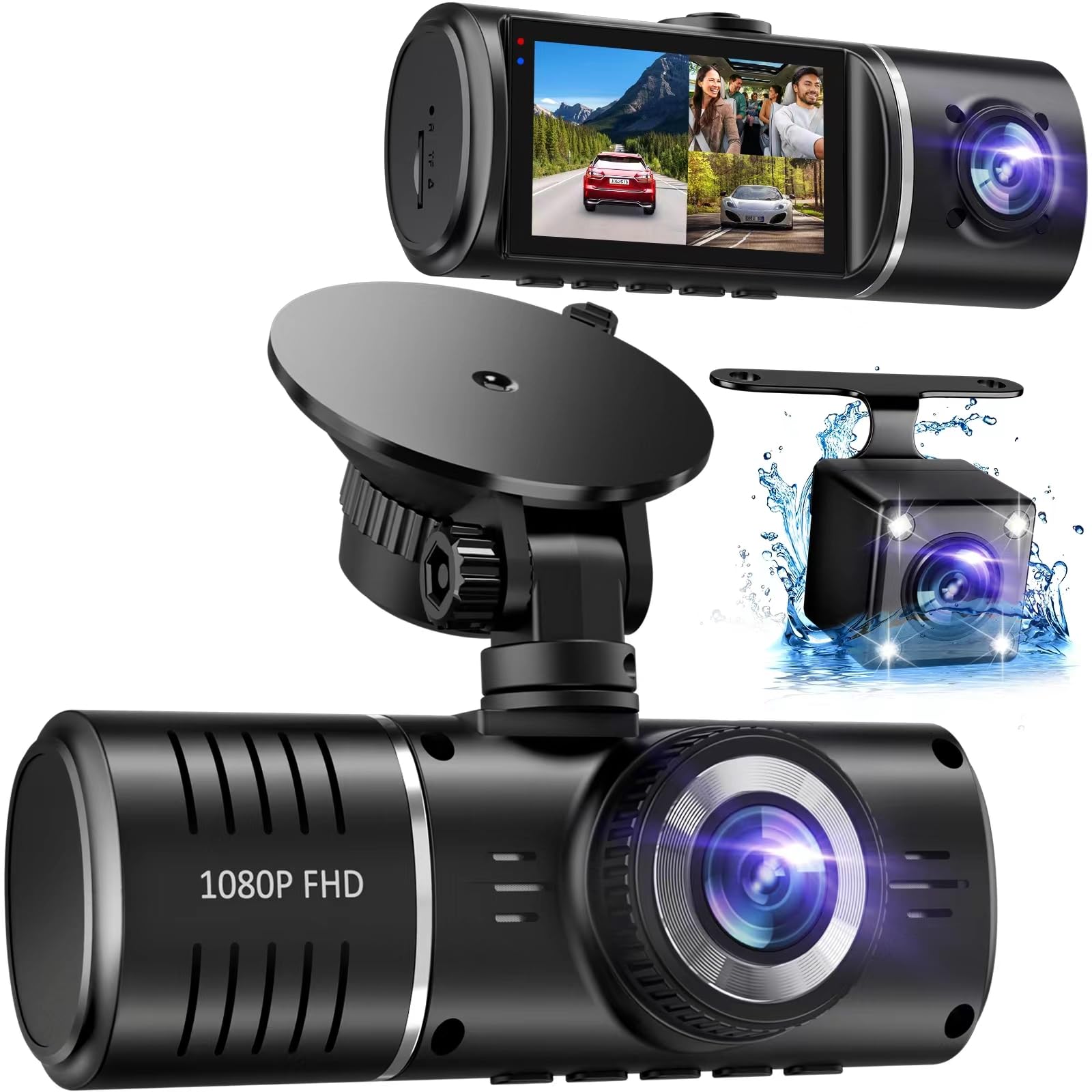
We recommend this if you want full coverage on a tight budget and can accept basic features and a clunky file transfer process.
Pros
- Wide coverage with front, cabin, and rear cameras.
- Easy plug-and-play install and a visible IPS screen.
- Includes 32GB card and reliable daytime footage for the price.
Cons
- No Wi‑Fi app — you must remove the SD card to view files.
- Rear and cabin video quality can be weak in some units.
- Adhesive mount can struggle to stay put on some windshields.
We installed the SUVCON J06 in two cars and used it for commuting and a weekend trip. The front camera captured clear daytime footage and the IPS screen made playback easy right after parking.
The cabin and rear cameras help close blind spots, but their detail drops at night and at long distances. We had to pull the microSD card into a laptop to show clips, which is slower than using an app.
Setup felt straightforward: route the cables, stick the mount, and plug into the car port. One car’s mount loosened after a few days, so plan for repositioning and cleaner glass before mounting.
When the G-sensor kicked in during a hard stop, the unit locked the clip as promised. Loop recording worked most of the time, though one unit later requested a format when the card filled, which interrupted recordings.
Overall, we found it to be a strong budget choice for wide coverage and easy installation, but expect to do extra work to access clips and accept uneven night or rear image quality.
Veement V300 Dash Cam

We recommend this camera if you want clear 1296P video and basic parking monitoring at a low price.
Pros
- Sharp daytime and decent night video.
- Small, discreet design that sits out of the way.
- App lets us preview and download clips wirelessly.
Cons
- Wi‑Fi app can be flaky on some phones.
- Requires USB‑C power constantly; no internal battery backup.
- Occasional setup or accessory quality issues reported.
We mounted the V300 on our windshield and liked how little it intruded into the view. Video looked crisp in daylight and the wide 170° lens caught most lanes without distortion.
Night footage surprised us for the price. The sensor and lens kept enough detail to read plates at moderate distances, though very low‑light scenes lost some clarity.
Connecting to the VeeCar app worked for live view and quick downloads on our phone, but it took a few tries and a specific phone model to be smooth. We relied on a good USB‑C power run to avoid interruptions.
Parking mode and loop recording ran as promised when using a proper fast microSD card. We would buy a reliable power cable and an SD card separately to avoid hiccups.
Overall, this feels like a solid budget pick for everyday drivers who want clear recordings and easy app control without spending much.
70mai M310

We recommend this if you want good daytime video and simple app control at a low price.
Pros
- Clear 1296p footage that shows plates and signs well.
- Small, unobtrusive design that mounts easily.
- Reliable loop recording and G-sensor lock for impact events.
Cons
- Parking mode needs a separate hardwire kit to work.
- No built-in screen; setup needs the app.
- Some users report app or connectivity hiccups.
We used the M310 on several short trips and liked how sharp daytime clips looked. The wide view catches multiple lanes, so you can see more than just the car ahead.
Installation felt familiar. We stuck the camera to the windshield, ran the cable, and paired it to the app. The compact size kept it out of sight while still recording useful detail.
Night shots held up better than many budget cams thanks to WDR and noise reduction, though very dark conditions still blur distant plates. The G-sensor locked accident clips cleanly, which gave us peace of mind after a hard brake.
If you plan to use parking surveillance, plan for the extra hardwire kit; without it, the camera won’t run when the car is off. The app controls work but can be hit-or-miss depending on your phone, so expect occasional reconnecting.
Overall, we found the 70mai M310 to be a solid budget pick for drivers who want clear daytime video, compact hardware, and basic smart features without spending much.
Editor’s Choice
Our editor’s choice is the ROVE R2-4K Dual because it offers the best overall balance of video quality, reliability, and useful features for the price. The front 4K footage is sharp enough to capture important road details, while the rear camera adds extra protection during daily driving, parking, and road trips.
We also liked its strong night performance, large 3-inch screen, dual-channel recording, and fast 5G WiFi for transferring clips. While the rear camera installation may take some time and full parking protection needs a hardwire kit, the overall value is excellent for drivers who want a dependable budget dash cam without sacrificing important features.
Conclusion
A good budget dash cam does not need to be expensive. The best models give you clear video, reliable loop recording, easy installation, and useful safety features like a G-sensor, parking mode, and night vision. For most drivers, the main goal should be to choose a camera that records clearly in both daytime and nighttime conditions.
If you want the best overall choice, the ROVE R2-4K Dual is a strong pick because it combines 4K front recording, rear coverage, and solid app support. If you want a full front, cabin, and rear view at a low price, the SUVCON J06 is worth considering. For drivers who prefer a compact and discreet camera, the Galphi Q2 and 70mai M310 are good options.
Before buying, think about how you will use the dash cam. If you drive often at night, choose a model with strong low-light performance. If you want parking protection, make sure the camera supports parking mode and check whether it needs a hardwire kit. The right budget dash cam can give you peace of mind and useful evidence without costing too much.
FAQs
What is the best budget dash cam?
The ROVE R2-4K Dual is our top budget pick because it offers sharp 4K front video, rear recording, good night performance, and fast WiFi at a reasonable price.
Do I really need a rear dash cam?
A rear dash cam is helpful because it records what happens behind your car. This can be useful in rear-end accidents, parking incidents, and situations where another driver approaches from behind.
Is 4K necessary for a dash cam?
4K is not always necessary, but it can help capture license plates, road signs, and small details more clearly. If your budget allows, a 4K front camera is a good choice.
Do budget dash cams work well at night?
Some budget dash cams work well at night, especially models with Sony STARVIS sensors, WDR, or strong low-light features. However, very dark roads may still reduce image clarity.
What is parking mode in a dash cam?
Parking mode allows the dash cam to monitor your car while it is parked. It can record impacts, motion, or time-lapse footage, depending on the model. Many cameras need a hardwire kit for full parking mode.
Do dash cams record all the time?
Most dash cams record continuously when the car is on. They use loop recording, which means old footage is automatically overwritten when the memory card is full, unless the file is locked by the G-sensor.
What size memory card should I use for a dash cam?
A 64GB or 128GB microSD card is usually a good choice for daily use. For 4K dash cams or dual-channel recording, a larger and high-endurance card is better.
Can I install a dash cam myself?
Yes, most budget dash cams are easy to install by plugging them into the car’s power outlet and mounting them on the windshield. Rear cameras and hardwire kits may take more time to install neatly.
Are app-controlled dash cams better?
App-controlled dash cams make it easier to view, download, and share clips from your phone. However, some apps can be slow or occasionally difficult to connect, so simple on-device controls can also be useful.
What should I check before buying a budget dash cam?
Before buying, check the video resolution, night vision quality, mounting system, storage support, parking mode, app reliability, and whether important accessories like a memory card or rear camera are included.

