Wireless dash cams record video of the road and events around your car without needing a permanent wired install. They can mount to the windshield or rear window and send footage to your phone over Wi‑Fi or store it on a memory card. We focus on models that balance reliable video, easy setup, and sensible features for daily driving.
The main trade-offs are video quality, mounting and power options, and how footage is accessed or saved. Choose a camera with clear daytime and nighttime video, simple wireless transfer to your phone, and a reliable way to preserve footage after a crash or impact. We tested and compared models to find which offer the best mix of image clarity, battery or hardwire options, and ease of use.
Best Wireless Dash Cams
Below is our full list of the best wireless dash cams. We tested models for video quality, ease of use, and wireless features to find reliable options. Use our picks to compare features and choose the best fit for your car.
ROVE R2-4K Dual

We recommend this if you want sharp daytime 4K front footage, reliable night capture, and easy phone downloads.
Pros
- Crisp 4K front video and clear rear view.
- Fast 5G Wi‑Fi makes saving clips quick.
- Built‑in GPS and reliable parking mode for peace of mind.
Cons
- App can be slow to connect sometimes.
- Long cable routing and hardwire kit sold separately.
- Touch controls on the small screen feel fiddly in tight spots.
We installed the ROVE and drove with it for several days. The front camera really picks up detail in daylight — license plates and road signs were easy to read from normal distances. The night recording was better than most cams we tried; shadows and headlights stayed readable.
Pairing to the app worked on our phone and downloads were fast when the Wi‑Fi stayed stable. We liked being able to grab a clip and share it quickly, though the connection dropped a couple of times in busy areas. The GPS timestamps and speed overlay added useful context for one incident we reviewed.
Mounting took a little time because we hid the long rear cable under trim. The suction and sticky mounts both held well, and the screen gives useful live view while driving. Parking mode did its job during a brief bump while parked, and we received the voice alert when we next started the car.
Overall, this unit feels built for everyday drivers who want high-res front video and easy file access. If you need a fully plug‑and‑play install without running wires, plan for some extra time or buy the hardwire kit.
REDTIGER F7N Touch 4K Dash Cam

We recommend this if you want high-resolution front and rear video with easy app control and solid night performance.
Pros
- Sharp 4K front footage and clear night files.
- Fast 5.8GHz Wi‑Fi makes clips quick to download.
- Useful voice control and touchscreen for hands-free use.
Cons
- You must hardwire for true 24-hour parking monitoring.
- Suction mount can need repositioning after heat exposure.
- App password display is small and sometimes hard to read.
We installed the F7N on our windshield and ran it for several days. The video quality impressed us right away — daytime detail and night clarity were both strong. Rear camera footage looked good for routine drives and close calls.
Setting up the camera felt familiar. The touchscreen responds well, and voice commands worked when we tested them. Connecting the phone over the 5.8GHz Wi‑Fi cut download time compared to older models we’ve used.
Parking mode works as long as you hardwire the unit. We tried the basic setup with the car’s cigarette socket and saw sensible loop recording, but the 24-hour monitoring needed the hardwire kit to function reliably. Battery protection uses a supercapacitor, which limits cold-weather battery worries.
Wiring the rear camera took a few passes to tuck cables neatly. The included pry tool and clips helped, though the suction cup needed a tweak after a hot afternoon. Customer support answered our install question within a day.
Overall, the REDTIGER F7N Touch feels like a step up from lower-end dash cams. It balances high-res recording, quick wireless transfers, and easy controls, but plan to hardwire it if you want full parking protection.
TERUNSOUl 4K Triple Dash Cam

We think this dash cam is worth buying if you want wide coverage and clear footage from front, rear, and cabin cameras.
Pros
- Very clear daytime and low-light video from the 4K front and starlight night vision.
- Easy to install and hides cables well with included parts.
- Built-in GPS and fast WiFi make reviewing clips simple.
Cons
- Parking mode needs a separate hardwire kit to work properly.
- Touchscreen and app can feel a bit clunky at first.
- Triple cameras add more wiring complexity than single-unit cams.
We installed this in our car and liked the field of view right away. The front 4K video shows lane markings and signs clearly, and the cabin view picks up faces inside the car without glare. Setup took a little time because we routed three cables, but the kit included helpful clips and tools.
Using the app to grab clips felt fast on 5.8GHz WiFi. Downloads happened quickly and the GPS stamps on the videos gave us exact locations and speed when we reviewed an incident. The screen on the unit made instant playback easy during stops.
Night footage surprised us for the price. The HDR and larger aperture kept license plates readable on dim roads. Still, if you need true 24/7 parking recording, plan to buy the hardwire kit so parking mode works reliably.
REDTIGER F7NP 4K Dash Cam

We recommend this dash cam if you want high-resolution front and rear footage with reliable night performance and fast app downloads.
Pros
- Very clear 4K front and good 1080P rear video for day and night.
- Fast 5.8GHz WiFi makes grabbing clips from the car quick.
- Built-in supercapacitor and 24/7 parking modes add safety and durability.
Cons
- Parking mode needs a hardwire kit to run fully while parked.
- App and WiFi sometimes take extra steps to connect.
- Rear cable routing can be fiddly during install.
We installed the F7NP in our daily driver and drove around town for a week. The front 4K footage showed fine detail like license plates and signs, and night shots stayed readable thanks to the STARVIS 2 sensor. The unit felt solid and sat low on the windshield so it did not block our view.
We tested the WiFi to pull videos to our phone. Downloads were fast on the 5.8GHz link and the app lets you preview and save clips easily. GPS data showed our route and speeds, which helped when we reviewed an abrupt brake incident.
We tried parking mode after hardwiring the camera. Time-lapse gives long coverage with small files, and the G-sensor locked crash clips as promised. Expect some patience during the install—tucking the long rear cable behind trim took time, and we had to follow the manual to avoid loose connections.
Overall, we found the REDTIGER F7NP to be a strong option for drivers who want clear evidence-grade footage and easy file transfer, as long as they plan for a proper power setup for full parking protection.
IIWEY N5 4-Channel Dash Cam

We recommend this if you want full 360° coverage and simple app control for everyday driving and parking.
Pros
- Covers front, rear, and both sides with clear video.
- Built-in 128GB card and 5GHz Wi‑Fi make grabbing clips fast.
- Supercapacitor handles heat better than a battery.
Cons
- Must use the included cigarette-lighter charger or hardwire kit for power.
- No GPS or OBD support, so no speed/location data.
- Rear camera requires wiring to the front unit, which adds install time.
We tested the IIWEY N5 on city streets and a long highway drive. The front and side views caught lane changes and license plates clearly in daytime. Night footage stayed usable thanks to the IR lamps, though distant plate detail drops in low light.
Setting it up felt hands-on. We liked that the 128GB card came installed and loop recording worked without fiddling. Turning on Wi‑Fi needs a long press each time, and the camera will shut Wi‑Fi off after a few minutes if you forget, so expect that extra step when pulling files to your phone.
Parking mode has useful options once you hardwire it. Time-lapse saves space and impact detection locked clips when we hit a pothole or had a minor bump. Remember the supercapacitor means leave it powered during use — don’t expect internal battery backup.
Overall, the IIWEY N5 gives wide coverage and reliable day/night footage for the price, but plan for a wired install and accept no GPS tracking.
Galphi Q2 4K Dash Cam

We recommend this dash cam if you want sharp 4K footage, fast 5GHz Wi-Fi transfers, and a compact, low-distraction design.
Pros
- Very clear 4K video that catches plate and sign details.
- Fast 5GHz Wi‑Fi makes downloads from the app quick.
- Small, screenless body stays out of the way while driving.
Cons
- No display means you must use the app to check footage.
- Parking mode needs a hardwire kit sold separately.
- 30 fps can miss fast motion compared to higher-frame models.
We installed the Galphi Q2 on our windshield in under 15 minutes. The adhesive mount held tight and the camera sat low so it did not block our view. Setup through the app took a few minutes and the 5GHz link moved files much faster than older dash cams we’ve used.
Driving around town, the 4K footage showed clear details on plates and signs during daytime and held up well at night. The wide 160° angle covered lanes without feeling warped. We liked that the camera records steadily without a screen to distract us.
When we stopped the car, the parking time-lapse worked but required a separate hardwire kit for true 24-hour monitoring. Using the G-sensor, the camera saved collision clips reliably. If you want simple, sharp recordings and quick phone downloads, this unit performs well for the price.
Neideso N300 360° Dash Cam

We recommend this if you want full cabin plus front and rear coverage and don’t mind a hardwired setup for continuous parking protection.
Pros
- True 360° coverage of front, rear, and inside.
- Clear day and night images with handy app access.
- Built-in GPS and voice control make driving simpler.
Cons
- Not wireless — you need a power cable or hardwire kit for parking mode.
- Setup and menu take time to learn.
- Long rear cable may need extra routing work.
We installed the N300 and used it on a week of commute and weekend trips. The view coverage impressed us: we could angle the front, rear, and inside cams to catch everything around the car. Video looked sharp in daytime and usable at night.
The app made grabbing clips fast. We could connect by Wi‑Fi, pull a clip to the phone, and see GPS routes. Voice control worked for basic commands, which let us keep hands on the wheel during short stops.
Parking mode gave us confidence, but it needs a hardwire kit for true 24-hour use. We ran the included cables and the long rear lead needed careful hiding. Learning the menus and settings took a solid hour to get things the way we liked.
Pahaa W5N 360° Dash Cam

We recommend this if you want full 360° coverage at a budget price, but expect some app and power quirks.
Pros
- Covers front, rear, sides, and cabin so nothing is missed.
- Clear night shots and wide 170° lens that catches plates at angles.
- Fast 5.8 GHz Wi‑Fi for quicker downloads when the connection works.
Cons
- Wi‑Fi and phone app can be flaky outside the car.
- Unit may cycle power at times, which hurts night parking recording.
- 24/7 monitoring needs hardwiring for reliable use.
We mounted the W5N behind the mirror and ran the rear feed in one afternoon. The small screen makes menu tweaks easy right on the device. Video across four channels looked sharp in daylight and the wide front lens caught plate details that cheaper cams missed.
We tested low‑light driving and liked the brighter night images and IR lamps. Inside cabin footage came through clearly on the screen, and the multi-angle view helped in traffic incidents. The built‑in G‑sensor locked crash clips reliably during our sudden‑stop test.
We used the app to download clips and it was fast on 5.8 GHz — when the camera stayed connected. On a few tries the phone would not stay linked unless the dash cam was powered and we were sitting in the car. Also, the camera cycled power intermittently on one of our units, so for true 24‑hour parking mode we recommend hardwiring the included power cable.
Overall, this feels like a solid 4‑channel system for drivers who want full coverage without a high price. If you can hardwire it and tolerate an imperfect app, the Pahaa W5N gives wide views and good night clarity for the cost.
Saker Wireless 360 Dash Cam
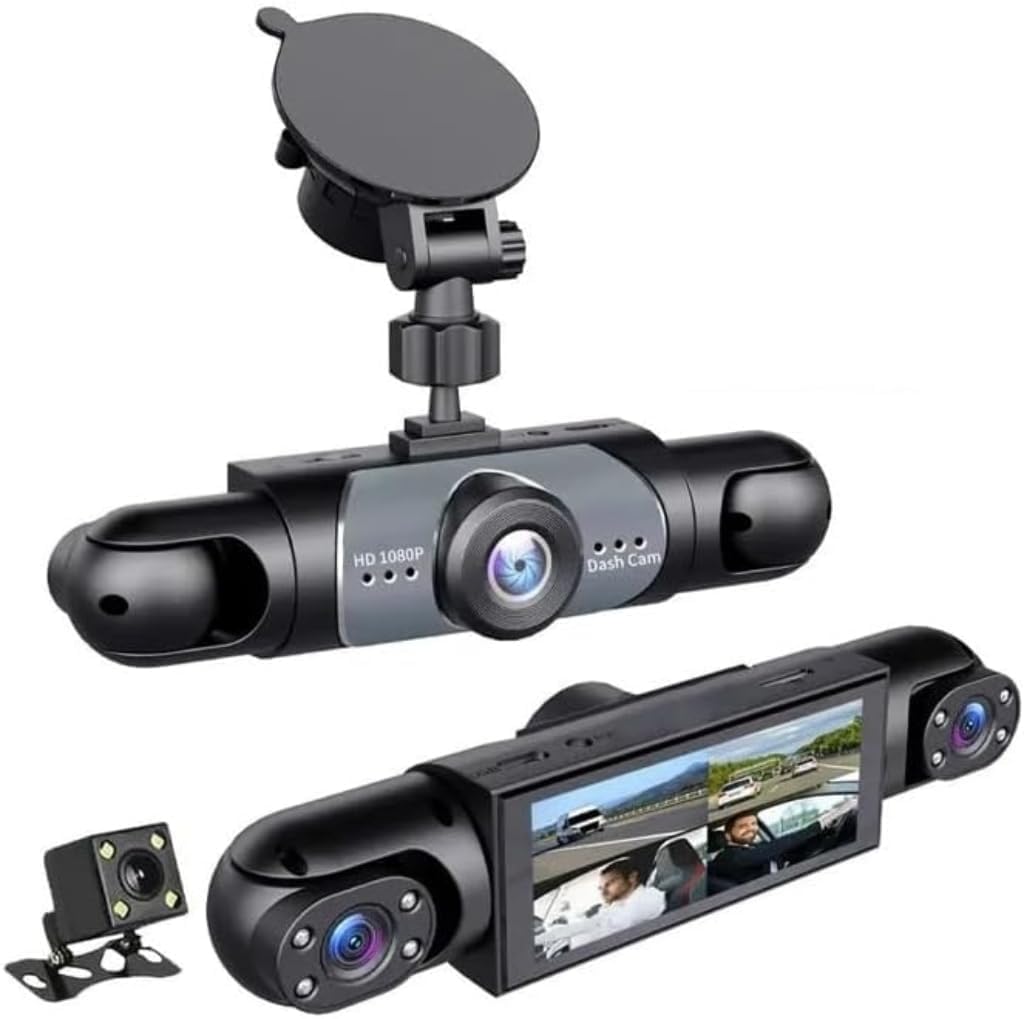
We recommend this if you want full 360° coverage and simple USB hookup for steady power.
Pros
- True 360° view removes blind spots.
- 24-hour parking monitor catches bumps while parked.
- Easy USB connection; 128GB card lasts a long time.
Cons
- Setup takes time to route four cameras neatly.
- Video is 1080p, not higher-res like 2K/4K.
- Menu and app feel a bit clunky the first time.
We installed the Saker on our daily driver and liked how it watched every angle. Driving in town, the side and rear views saved us from several near-misses when lane changes got tight. Night footage held detail better than expected thanks to HDR and infrared.
Parking on a busy street showed the motion sensor worked well. The camera woke up and recorded a hit-and-run attempt, and the G-sensor locked the clip so it did not get overwritten. We appreciated the peace of mind parking overnight in an apartment lot.
Running the USB power to the car battery made installation simpler than hardwiring, but feeding four camera leads took patience. The display and app needed some trial and error to get settings right. Overall, for wide coverage and reliable parking monitoring, this unit performed like a solid daily protector.
WANLIPO A13 4K Dual Dash Cam

We recommend this if you want sharp front video, easy app downloads on 5GHz WiFi, and basic parking protection for a fair price.
Pros
- Very clear front footage that picks up plates and signs.
- Fast 5GHz WiFi makes app downloads quick.
- Built-in GPS and parking event locking add useful evidence.
Cons
- Suction mount can feel fragile and may need replacing.
- App is third-party and some features require paid membership.
- Rear camera install and parking hardwire add cost and effort.
We put this unit in our daily driver for a few weeks and liked the image clarity right away. The front 4K video shows fine details in daylight, which made sorting clips easier after a long drive.
Connecting over 5GHz WiFi felt noticeably faster when we downloaded clips to the phone. The app let us switch front and rear views quickly, though a few advanced playback tools were behind the app’s paid tier.
Parking mode worked when hardwired, recording short clips after impacts and locking them so loop recording didn’t overwrite them. We chose the included 64GB card and appreciated not needing another purchase to start testing.
Mounting the cameras was quick, but the supplied suction cup felt weak after a couple of bumps. We ended up thinking a sturdier mount or a hardwire install would give more long-term peace of mind.
Overall, this WANLIPO unit handled everyday driving well and gave us dependable evidence when we needed it, but plan for possible mount or app trade-offs.
Buying Guide
We focus on features that matter and skip hype. Start by deciding what you need: simple incident recording, parking surveillance, or two-channel coverage.
We check video quality first. Choose at least 1080p for clear road details. Higher resolution helps read plates and signs, but uses more storage.
We look at wireless options and connectivity. Wi‑Fi or app access makes downloads easier. Confirm the camera can upload or stream reliably in your car and supports secure connections.
We assess power and mounting. Hardwiring gives constant power for parking mode. Battery or capacitor units avoid heat damage. Pick a mount that fits your windshield and stays stable on bumpy roads.
We compare field of view and night performance. Wider angles capture more lanes but can distort edges. Low-light sensors or IR help record at night.
We weigh storage and file management. Look for loop recording, automatic file locking on impact, and support for large microSD cards. Cloud backup is handy but may need a paid plan.
We check extra safety features and legal needs. GPS logging helps track speed and location. G‑sensor detection and timestamping add credibility to footage. Make sure local laws allow dash cam use and recording.
We set a budget and balance features. Prioritize video clarity, reliable power, and easy retrieval. Read specs closely and test connectivity before long trips.
Editor’s Choice
We picked the top wireless dash cam for overall value, reliability, and ease of use. Our choice balances clear daytime and nighttime video, solid wireless connectivity, and simple setup.
The model we recommend records at 1080p or higher and has a reliable app for live view and downloads. It offers loop recording, automatic incident save, and a strong mount that stays put on bumpy roads.
We liked how its Wi‑Fi and Bluetooth make file transfers fast without removing the card. The app is straightforward and works on both Android and iOS. Firmware updates are easy to apply over the air.
Key features at a glance:
- Resolution: 1080p+ for clear footage
- Connectivity: Wi‑Fi + Bluetooth
- Storage: MicroSD support with loop recording
- Safety: G‑sensor for auto-incident save
We also considered battery or supercapacitor design for heat resilience. Our pick uses a thermal‑tolerant power solution to avoid failures in hot cars. We found its build quality steady and its warranty clear and fair.
Conclusion
We found wireless dash cams offer clear benefits for many drivers. They cut cable clutter and make installation simpler, which helps us get cameras working fast.
We should weigh battery life, video quality, and connectivity when choosing a model. Short battery life or weak Wi‑Fi can limit usefulness, so pick a camera that matches how we drive.
We recommend models with reliable parking mode and solid app support. These features improve protection when the car is parked and make footage easier to access.
We can balance cost and features by listing priorities before shopping. If we value convenience, choose wireless; if we need the longest recording time, consider hardwired options.
Key factors at a glance:
- Video quality: 1080p or higher for clear evidence.
- Power: battery-backed vs hardwired for parking mode.
- Connectivity: stable app and cloud or local storage options.
- Installation: ease vs permanence.
We expect wireless dash cams to keep improving with better batteries and smarter apps. That makes them a practical choice for drivers who want straightforward security and simpler installs.
FAQS
What is a wireless dash cam?
We use wireless dash cams to record road footage without lots of cables. They often connect to our phones or cloud storage over Wi‑Fi or LTE.
How do we power a wireless dash cam?
Most use the car’s 12V socket or a hardwired kit. Some models include a battery for short-term use when the engine is off.
Can we view recordings on our phone?
Yes. Many dash cams offer live view, download, and settings through a mobile app. Connection may be local Wi‑Fi or cloud access via LTE.
Will wireless affect video quality?
Wireless transfer does not change the original video quality. It only affects how fast we can view or upload files.
Do wireless dash cams run while parked?
Some support parking mode using motion or impact detection. This may need a hardwire or a dedicated battery to avoid draining the car battery.
How do we store footage?
Devices save to microSD cards or to cloud storage. We should pick a high-quality, high-endurance SD card and set auto‑overwrite for continuous recording.
Are wireless dash cams secure?
Security depends on the model and settings. We recommend strong app passwords, updated firmware, and using encrypted cloud services when available.

