Quick Answer: To use an OBD2 scanner, plug it into the OBD2 port under your dashboard (usually near the steering column), turn your ignition to the “On” position without starting the engine, and select “Read Codes” on the scanner. The device will display Diagnostic Trouble Codes (DTCs) that pinpoint your car’s problem. The whole process takes less than two minutes.
If your check engine light just came on and you have no idea what it means, you are not alone. Most drivers either ignore it or pay a mechanic $100 just to read a code that could have been pulled for free in their driveway. I’m Ryan Carter, and after years of testing automotive tools in real driving conditions, I can tell you that learning how to use an OBD2 scanner is one of the most practical skills any car owner can have.
In this guide, I’ll walk you through everything — from plugging in your scanner for the first time to reading live sensor data like a pro. Whether you drive a 2005 Honda Civic or a 2023 Ford F-150, this process is nearly identical, and I’ll explain every step in plain language.
What Is an OBD2 Scanner and Why Every Driver Needs One
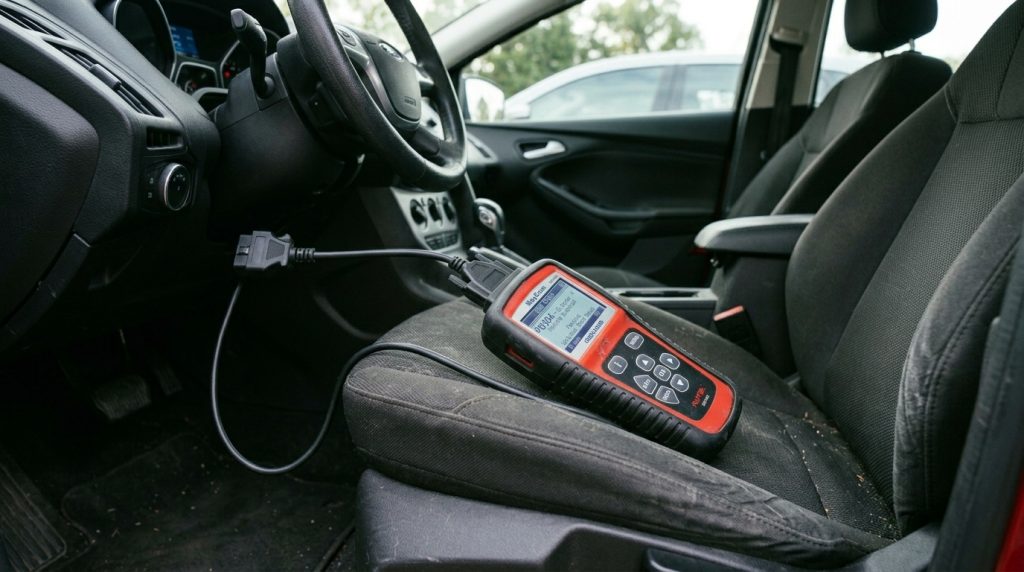
An OBD2 scanner — short for On-Board Diagnostics Generation 2 — is a handheld device or wireless adapter that communicates with your car’s built-in computer. Since 1996, all gasoline-powered vehicles sold in the United States have been required by law to include an OBD2 system. Diesel trucks followed in 2008. This means nearly every car on the road today can be scanned.
When something goes wrong with your vehicle — whether it’s a misfiring cylinder, a failing oxygen sensor, or a loose gas cap — your car’s Engine Control Module (ECM) logs a fault code and triggers the check engine light. An OBD2 scanner reads those codes and translates them into plain language so you know exactly what you are dealing with.
What Does OBD2 Stand For?
OBD2 stands for On-Board Diagnostics, Second Generation. The first generation (OBD1) was inconsistent across manufacturers — every brand had its own connector and protocol. OBD2 standardized everything: one universal connector, one universal location (within 3 feet of the steering column), and standardized diagnostic codes across all makes and models.
What Can an OBD2 Scanner Tell You?
- The specific cause of your check engine light
- Engine misfires, sensor failures, and emission system faults
- Live data: RPM, coolant temperature, fuel trim, oxygen sensor readings
- Freeze frame data: what the car’s conditions were when the fault triggered
- Emissions readiness: whether your car will pass a state inspection
- Battery voltage and charging system status (on capable scanners)
- ABS, airbag, and transmission codes (on advanced scanners)
Where Is the OBD2 Port Located in Your Car?
The OBD2 port is a 16-pin trapezoidal connector, and by federal regulation it must be within 3 feet of the driver’s steering column. In most vehicles, it sits under the dashboard on the driver’s side. You usually don’t need a flashlight — just reach under the dash and feel for it. It’s about the size of a USB-A port but wider.
OBD2 Port Location by Vehicle Type
| Vehicle Type | Common OBD2 Port Location |
|---|---|
| Sedan / Coupe | Under dash, left of steering column |
| SUV / Crossover | Under dash, near center console or left of column |
| Pickup Truck | Under dash, below and left of steering wheel |
| Minivan | Under dash, driver side, sometimes covered by a panel |
| Older Vehicles (1996–2005) | May require removing a small plastic cover to access |
| European Imports | Often near the ashtray or center dash area |
If you cannot find it, check your owner’s manual under “OBD port” or “diagnostic port.” You can also search your year, make, and model at Edmunds for vehicle-specific diagrams.
How to Use an OBD2 Scanner: Step-by-Step for Beginners
This process works whether you have a basic $25 code reader or a professional-grade scanner. I’ve done this on dozens of vehicles, and the steps are almost always identical.
Step 1 – Prepare Your Scanner and Vehicle
Make sure your vehicle is parked safely and the engine is off. If you are using a Bluetooth OBD2 adapter, download the paired app on your phone before starting. For handheld scanners, ensure the device is powered or has fresh batteries. Have your Vehicle Identification Number (VIN) handy — some scanners ask for it to improve code accuracy.
Step 2 – Plug In the OBD2 Scanner
Insert the OBD2 scanner’s connector into the OBD2 port firmly until it clicks. It only connects one way — the wider side of the trapezoid faces up. You should not have to force it. If you are using a Bluetooth adapter, the LED indicator will begin flashing once it detects power from the port.
Step 3 – Turn On the Ignition
Turn your key to the “On” position — also called “Run” or “ACC+ON” — without cranking the engine. On push-button start vehicles, press the Start button twice without pressing the brake pedal. This provides power to the OBD2 system without running the engine, which gives the scanner full access to all stored codes.
Step 4 – Read Diagnostic Trouble Codes (DTCs)
On a handheld scanner, navigate to “Read Codes,” “Scan,” or “Diagnose” from the main menu. The scanner will spend 5 to 30 seconds communicating with your car’s ECU. Once finished, it will display a list of codes. If your car is healthy, you will see “No Codes Found” or “System OK.” If there are issues, you will see codes like P0420 or P0300.
Step 5 – Understand Your Codes
Every OBD2 code follows the same format: one letter followed by four numbers. The letter tells you which system is affected — P for powertrain, B for body, C for chassis, U for network. Most scanners display a brief description alongside the code. For deeper explanations, I recommend cross-referencing with a resource like Car and Driver or a dedicated OBD2 database.
Step 6 – Fix the Problem or Clear the Code
Once you identify the issue, you have two options. If the problem is minor — like a loose gas cap causing a P0457 — you can fix it and then use the scanner to select “Erase Codes” or “Clear Codes.” The check engine light will turn off. If the problem requires a repair, address it first, then clear the code. Clearing codes without fixing the underlying issue only delays the light from returning — usually within one to three drive cycles.
How to Read Live Data and Freeze Frame Data on an OBD2 Scanner

Basic code reading gets most people 80% of the way there. But live data and freeze frame data are where OBD2 scanning becomes genuinely powerful — especially for intermittent problems that don’t always trigger a code.
What Is Live Data?
Live data (also called real-time data or data stream) shows you your engine’s sensors operating in real time as you drive or idle. On a capable scanner, you can monitor engine RPM, vehicle speed, coolant temperature, intake air temperature, throttle position, short-term and long-term fuel trims, oxygen sensor voltage, and battery voltage — all simultaneously. This is invaluable for diagnosing a problem that only shows up at highway speed or when the engine is fully warmed up.
What Is Freeze Frame Data?
When a fault code is triggered, your ECU automatically takes a snapshot of all sensor values at that exact moment. This is called freeze frame data. It shows you the RPM, speed, load, fuel trim, and coolant temperature from the instant the problem occurred. Freeze frame data often tells you far more than the code itself — for example, if the fault always triggers at high RPM and lean fuel trim, that points to a fuel delivery problem rather than a sensor fault.
OBD2 Code Types Explained: P, B, C, and U Codes
Not all OBD2 codes are the same. Understanding the code structure helps you know immediately which system is involved and how serious the fault might be.
| Code Prefix | System | Examples | Severity |
|---|---|---|---|
| P (Powertrain) | Engine, transmission, fuel system, emissions | P0300, P0420, P0171 | Most common; ranges from minor to severe |
| B (Body) | Airbags, power windows, climate control | B0020, B1000 | Comfort/safety systems; needs capable scanner |
| C (Chassis) | ABS, traction control, steering | C0031, C0265 | Safety critical; requires advanced scanner |
| U (Network) | Communication between modules (CAN bus) | U0100, U0155 | Often caused by wiring or module failures |
| P0xxx | Generic OBD2 (all manufacturers) | P0301, P0455 | Standardized across all brands |
| P1xxx | Manufacturer-specific codes | P1135 (Toyota), P1000 (Ford) | Requires brand-specific scanner for full detail |
Most Common OBD2 Trouble Codes and What They Mean
In my experience testing dozens of vehicles, a handful of codes come up again and again. Here are the ones you are most likely to encounter and what they typically indicate.
| OBD2 Code | Description | Common Cause | DIY Fixable? |
|---|---|---|---|
| P0420 | Catalyst system efficiency below threshold (Bank 1) | Failing catalytic converter or bad O2 sensor | Sometimes (sensor first) |
| P0300 | Random/multiple cylinder misfire detected | Bad spark plugs, ignition coils, or injectors | Yes (plugs and coils) |
| P0171 | System too lean (Bank 1) | Vacuum leak, dirty MAF sensor, weak fuel pump | Yes (MAF cleaning) |
| P0455 | Evaporative emission system large leak | Loose or damaged gas cap | Yes (tighten cap) |
| P0128 | Coolant temperature below thermostat regulating temperature | Faulty thermostat | Yes (thermostat replacement) |
| P0430 | Catalyst system efficiency below threshold (Bank 2) | Same as P0420 on the other side | Sometimes |
| P0442 | Evaporative emission system small leak | Cracked EVAP hose or loose gas cap | Yes |
| P0113 | Intake air temperature sensor circuit high input | Dirty or failed IAT sensor | Yes |
According to data from Consumer Reports, P0420 and P0300 are consistently among the top five most-reported check engine codes across all vehicle makes and model years.
OBD2 Scanner Not Working? Why Your Scanner Is Not Connecting (Real Causes)
A scanner that won’t connect is frustrating, but the cause is almost always simple. Here are the real-world issues I’ve run into — and how to fix each one.
| Problem | Likely Cause | Solution |
|---|---|---|
| Scanner powers on but shows “No Link” or “Link Error” | Ignition not fully in “On” position; engine running | Turn key to “On” only — do not start the engine |
| Scanner shows nothing after plugging in | Blown OBD2 fuse (usually a 7.5A or 10A fuse) | Check fuse box; replace blown fuse |
| Bluetooth adapter pairs but app shows no data | Wrong app protocol selected (ELM327 vs. other) | Try a different app; use Torque Pro or OBD Fusion |
| Scanner says “Not Supported” or “Protocol Error” | Vehicle uses a less common protocol (CAN vs. J1850) | Use a multi-protocol scanner; update scanner firmware |
| Codes read fine but won’t clear | Active fault still present; permanent DTC set | Fix the underlying problem first, then clear |
| Scanner shows codes but light returns within days | Root cause was not repaired | Diagnose and repair the actual fault |
| OBD2 port connector feels loose | Damaged or corroded port pins | Inspect and clean port; consult a mechanic if damaged |
Common Mistakes to Avoid When Using an OBD2 Scanner
Over the years, I’ve watched people make the same OBD2 mistakes repeatedly. Avoiding these will save you time and money.
- Clearing codes without fixing the problem. The light will come back, and you may have wiped useful freeze frame data that could have helped diagnose it.
- Assuming one code means one problem. Multiple codes can share a single root cause. Always investigate the most relevant code first before chasing every fault.
- Using a cheap Bluetooth adapter with an incompatible app. Not all ELM327-based adapters support all OBD2 protocols. Stick with reputable brands.
- Scanning with the engine running. Some scanners require ignition-on but engine-off to establish a reliable connection.
- Ignoring pending codes. A pending code (not yet confirmed) can warn you of a developing problem before it becomes a full fault. Check for these in your scanner’s menu.
- Not checking readiness monitors before an emissions test. After clearing codes, readiness monitors need several drive cycles to complete. Taking your car for inspection too soon will result in a fail even if the original problem is fixed.
Handheld OBD2 Scanner vs Bluetooth OBD2 App: Full Comparison

When people ask me which type of OBD2 scanner to buy, my answer depends entirely on how they plan to use it. Here’s an honest breakdown of both options.
| Feature | Handheld OBD2 Scanner | Bluetooth OBD2 Adapter + App |
|---|---|---|
| Price Range | $30 – $500+ | $10 – $100 (adapter) + free or paid app |
| Ease of Use | Plug-and-play; no phone needed | Requires phone pairing and app setup |
| Screen Size | Built-in display (varies) | Your phone screen (larger) |
| Live Data | Yes (mid-range and above) | Yes (depends on app) |
| ABS / Airbag Codes | Yes (mid-range and above) | Limited (some apps support it) |
| Update-ability | Varies; some require paid updates | App updates automatically |
| Reliability | Very reliable; no wireless interference | Can have pairing issues or dropouts |
| Best For | Mechanics, frequent users, emergency kits | Casual users, daily driver monitoring |
| Portability | Dedicated device (takes up space) | Small dongle stays in port permanently |
My recommendation: If you are a daily driver who occasionally checks a code, a quality Bluetooth adapter paired with an app like OBD Fusion or Car Scanner works great. If you maintain multiple vehicles, work on cars regularly, or want something you can trust in any situation, invest in a mid-range handheld scanner.
FOXWELL NT301 OBD2 Scanner
Reads and clears codes, displays freeze frame data, and checks emissions readiness — all on a large, easy-to-read screen. One of the best value handheld scanners for everyday drivers.
VEEPEAK Mini Bluetooth OBD2 Scanner
A reliable, compact Bluetooth adapter that pairs easily with iOS and Android apps. Great for drivers who want to monitor their car passively without carrying extra devices.
Best OBD2 Scanner for Daily Driving, Travel, and Maintenance
Different driving situations call for different tools. Here’s how I’d match scanner type to use case based on my own experience on long road trips, commuter routes, and used-car shopping.
- Daily driving and city commutes: A small Bluetooth adapter that stays plugged in is ideal. Pair it with a free app and let it passively monitor your car without adding clutter.
- Long road trips and interstate travel: A dedicated handheld scanner is worth having in your glove box. If a light comes on at mile 400 in a rural area, you want to know immediately whether it’s safe to drive or whether you need to stop.
- Buying a used car: Carry a handheld scanner when test-driving. Scan the car before you buy to check for stored codes, pending codes, and cleared codes (indicating the seller may have hidden a problem).
- DIY home maintenance: A mid-range scanner with live data — in the $80 to $150 range — is the sweet spot. It gives you enough data to diagnose most issues without the cost of a professional scan tool.
Practical Tips for Getting the Most Out of Your OBD2 Scanner
- Always record codes before clearing them. Take a photo of the screen or write them down.
- Run a scan every 1,000 to 2,000 miles as preventive maintenance, even if no light is on. Pending codes can warn you early.
- After any repair, verify with the scanner that the code cleared and that readiness monitors are resetting.
- If you get a P1xxx manufacturer-specific code, search your exact code with your vehicle’s make and model — these vary widely between brands.
- Keep your scanner firmware updated if it supports updates. Code databases expand regularly as new vehicles are released.
- When buying a Bluetooth adapter, choose one that explicitly states compatibility with your vehicle’s OBD2 protocol (CAN, ISO, VPW, or PWM). Most post-2008 vehicles use CAN bus.
Frequently Asked Questions About OBD2 Scanners
Can an OBD2 scanner damage my car?
No. An OBD2 scanner only reads data from your car’s computer — it does not send commands that can alter engine operation. The only risk is if you use the “erase codes” function without first understanding what those codes mean, which could cause you to overlook a real mechanical issue.
Does an OBD2 scanner drain the car battery?
A handheld scanner plugged in for a brief scan (5–10 minutes) draws negligible current and will not drain your battery. However, leaving a Bluetooth adapter permanently plugged in with the engine off will draw a small but constant current. On older vehicles with weaker batteries, removing the adapter when parked overnight is a good habit.
Do OBD2 scanners work on diesel vehicles?
Yes, but with some nuance. Diesel light-duty trucks manufactured from 2008 onward in the USA are OBD2 compliant and can be read with a standard scanner. Older diesel vehicles or heavy-duty trucks may use a different diagnostic system (J1939 or J1708) that requires a specialized scanner.
Can I use an OBD2 scanner to read ABS and airbag codes?
Not with a basic code reader. Entry-level scanners only access powertrain (engine and transmission) codes. To read ABS, airbag, and transmission codes, you need a mid-range scanner with enhanced system support or a brand-specific scan tool.
How long does it take for readiness monitors to reset after clearing codes?
It typically takes one to three complete drive cycles for readiness monitors to reset. A drive cycle involves a cold start, highway driving, city driving, and deceleration. Some monitors — particularly the EVAP monitor — can take up to a week of normal driving to fully complete. Do not schedule an emissions test immediately after clearing codes.
Why does my check engine light come back after I clear the code?
This always means the underlying problem was not fixed. Clearing a code only removes the stored fault from memory — it does not repair the component or system that caused it. Once the car completes its diagnostic checks (usually within one to three drive cycles), it will detect the same fault again and re-illuminate the light.
What is the best OBD2 scanner for beginners?
For beginners, I recommend starting with a straightforward handheld scanner in the $30 to $60 range, such as the FOXWELL NT301 or Autel AutoLink AL319. These read and clear codes, show freeze frame data, and display basic live data without an overwhelming amount of options. Once you are comfortable with those basics, you can upgrade to a more capable device.
Final Thoughts
Knowing how to use an OBD2 scanner is one of the simplest ways to take control of your car’s health and avoid unnecessary repair bills. The process takes under two minutes, works on virtually every vehicle built after 1996, and can tell you immediately whether a problem is minor or something that needs urgent attention.
I’ve used OBD2 scanners to catch a failing oxygen sensor before it caused a catalytic converter failure, to diagnose a simple loose gas cap that was triggering a check engine light on a road trip, and to verify repairs were done correctly after leaving a shop. Once you do your first scan, you’ll wonder how you managed without one.
Pick up a scanner that fits your budget and driving habits, keep it in your glove box, and use it. Your car’s computer has been keeping detailed records — it’s time you started reading them.

