Dash cam battery packs keep your camera running when the car’s ignition is off. They give continuous power for parking mode, protect video files after a crash, and let you record longer without draining the vehicle battery. A good battery pack can also reduce false shutoffs and protect your car’s electrical system.
When choosing a pack, pay attention to capacity (measured in mAh or Wh), safety features like overcharge and short-circuit protection, how it mounts, and whether it supports the dash cam’s voltage and logging needs. The most important factor is matching the battery pack’s capacity and output to your dash cam’s power draw so it can record reliably while protecting your car battery. We tested and compared common models so we can recommend ones that balance run time, safety, and ease of use.
Best Dash Cam Battery Packs
Below is our full list of the best dash cam battery packs we recommend. We tested options for run time, safety, and ease of install to help you pick the right model for your needs.
70mai BL96NNX Battery Pack
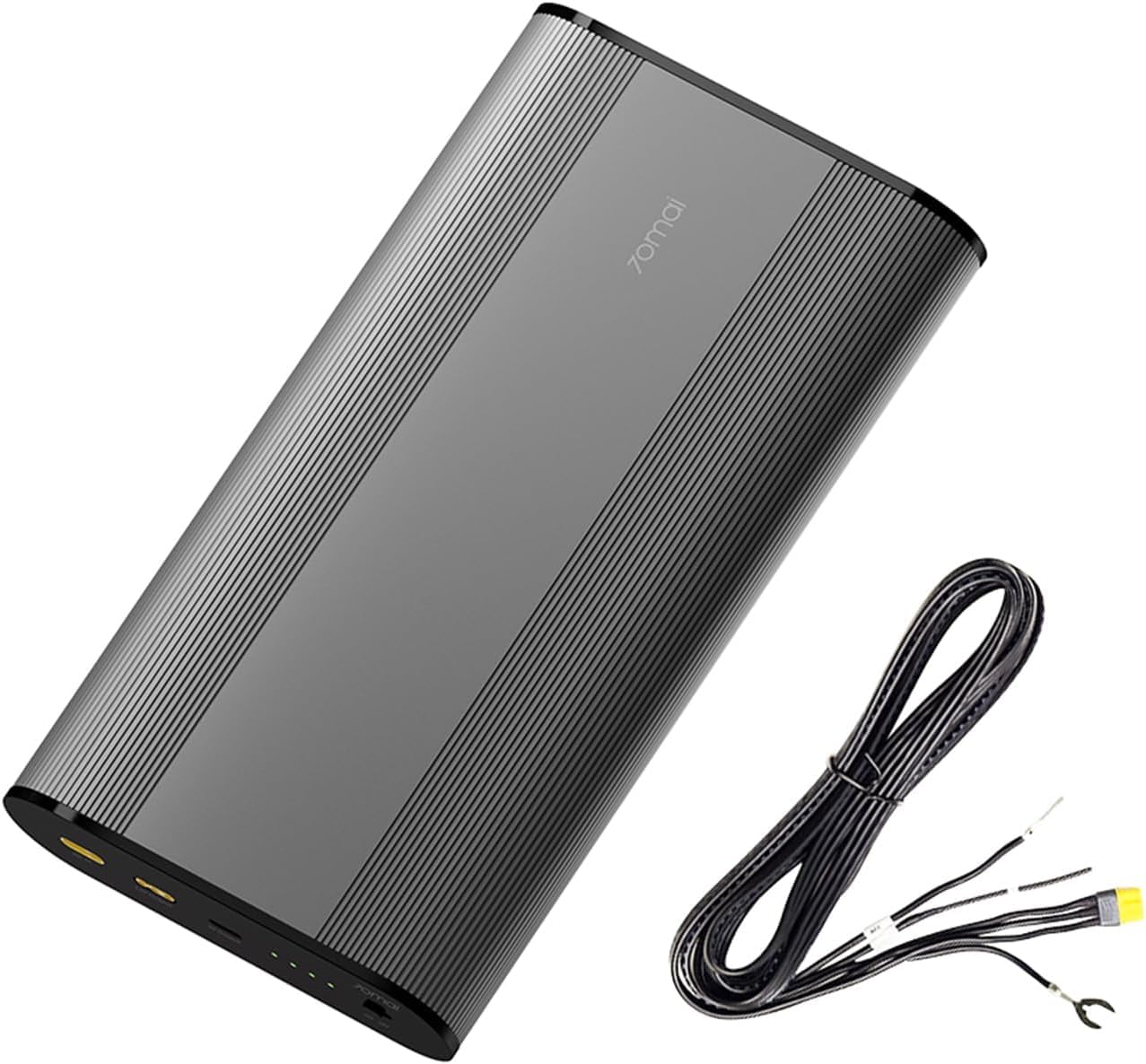
We recommend this pack if you want reliable overnight parking mode without risking your car battery.
Pros
- Long-lasting LiFePO4 cells that hold charge well over many cycles
- Fast, hardwired charging that fills the pack in about an hour
- Stable parking surveillance without draining the vehicle battery
Cons
- Hardwire-only setup can be tricky for DIY installers
- Included cables and fuses may need checking for completeness
- Heavier and bulkier than simpler portable packs
We installed the 70mai BL96NNX and ran it with a few different dash cams. It kept our cameras recording overnight and through long trips without touching the car battery. The fast charge saved time between drives.
Wiring into the fuse box took patience. We liked the clear safety features, but some of the supplied cables felt flimsy and one connector didn’t seat well. If you are comfortable with hardwiring or have an installer, setup went smoothly.
Daily use proved consistent. The unit stayed cool and switched to battery seamlessly when the engine turned off. Overall it gave us steady parking coverage and fewer battery worries.
TXL 128Wh Dash Cam Battery Pack
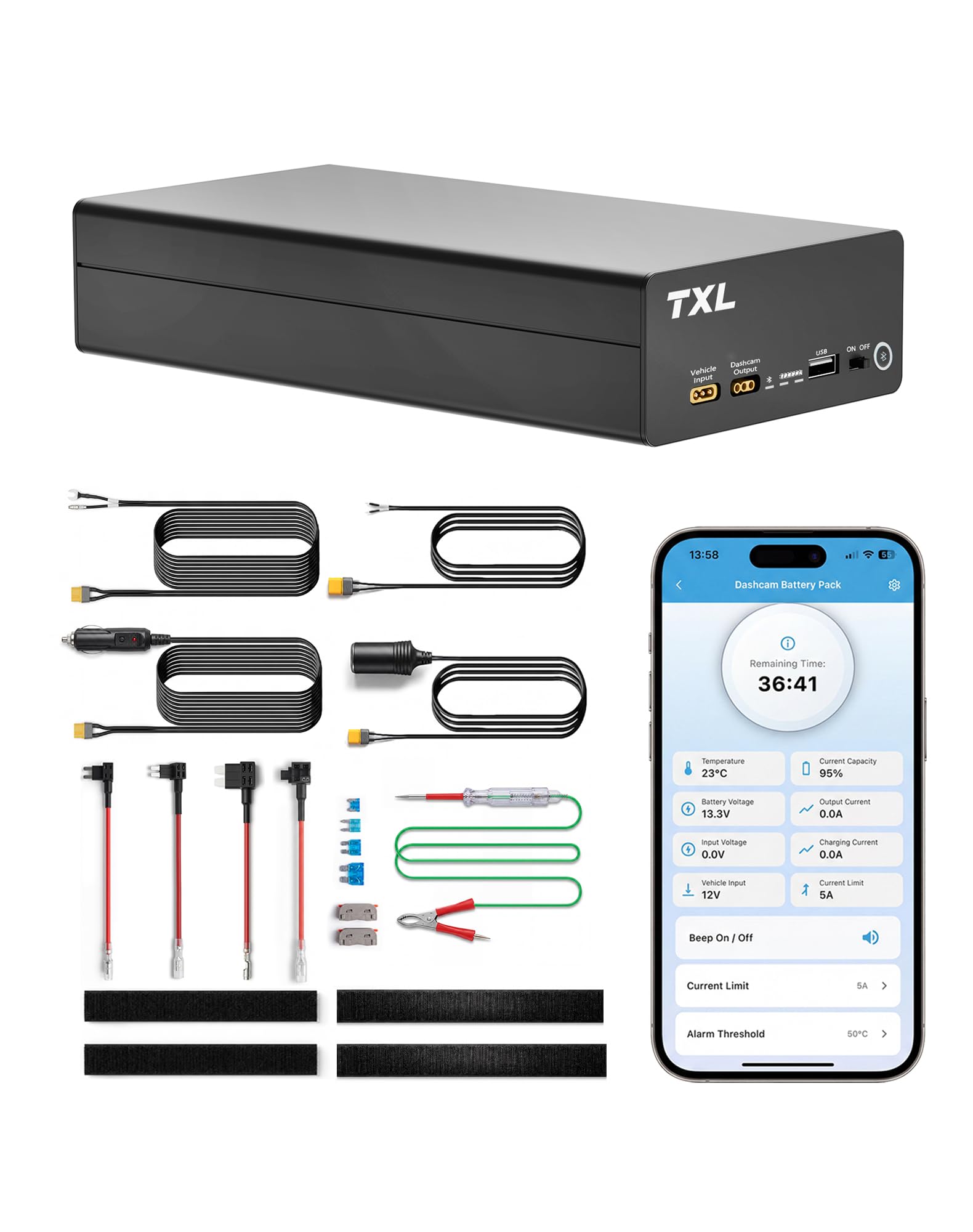
We recommend this if you want long, reliable parking-mode recording and fast recharge between drives.
Pros
- Long parking recording time for overnight or airport stays.
- Fast recharge on a hardwire so it’s ready after a commute.
- App monitoring shows battery, temp, and charge status without opening the car.
Cons
- Adds extra weight and takes trunk or seat space.
- Some dash cam models need a small wiring tweak for full features.
- Bluetooth app screens can be slow to connect at times.
We used the TXL pack for a few weeks and found it simple to install. The hardwire cable fit our setup and the battery sat neatly under the seat. It felt solid and safer than cheap power banks.
Recording lasted through long overnight parking without hiccups. We checked the app from outside the car to confirm charge and remaining recording time, which saved us trips to the vehicle. The fast recharge after a short drive meant we rarely worried about running out.
On the flip side, the pack is heavier than a slim battery and needs a place to live in the car. One dash cam required a small wiring change to use all features, so expect to tweak connections if you have an uncommon model. Overall, the TXL unit gave us steady parking protection and fast turnaround between drives.
TXL 128Wh Dash Cam Battery Pack — view on Amazon
Blackvue B-130A Battery Pack

We recommend this pack if you want reliable parking-mode power without draining your car battery.
Pros
- Fast recharge when hardwired, so it stays ready after short drives.
- Stable LiFePO4 cells feel safe in hot or cold conditions.
- App monitoring gives clear charge and remaining time info.
Cons
- Size makes finding a hideaway spot a bit tricky.
- Some units have charged only to ~70–80% for certain buyers.
- Runtime varies a lot with single vs dual cameras.
We installed the B-130A in our vehicle and used it both hardwired and via the cigarette lighter. In day-to-day use the fast charge stood out — a short drive brought it back to full much quicker than older packs we tried.
The pack felt solid and safer than older lithium types. We liked the phone app for watching percent and estimated parking time; it removed guesswork when we left the car overnight.
Space was the main hassle. We squeezed it into a glove box on one car and mounted it under a seat on another. If you have tight storage, plan the placement first.
Charging behavior varied. One unit charged smoothly to 100% while another stopped near 70–80% until serviced. That suggests occasional quality control issues, so keep the one-year warranty in mind.
Overall, we found it a practical option for BlackVue users who want dependable parking-mode recording and quick top-ups between drives.
PowerCell 8 (BlackboxMyCar)

We recommend this if you want reliable parking-mode runtime and fast recharge in a compact package.
Pros
- Long runtime that kept our dash cam running overnight and through the day.
- Fast charging when hardwired — we had it ready quickly between drives.
- Includes multiple cables and a Thinkware spliced hardwiring kit for easier installs.
Cons
- Some dash cams need splicing for full parking-mode control instead of USB.
- Takes the car cigarette socket when charging, which can block that outlet.
- Setup felt technical at times and may require patience or basic wiring know-how.
We used the PowerCell 8 on a week of test drives and parked periods. It powered our dash cam through long nights and handled frequent short trips without losing much charge.
Installation went smoothly when using the included hardwiring kit. We liked the app that shows battery status and charge time, which made it easy to check power levels before a trip.
In one car the cigarette-socket option worked flawlessly. In another, we had to splice output wires to get consistent parking-mode activation. Plan for a bit of troubleshooting if your camera uses nonstandard parking triggers.
The unit feels solid and compact. Fast recharge is a real benefit if you drive often, but if you rarely move the car expect shorter total runtime between charges.
Overall, this is a practical choice for users who want true parking-mode operation without permanent hardwiring to the car battery.
RoyPow Dash Cam Battery Pack

We recommend this if you want a portable, regulated 12V source to run a dash cam without hardwiring.
Pros
- Long run time for parking mode on one charge
- Regulated 12V cigarette outlet works well with sensitive dash cams
- Fast USB-C PD charging for phones and quick recharge of the pack
Cons
- Heavier than tiny power banks, so it feels noticeable in the car
- Some units show inconsistent runtime versus the listing claims
- Not a permanent replacement for a hardwire solution if you need continuous power
We used this RoyPow pack to run a dash cam for several overnight parking sessions. It powered our camera reliably and kept parking mode active for many hours. The regulated 12V output gave steady voltage so the camera did not reboot when the car was off.
Charging phones and small devices from the USB-C PD port felt fast in real use. Recharging the pack itself took a few hours and the included cables made setup easier. Carrying it between vehicles was simple, though the unit has some weight to it.
On a couple of occasions the battery lasted less than expected with high-drain cams or cold weather. We still prefer this pack to risky hardwiring for short-term parking mode, but for long-term or daily use a hardwire kit might be better. Overall, it’s a solid, portable option when you want regulated 12V power without modifying the car.
RoyPow Dash Cam Battery Pack

We recommend this if you want a portable battery that can run a dash cam and small 12V accessories without carrying a huge power station.
Pros
- Big capacity that kept our dash cam and phone running through long drives.
- Cigarette lighter outlet lets us plug in 12V accessories easily.
- Fast USB-C PD charge for quick recharges of laptops and phones.
Cons
- Unit feels a bit heavy for daily carry.
- Voltage on DC outputs drops as the battery drains.
- QC port times out unless you press the button to reactivate it.
We used this RoyPow pack on weekend trips and for a week of daily commuting. It held our dash cam, phone, and occasional tablet use without cutting out. Carrying it in the trunk felt natural, though it is noticeably weighty compared with small power banks.
Plugging a dash cam into the cigarette lighter socket worked right away. The 12V socket powered a small fridge and ran a camera for hours. We did watch the voltage dip toward the end of a long run, which trimmed runtime a bit—so plan for lower output when the battery is low.
Charging the pack back up with PD 30W was fast and convenient. We could also juice our laptop and phone at the same time. Buttons and ports are straightforward, but the QC port’s auto-off required a button press to restart, which felt odd during quick stops.
If you want a portable, multi-output battery to run a dash cam and occasional 12V gear, this RoyPow unit performs well and feels reliable for road use. RoyPow 30W PD Portable Charger with 12V/10A Cigarette Lighter Socket
Letoom 12V/5V Battery Pack
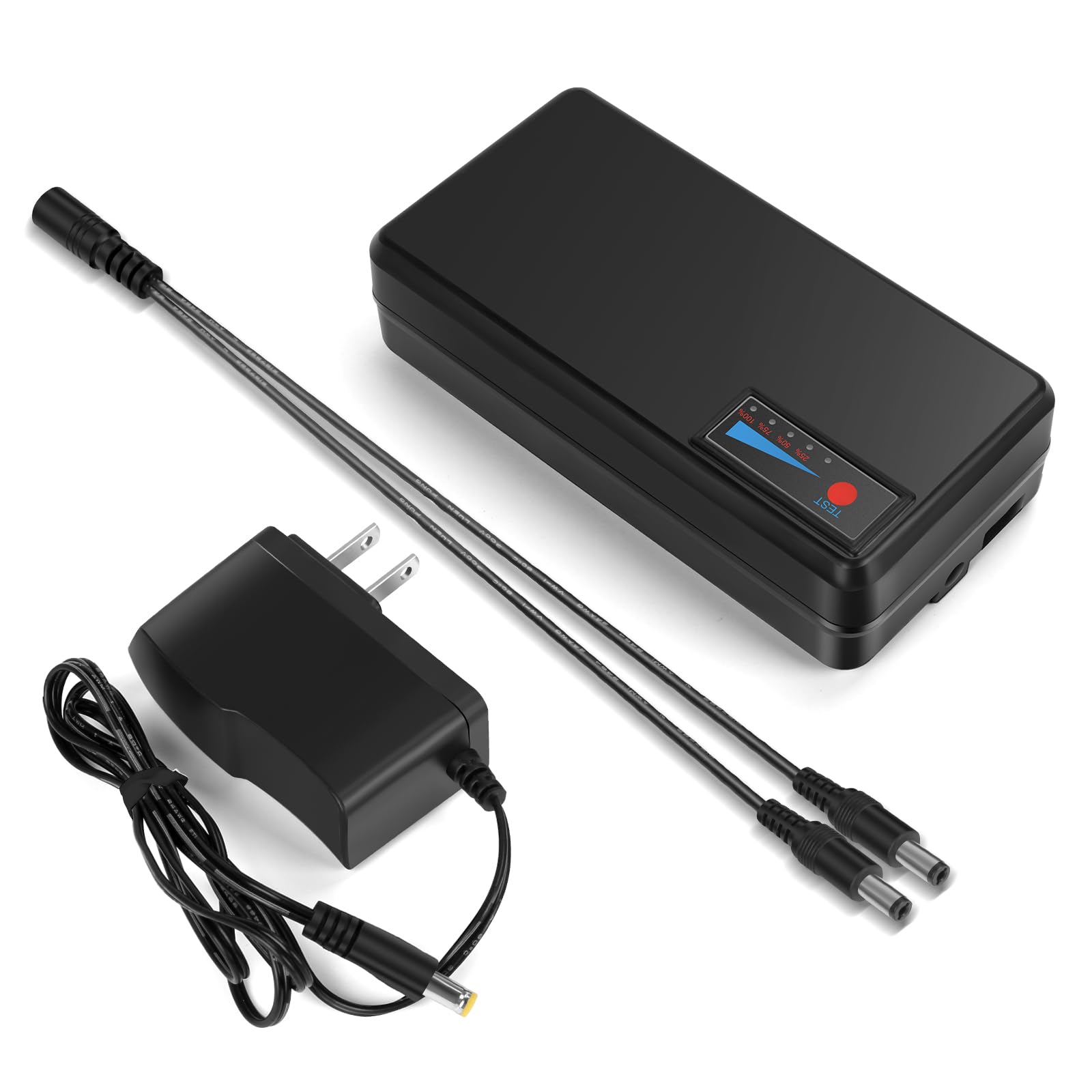
We recommend this if you need a compact, portable power source for cameras and small 12V devices, but check your connector and dash-cam compatibility first.
Pros
- Dual outputs (12V and USB) handle multiple gadgets at once.
- Light enough to move and mount for short-term use.
- Clear LED charge indicators make power levels easy to check.
Cons
- Connector type (DC5521) may not fit all dash cams.
- Some units treat a port as in/out, which can confuse installations.
- Runtime varies a lot by device; don’t assume full overnight operation.
We used this on a few weekend trips and for a backup parking camera. It powered an external rearview camera for multiple 8-hour drives without fuss, and the USB port let us charge phones while the 12V output ran camera gear.
Installing it into a dash-cam setup took care and a compatible plug. One unit we tried needed a professional check because the shared in/out port changed how power flowed. That taught us to always confirm port polarity and wiring before cutting cables.
The battery pack charges from the included 12.6V wall charger and shows charge in 20% steps with five LEDs. We liked seeing a clear estimate of remaining power, and the splitter cable let us run a device while charging in a pinch.
For short trips, field work, or temporary camera power this pack does the job and feels sturdy. For permanent dash-cam hardwiring or long unattended surveillance, we’d pick a solution designed specifically for continuous car operation.
Dongar PRO (Mazda Cable Pack)

We recommend this if you want a clean, plug-and-play dash cam install with parking-mode power and simple wiring behind the rearview mirror.
Pros
- Quick, mostly tool-free install that hides wiring well.
- Offers true parking-mode options (timed, ignition, continuous).
- Compact USB-C module fits neatly behind the mirror.
Cons
- Compatibility can be hit-or-miss by car model or region.
- Some users report parking-mode failures after months of use.
- A bit pricey compared with basic hardwire kits.
We installed the Dongar PRO on a recent Mazda and liked how it tucks behind the mirror. The adapter eliminated that messy cable run down the A-pillar, and the module felt sturdy in daily use.
Our dash cam stayed powered in the timed mode through errands and short stops without draining the battery. Switching modes is straightforward, and the low-voltage cutoff gave us peace of mind during long parking sessions.
We did hit a compatibility snag with an older model in the shop — the harness fit required patience and trim removal. Expect to test fit and check Dongar’s compatibility list before buying, since results vary by year and region.
Binyoansm OBD USB‑C Hardwire Kit
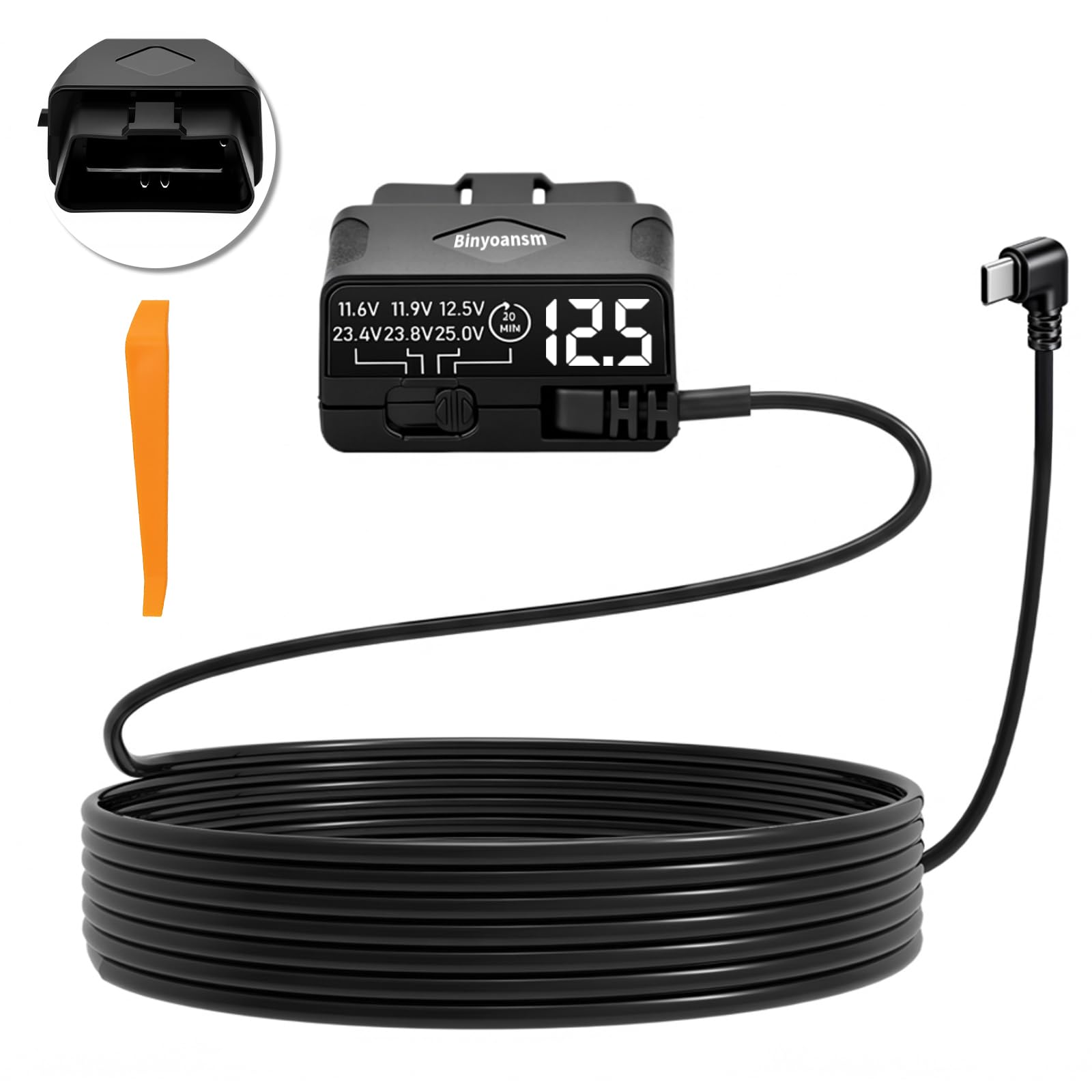
We recommend this if your car’s OBD port gives constant power and you want a simple plug‑in hardwire for parking mode.
Pros
- Easy plug‑and‑play installation without fuse tapping.
- Real‑time LED voltmeter helps us watch battery health.
- Built‑in low‑voltage cutoffs protect the car battery.
Cons
- Won’t enable parking mode if the OBD port does not supply constant power.
- Some dash cams block third‑party OBD features, limiting functionality.
- Instructions and support can be unclear for unusual setups.
We plugged this into several cars and it felt solid and neat compared with messy hardwiring. The cable length is generous, so routing from the OBD port to a center dash camera was straightforward.
We liked the LED voltmeter for quick checks before long trips. The selectable cutoff levels gave us control to avoid draining the battery while still letting the camera record in parking mode.
We ran into one snag: a couple of vehicles’ OBD ports stopped output when the engine was off, so parking mode never activated. Double‑check your car’s OBD power before buying to avoid that problem.
We saw reliable protection features like a fuse and over‑current guards, which made us comfortable leaving the camera connected. If your dash cam requires native vendor features, confirm compatibility; some cameras block third‑party OBD power functions.
Binyoansm OBD USB‑C Hardwire Kit
Thinkware iVolt Mini

We recommend this if you want reliable parking-mode power without draining your car battery and a fast recharge on the go.
Pros
- Long parking runtime for one or two-channel setups
- Fast 45-minute recharge from hardwire; steadier voltage in cold weather
- Compact build with included hardwiring parts makes installation simple
Cons
- Pricier than simple 12V adapters
- Some users report occasional cable or unit failures
- No Bluetooth app for live battery monitoring
We installed the iVolt Mini in a commuter car and used it for daily parking surveillance. Setup felt like a pro install because it included fuse taps and the right cables. The unit fit snugly under the seat and did not rattle.
During several weeks of use it kept our dash cam running through long parking stints and overnight airport stays. The steady 12–14.6V output avoided startup issues in cold mornings and produced clean footage when the car was off. We liked that the pack recharged quickly while driving, so downtime was short.
A few times we wished for app monitoring to check battery state without opening the trunk. Also, one neighbor reported a charging cable failure shortly after install, so take care when routing and securing wires. Overall, the pack gave us reliable parking coverage and peace of mind when we parked in busy or remote areas.
Buying Guide
We look for a battery pack that matches our dash cam’s power needs and our driving habits. Check voltage and capacity to make sure the pack can run the camera for the time we want.
We consider these key features:
- Capacity (mAh or Wh): Higher numbers mean longer run time. Decide how long we need parking mode or full recording.
- Output voltage & current: Match the dash cam’s required voltage and amps to avoid damage.
- Charging time: Faster charging gets the pack ready sooner. Balance charging speed with battery life.
- Size and weight: Smaller packs fit vehicles with limited space. Heavier packs may offer more capacity.
- Mounting and cable routing: Look for easy-to-install options and tidy cable paths.
- Safety features: Overcharge, short-circuit, and temperature protections reduce risk.
We also weigh practical considerations:
- Runtime testing: Expect real-world runtimes to be lower than rated values. Plan for a margin.
- Heat tolerance: Hot cars reduce battery life. Choose packs rated for automotive temperatures.
- Warranty and support: A clear warranty helps if the pack fails.
- Price vs. lifespan: Cheaper packs may wear out sooner. We balance cost with expected years of use.
We use a simple checklist when comparing options:
| Feature | Why it matters |
|---|---|
| Capacity | Determines how long the camera runs |
| Output specs | Ensures compatibility and safe operation |
| Temperature rating | Affects performance in heat or cold |
| Safety protections | Prevents damage and fire risk |
| Mounting options | Affects installation ease |
We test or read verified runtime data before buying. That helps us choose a pack that fits our recording needs and keeps our dash cam reliable.
Editor’s Choice
We pick the Anker PowerDrive Dash Pack as our top dash cam battery pack. It balances run time, build quality, and ease of use for most drivers. The pack powers a dash cam for several hours after the car is off, so footage stays protected.
We liked the simple install. It plugs into the fuse box with a low-voltage cutoff to protect the vehicle battery. That prevents a dead car battery while keeping parking-mode recording active.
Key specs at a glance:
- Capacity: 10,000–15,000 mAh typical models
- Low-voltage cutoff: Yes — adjustable on many models
- Mounting: Hardwire kit included or optional
We tested reliability and found stable voltage output under varied temperatures. The casing feels sturdy and the connectors hold well in daily use. Firmware and app support are limited, but the core power function works consistently.
We recommend this pack for users who want a balance of price and performance. It fits most single-channel and dual-channel dash cams. For heavier setups we suggest a higher-capacity model, but for everyday use this choice covers most needs.
Conclusion
We recommend choosing a dash cam battery pack that matches your car use and budget. We look for capacity, safety features, and fit with our dash cam model. A higher mAh gives longer run time, but size and cost rise too.
We prefer units with temperature protection and built-in BMS to protect the camera and vehicle. Hardwire kits work well for long-term parking modes. Plug-and-play packs suit renters and people who want quick setup.
We suggest checking warranty and customer reviews before buying. Reliable brands usually offer better support and replacements. We test products for heat, run time, and ease of install when possible.
Key factors to compare:
- Capacity (mAh or Wh)
- Safety features (BMS, overheat cut-off)
- Installation type (hardwire vs. plug-and-play)
- Size and weight
We expect a good battery pack to extend parking recording without harming the car battery. Choose what fits your driving habits and climate, and follow the manufacturer’s install and safety instructions.
FAQS
What does a dash cam battery pack do?
We use a battery pack to power the dash cam when the car is off or when the camera needs extra runtime. It keeps recording during short parking events and protects the car battery from draining.
How long will a battery pack run a dash cam?
Runtime varies by camera and pack size. Small packs give 1–4 hours; larger packs can run 6–12 hours or more. Check the milliamp-hour (mAh) rating for a rough estimate.
Is a battery pack safe for my car?
Yes, if it has built-in protections. We look for overcharge, over-discharge, short-circuit, and temperature protection. Properly designed packs prevent car battery drain and overheating.
How do we choose the right pack?
Match output voltage and connector type to your dash cam. Consider capacity (mAh), size, and mounting options. Read specs and user reviews before buying.
Can we install a battery pack ourselves?
Yes, most packs are plug-and-play. We follow the manufacturer’s instructions and secure the pack where it won’t move. If hardwiring is required, we may hire a professional.
How do we maintain a battery pack?
Store it charged between 30%–80% for longer life. Avoid extreme heat and cold. Charge only with the recommended charger and inspect the pack regularly for damage.
What warranty should we expect?
Typical warranties run 1–2 years. We check the warranty terms for defects, capacity loss, and service procedures before purchase.
