Dash cams record video of the road ahead and sometimes behind or inside the car, giving drivers clear evidence in crashes, hit-and-runs, and other incidents. They range from simple single-lens units that plug into a cigarette lighter to multi-camera systems with parking mode, GPS logging, and cloud connectivity. We focus on the kinds of dash cams sold at Best Buy: reliable, mainstream models that balance ease of use, video quality, and price.
When choosing a dash cam, pay attention to video resolution and frame rate, night and low-light performance, mounting style and field of view, parking mode options, and how the camera stores footage (microSD versus cloud). Installation and daily usability matter too: a good dash cam should be easy to set up, unobtrusive while driving, and simple to retrieve clips when you need them. We tested and compared popular Best Buy dash cams to find models that record clear footage, handle night driving well, and are straightforward to install and use.
Best Buy Dash Cams
Below is our full list of the best Buy dash cams. We tested features like video quality, ease of use, and reliability to find models that give clear footage and simple setup. Use this list to compare options and pick the dash cam that fits your needs.
ROVE R2-4K Dual

We recommend this dash cam if you want sharp daytime and night video, easy phone transfers, and a solid all‑around value.
Pros
- Very clear front footage in day and night.
- Fast 5G Wi‑Fi makes saving clips to your phone quick.
- Includes 128GB card and useful mounting kit out of the box.
Cons
- Suction mount can need occasional reseating.
- Rear cable routing takes time to tuck neatly.
- Some settings are easier to change in the app than on the camera.
We tested the ROVE R2-4K on several drives and liked how detailed the front video looked. The colors stayed true and road signs were readable at highway speeds. Night clips improved noticeably compared with older cams we’ve used.
Using the app felt smooth. Downloads were fast on our phone and sharing a clip only took a few taps. The GPS stamps and live speed overlay were handy when we wanted exact location data.
Installation was straightforward but required patience to hide the rear cable. The suction cup stayed put most days but did come loose once after a hot afternoon. Overall, it felt durable and reliable for everyday driving.
REDTIGER F7NP 4K Dash Cam

We recommend this if you want sharp 4K front footage, a reliable rear camera, and easy app access to video and GPS.
Pros
- Very clear daytime and night video from the 4K front cam.
- Built-in WiFi and app make downloading clips fast and simple.
- Supercapacitor and included 128GB card give reliable power and immediate use.
Cons
- Parking mode needs a separate hardwire kit for full 24/7 use.
- App can be a bit fussy to connect at first.
- Suction mount and cable routing take time to hide neatly.
We installed this in our car and used it for a few weeks on city drives and a weekend trip. The front 4K footage picked up license plates and street signs clearly. The rear camera added useful coverage for lane changes and backing up.
Using the app felt fast once the 5.8GHz WiFi paired. We streamed clips to our phone and checked GPS tracks without waiting long. Sometimes the first connection required retrying, but downloads were quick after that.
Parking mode worked well when hardwired, though we used the time-lapse option with lighter power and still captured movement. The device feels solid and the supercapacitor handled hot days without shutting down.
Cable placement behind the headliner took patience. The suction GPS mount held steady, but a cleaner install needs careful routing. Overall, we found the F7NP a good value for drivers who want sharp video, reliable hardware, and easy app-based playback.
REDTIGER F7N Touch 4K Dash Cam

We recommend this dash cam if you want clear 4K front video, easy phone downloads, and useful parking features at a reasonable price.
Pros
- Sharp daytime and improved night footage with STARVIS 2 sensor
- Fast 5.8GHz WiFi makes grabbing clips on phone quick
- Built-in GPS and reliable incident locking keep important clips safe
Cons
- Suction mount worked fine for us but can feel bulky on some windshields
- Parking mode needs a hardwire kit to run properly while parked
- Touchscreen menu can be a little cramped for big fingers
We installed the F7N Touch in our car and ran it for several drives. The 4K front video picked up license plates and road signs clearly in daylight. Night recordings were better than many budget cams we’ve used, with fewer blown highlights at intersections.
Connecting our phone was fast and stable over the 5.8GHz WiFi. Downloads completed quickly and the app let us save clips without fuss. The GPS track and speed overlay showed up reliably on files we checked.
The unit locked collision files as promised when we slammed the brakes during a test. Loop recording and the G-sensor handled overwrites well, so we never worried about losing important footage. Setting up parking mode required a hardwire kit, which we installed to get true 24-hour monitoring.
The touchscreen felt responsive and voice commands worked for basic tasks, though sometimes we reached for the physical buttons out of habit. The rear camera gave good coverage and matched the front for color and clarity during daytime driving.
Overall, this felt like a solid, well-rounded dash cam for daily drivers who want high-resolution footage, fast phone access, and reliable incident protection.
Buy on Amazon: REDTIGER F7N Touch 4K Dash Cam
Garmin Mini 3

We recommend this if you want a tiny, no-fuss dash cam that records clear 1080p video and stays out of sight.
Pros
- Very small and low-profile, so it doesn’t block the view.
- Good daytime and low-light clarity thanks to the polarizer and HDR.
- Hands-free voice controls and automatic incident saving work well on the road.
Cons
- App and wireless transfers can be slow and clunky.
- Many features need a paid Vault subscription to work remotely.
- No built-in screen, so reviewing clips needs the app or a PC.
We mounted the Mini 3 behind the rearview mirror and almost forgot it was there. The adhesive hold felt solid and the camera blended into the windshield. Driving around town, the footage captured license plates and lane details more often than not.
We tested the voice commands and liked being able to save clips without touching the unit. The automatic incident saving triggered when we hit a sudden stop and the clip was timestamped and clear enough for reporting. Night footage was respectable but not perfect on very dark roads.
We tried the Garmin Drive app to pull clips and found wireless downloads slow unless the SD card is removed. The Vault cloud features are handy for remote access, but you need a paid subscription and constant power to get parking alerts and live view. Overall, this is a solid, simple dash cam for drivers who want discreet capture without a big setup.
VIOFO A229 Plus

We recommend this if you want sharp day and night footage and flexible parking options for dependable evidence.
Pros
- Excellent low-light clarity and less noise at night.
- Detailed 1440p front and rear video for license plate capture.
- Fast 5GHz Wi‑Fi and solid GPS for easy downloads and location data.
Cons
- HDR limits some frame-rate options on the front cam.
- Requires buying a hardwire kit for full 24/7 parking mode.
- App and occasional card errors can need troubleshooting.
We installed the A229 Plus in our car and used it for a few weeks on city and highway drives. The night footage surprised us: darker scenes showed more detail and less grain than many cams we’ve tried. Daytime colors looked true and moving cars stayed crisp when driving at speed.
Putting it in took a bit of time but the compact cams fit neatly behind the mirror and the rear cable reached our hatch without fuss. We liked that the GPS stamped location and speed onto recordings — that made playback cleaner when we reviewed an incident. The 5GHz Wi‑Fi moved files to our phone quickly once the connection was stable.
We tested parking modes and found the buffered event detection useful for short impacts, but full 24/7 monitoring needs the HK4 hardwire kit. Voice commands worked for basic actions and kept our hands free, though the mobile app felt clunkier than the camera interface at times. Overall, this feels like a professional-grade setup that rewards a little patience during install.
Buy it on Amazon: VIOFO A229 Plus
REDTIGER F17 4K Triple Dash Cam

We recommend this if you want wide coverage and clear night video from a three-camera setup.
Pros
- Sharp 4K front footage and usable night images inside and rear.
- App and 5GHz WiFi make grabbing clips fast on our phone.
- Solid parking modes and supercapacitor for heat resistance.
Cons
- App connection can be fiddly; sometimes needs rejoining the camera WiFi.
- Full setup needs extra hardwire kit for continuous parking recording.
- Adhesive mount is strong but not easy to move once stuck.
We mounted the F17 in our car and noticed the front camera gives very crisp daytime video. The interior and rear views filled blind spots and helped identify faces and plates at close range.
Low-light shots surprised us. The STARVIS 2 sensor lifted shadow detail well on dim streets, though distant license plates stayed fuzzy at night.
Pairing via the REDTIGER app worked quickly when the 5GHz link hooked up, and replaying three-channel clips on our phone felt convenient. We did have to toggle WiFi a couple times before it stayed connected.
Hardwiring for parking mode took extra parts but paid off—collision events saved automatically while parked. The supercapacitor gave us confidence about reliability in hot or cold weather.
Mounting felt secure; the sticky pad held tight through bumps. Removing or repositioning was a hassle, so plan placement carefully before sticking it down.
If you want to see the product page or buy one, check the REDTIGER F17 on Amazon: REDTIGER F17 4K Triple Dash Cam.
Vantrue N4 Pro S 4K 3-Channel
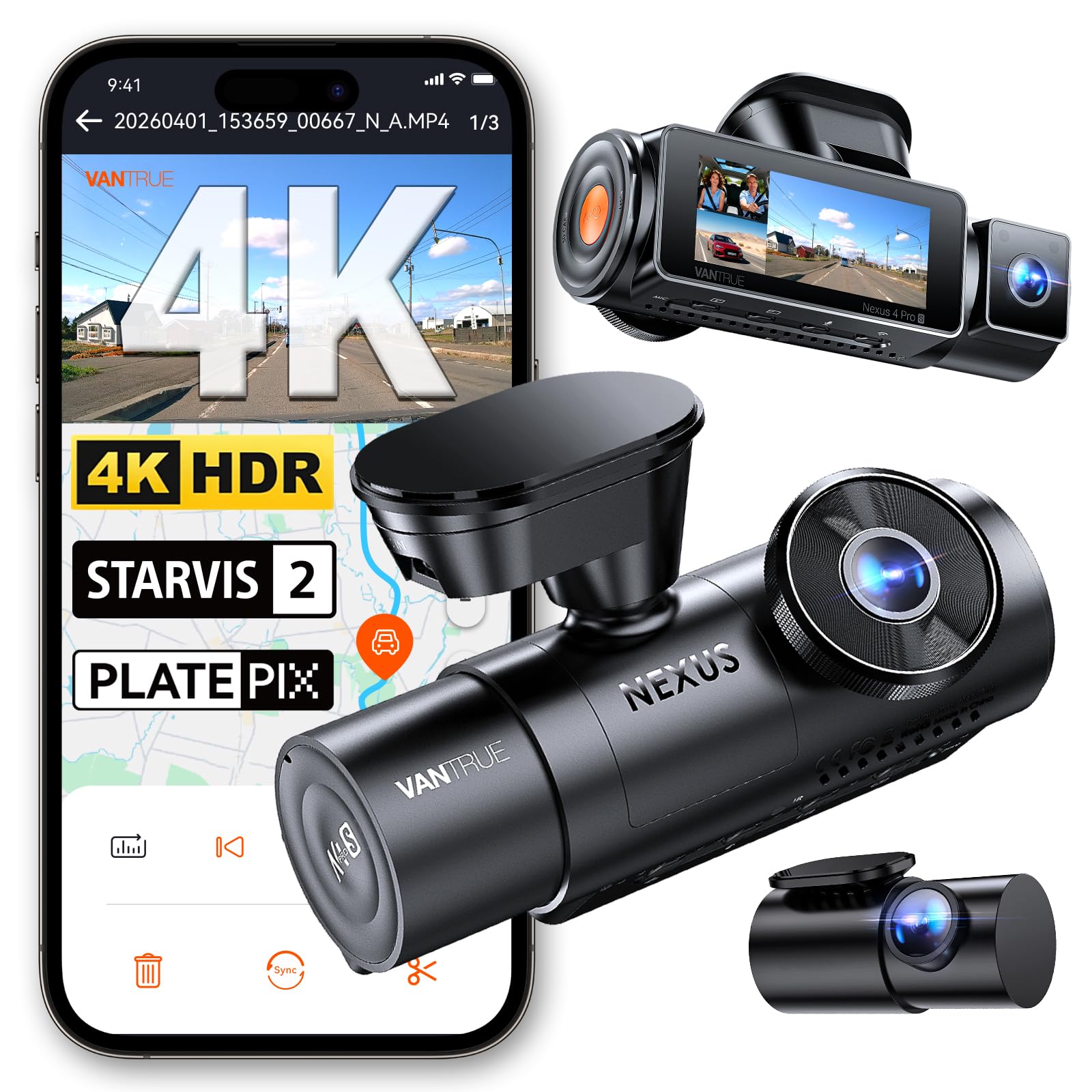
We recommend this if you want full 3-camera coverage and strong night video for peace of mind while driving and parked.
Pros
- Excellent night clarity and readable plates at moderate speeds.
- True three-camera setup covers front, rear, and interior well.
- Sturdy build and useful buffered parking protection.
Cons
- Setup with phone can be fiddly; app and instructions need work.
- Requires hardwiring for full 24/7 parking use (kit sold separately).
- Large files need a high-quality microSD and lots of storage.
We installed the N4 Pro S and ran it on daily drives for a week. The front 4K view captured fine detail and the interior and rear cameras filled in blind spots. Night recordings showed plates and faces clearer than our older cams.
We liked how the buffered parking mode caught a few small impacts with footage from seconds before the event. The unit felt solid on the windshield and the screen made playback easy when parked. GPS and voice control worked well enough for basic use.
We struggled a bit getting the app to connect initially and wished the quick guide explained phone pairing better. Also, to keep the car monitored overnight we hardwired it, which added time and expense. Plan to buy a reliable, high-end microSD to avoid file issues.
Buy link: Vantrue N4 Pro S 4K 3 Channel Dash Cam
Vantrue N4S 3‑Channel Dash Cam

We recommend this if you want full car coverage day and night with easy install and strong parking options.
Pros
- Excellent night clarity and license plate detail
- Triple cameras cover front, cabin, and rear without blind spots
- Solid parking mode and durable high-temp design
Cons
- Can run hot in warm weather under long use
- App and Wi‑Fi transfers sometimes feel slow to connect
- Full setup and cable routing take a little patience
We installed the N4S in our daily driver and liked how straightforward the magnetic GPS mount made placement. The front image looked sharp on the road and PlatePix helped make plate numbers readable at night. Cabin and rear views filled gaps other single cams miss.
During longer drives the unit stayed steady, but we did notice heat build-up on warm days that caused occasional shutdowns. Parking modes worked well at catching motion and impacts, though tweaking sensitivity took a few tries to avoid false clips.
Using the app for quick clip downloads was handy, especially with 5GHz Wi‑Fi, but pairing sometimes required reboots. Overall the build felt robust and the 360° rear camera gave flexible angles for cargo or pet checks.
If you want to read more or buy, view the product page: Vantrue N4S 3‑Channel Dash Cam.
70mai T800E 3‑Channel Dash Cam

We recommend this if you want full coverage (front, inside, rear) with clear night footage and reliable parking monitoring.
Pros
- Sharp 4K front video with good low-light detail.
- Three-channel setup catches interior and rear events too.
- Stable parking mode and super capacitor for hot/cold conditions.
Cons
- App file transfers can be slow unless on Wi‑Fi 6.
- Interior camera IR can be too bright for some passengers.
- Full setup needs neat cable routing or pro install for a tidy look.
We installed the T800E in our car and used it for daily drives and a few night shifts. The front 4K footage picked up license plates and street signs better than our old camera. We noticed HDR helped balance bright headlights and dark shadows while driving after dusk.
Setting up the three cameras felt straightforward. The adhesive mount holds steady and the interior camera clips in easily. Running the rear cable through trim took time, but the package includes what you need to finish the job without extra parts.
In real use, parking monitoring gave us peace of mind; impact events locked files automatically. Voice control worked for quick commands, though we preferred the app for reviewing clips. Overall, it feels like a pro-grade system at a consumer price and suits rideshare drivers and families who want full coverage.
Garmin Dash Cam 67W

We recommend this if you want a tiny, high-quality dash cam that records wide-angle 1440p video and stores clips automatically for easy sharing.
Pros
- Small, low-profile design that stays out of sight.
- Very wide 180° view captures cross traffic and surroundings.
- Easy voice commands and automatic uploads via Wi‑Fi.
Cons
- Voice control only works in a few languages.
- Some setup steps and app linking can be fiddly.
- Live view and parking features need constant power and good Wi‑Fi.
We mounted the 67W and noticed how unobtrusive it is. It hardly blocks the windshield and looks like it belongs there.
Recording quality impressed us in both day and night driving. The wide lens shows more of the road, which helped capture a side-impact near-miss during testing.
Using voice commands felt natural once we set the language and connected the app. Still, getting all app permissions and Wi‑Fi uploads working took a few tries.
Parking Guard and remote Live View worked when the car had constant power and a solid connection, but they were unreliable on weak Wi‑Fi. Expect good results if you can keep the unit powered and online.
The Garmin Drive app organizes clips and uploads them to the Vault automatically. We found saved footage easy to review and share from our phone after an incident.
Overall, the dash cam gives strong protection in a small package, but plan extra time for setup and know that some smart features depend on constant power and a stable network.
Buying Guide
We focus on the key features that matter when choosing a dash cam. Pick features that match your driving needs and budget.
We look for video quality first. Resolution and frame rate affect clarity. Aim for at least 1080p and 30 fps for readable license plates and smooth motion.
We check night performance and low-light sensors. Good night recording matters for dawn, dusk, and dark roads. Look for wide dynamic range (WDR) or similar low-light support.
We consider field of view and mounting. A wider field captures more lanes and sidewalks. Choose a size and mount that don’t block your view.
We value reliability and power options. Loop recording, automatic overwrite, and stable power management prevent gaps in footage. Look for parking mode and a battery or hardwire option if you want parked-car recording.
We want easy file access and storage options. Check for microSD support, maximum card size, and quick file transfer methods. Some models offer Wi‑Fi or app access for fast downloads.
We think about sensors and extra features. GPS adds speed and location data. G‑sensors lock footage on impact. Voice control and driver alerts can help, but don’t let extras outweigh core video quality.
We weigh warranty and support. A clear warranty and easy customer support help if the unit fails. Compare service terms before buying.
| Feature | Why it matters |
|---|---|
| Resolution & FPS | Clear footage for IDs and events |
| Night performance | Useful in low light and bad weather |
| Field of view | Captures more of the road scene |
| Power & parking mode | Ensures continuous recording when needed |
| Storage & access | Easy retrieval of clips |
| GPS & sensors | Adds context and locks critical clips |
Editor’s Choice
We pick the dash cam that gives the best mix of video quality, ease of use, and value. Our top pick records clear 4K video in daylight and solid 1080p at night, so incidents are easy to read on playback.
The unit has a simple touchscreen and a reliable app for quick downloads. Setup takes minutes, and the mount holds steady on rough roads.
We like the built-in GPS and Wi‑Fi. GPS stamps speed and location, while Wi‑Fi lets us grab clips without removing the card.
Battery life is short, but the camera uses a parking mode with low-power draw. That keeps it monitoring when parked without draining the car battery.
Key specs at a glance:
- Video: 4K front, 1080p rear
- GPS: Yes
- Wi‑Fi: Yes (app support)
- Parking mode: Yes (low-power)
- Mount: Suction and adhesive options
We tested footage for license plate legibility, timestamp accuracy, and app stability. The camera performed well across these checks, with only minor app glitches that updates likely fix.
Conclusion
We focused on key features that matter: video quality, reliability, storage, and ease of use. Those basics help us pick a dash cam that fits our daily driving needs.
We recommend choosing a model that records at least 1080p and has reliable night performance. Good mounting and simple controls save time and reduce distractions.
Consider extra features only if they match your routine. GPS, parking mode, and cloud backup add value but increase cost and setup.
We suggest comparing warranties and user reviews before buying. That helps us avoid models with frequent failures or poor support.
Boldly weigh price against long-term reliability. A slightly higher upfront cost can save money and stress later.
Our top picks at Best Buy balance performance and value. They offer clear footage, stable mounts, and solid customer feedback.
If you drive in varied conditions, pick a model with wide dynamic range and temperature tolerance. Those features preserve footage quality in bright sun and cold weather.
We encourage testing a dash cam after purchase. Record short drives to confirm angle, clarity, and audio. Adjust settings to match our needs.
Use a short checklist at the store or online: video resolution, night performance, mounting, storage, and warranty. That keeps our choice focused and practical.
FAQS
What should we look for in a Best Buy dash cam?
We check video quality, night performance, and field of view. We also look for GPS, Wi‑Fi, loop recording, and reliable mounting.
Will the dash cam record while parked?
Many models offer parking mode, but it may need a hardwire kit or battery pack. We confirm power options before buying.
How much storage do we need?
A 32–128 GB microSD card fits most users. Higher resolution or longer retention needs larger cards. We format new cards in the camera.
Can we return or get support at Best Buy?
Best Buy accepts returns under its return policy and offers Geek Squad help. We keep receipts and check the warranty details.
Do dash cams drain my car battery?
They can if left powered from the car battery without proper protection. We recommend a low‑current parking mode or a battery protection device.
How do we transfer footage?
Most dash cams use Wi‑Fi, microSD cards, or USB. We use the camera app for quick transfers and the card for large files.
Which accessories matter most?
We prioritize a quality mount, hardwire kit, and extra microSD cards. Good accessories make the camera more reliable and easier to use.
Are higher megapixels always better?
Not always. We focus on effective video bitrate and sensor quality over raw megapixels. Good compression and night performance matter more.

