Commercial dash cams record video and data from vehicles used for work. They help fleets, rideshare drivers, and delivery services monitor driver behavior, document accidents, and protect against false claims. These devices range from single cameras to multi-camera systems with GPS, impact sensors, and cloud upload features.
Choosing the right commercial dash cam means weighing video quality, reliability, and data access. You should focus on resolution for clear evidence, storage and upload options for keeping footage, and ruggedness for long work hours so you can trust the footage when you need it most. We tested and compared options to find reliable systems that balance performance, ease of use, and cost.
Best Commercial Dash Cams
Below is our full list of the best commercial dash cams. We tested models for video quality, durability, and ease of use so fleet managers can pick the right option. Our picks focus on reliable recording, simple setup, and features that help protect drivers and vehicles.
PRUVEEO D90 4-Channel 360° Dash Cam

We recommend this if you want full 360° coverage and reliable day/night recording for fleet or commercial use.
Pros
- True four-camera coverage catches all sides of the vehicle.
- Strong night vision and adjustable lenses give useful detail in low light.
- Built-in GPS and Wi‑Fi make tracking and file transfer fast.
Cons
- App playback can be slow or clunky at times.
- Parking mode needs a hardwire kit for 24/7 protection.
- Some tweaking required to get side cameras angled perfectly.
We installed this in a company van and used it on jobs for weeks. The system felt solid and the four cameras actually covered blind spots we used to miss. Adjusting the front three lenses let us focus on the road and the cab without needing extra parts.
We relied on the night vision during early-morning runs and the footage stayed clear enough to read plates and signs. The GPS track came in handy when we reviewed routes after a dispute, so the map log proved useful more than once.
We used the Wi‑Fi to pull clips to a phone, but streaming large files over the app was slow. Loop recording and collision lock worked as promised, so we never lost incident files while on the road. Installing the unit was straightforward, though hardwiring for true parking surveillance required an extra purchase.
Overall, we found this dash cam a cost-effective choice for commercial use when you need full coverage and dependable recordings.
ZMOPO 360 View 4-Channel Dash Cam

We recommend this camera if you need full 360° coverage and easy wireless transfers, but expect some mounting and heat concerns.
Pros
- Covers front, rear, sides, and interior so nothing gets missed.
- Clear night footage and useful WDR in mixed lighting.
- Built-in Wi‑Fi and included 128GB card speed up downloads.
Cons
- Suction/adhesive mounts can fail in hot conditions.
- GPS and hardwire parking mode require extra purchases.
- Setup wiring for four cameras can be fiddly on larger vehicles.
We installed this unit on a company van and used it for a month of daily runs. The four cameras really do catch everything around the vehicle. We liked being able to check clips on our phone the same day.
Driving at night showed strong detail; the WDR cut glare and the image stayed balanced in tunnels and under streetlights. Video was steady and useful for incident review. Time-lapse parking recording saved card space when we tested it.
Mounting took patience and a few extra cable clips to hide wires. The adhesive on one mount softened in afternoon sun and needed stronger tape. If you plan long outdoor parking or want GPS tracking, budget for the optional accessories.
Link: ZMOPO 360 View 4-Channel Dash Cam
ROVE R2-4K Dual

We recommend this if you want sharp daytime 4K front footage, reliable night capture, and easy Wi‑Fi downloading for fleet or personal use.
Pros
- Very clear front video and good low‑light performance.
- Fast 5G Wi‑Fi makes grabbing clips quick.
- Built‑in GPS and tidy mounts simplify installation and use.
Cons
- Rear camera setup can be fiddly in tight vehicles.
- Some features need the app to work well.
- Parking mode requires a hardwire kit sold separately.
We installed this in two company trucks and liked how quickly the front Sony STARVIS 2 sensor locked onto detail. Road signs, license plates, and lane markings came through cleaner than on cheaper models. The 3″ screen makes checking clips simple when parked.
Using the app felt like using a remote file cabinet — downloads were fast and we could pull footage on the phone without removing the card. GPS stamps and live speed added helpful context when reviewing incidents. Still, relying on the app for firmware and settings meant a learning curve for a few drivers.
Running the rear cable around trim took patience in one vehicle, and we had to hardwire the unit to test parking mode fully. When parked, the motion and collision recording worked as promised, but plan to buy the hardwire kit if you need 24/7 protection. Overall, it performed like a pro dash cam for fleets or drivers who prioritize clear day footage and fast file transfer.
Terunsoul D018 Pro 3-Channel 4K Dash Cam
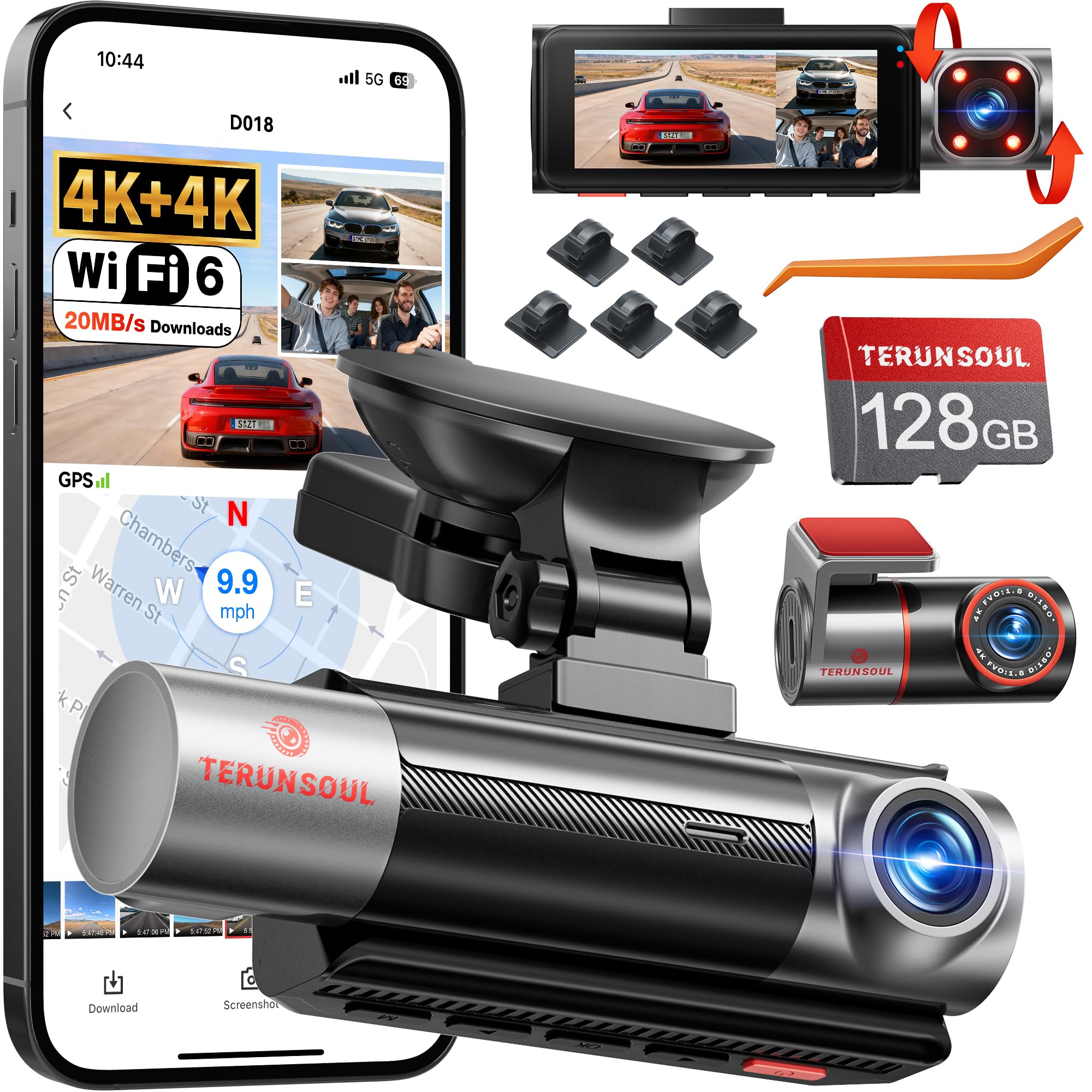
We recommend this unit if you want clear front and rear 4K footage plus an interior view and strong night performance.
Pros
- Very sharp front and rear video, even in low light.
- Easy app access and GPS tracking for trip evidence.
- Starts recording right away with included 128GB card.
Cons
- Menu and instructions felt scattered during setup.
- Full parking monitoring needs an extra hardwire kit.
- Bulkier mount needs careful placement on some windshields.
We installed the D018 Pro across a company vehicle fleet and liked how clean the 4K clips looked. License plates and road signs came through readable, and the cabin camera picked up faces well at night thanks to the IR lights.
Connecting the app was fast and stable. We used Wi-Fi to pull clips and checked GPS logs for routes and speeds. The included memory card lets you test everything immediately without hunting for extras.
Daily use showed reliable loop recording and solid impact detection; the G-sensor locked important files when we hit a pothole during a test. Long highway drives didn’t overheat the unit, and the laminated screen stayed readable under sun glare.
We found the physical install straightforward if you have some routing experience, but the paper guides jumped between steps. For true 24-hour parked monitoring, plan to buy the hardwire kit so the unit can run when the engine is off.
Buy link: Terunsoul D018 Pro 3-Channel 4K Dash Cam
Seventour 4-Channel Dash Cam
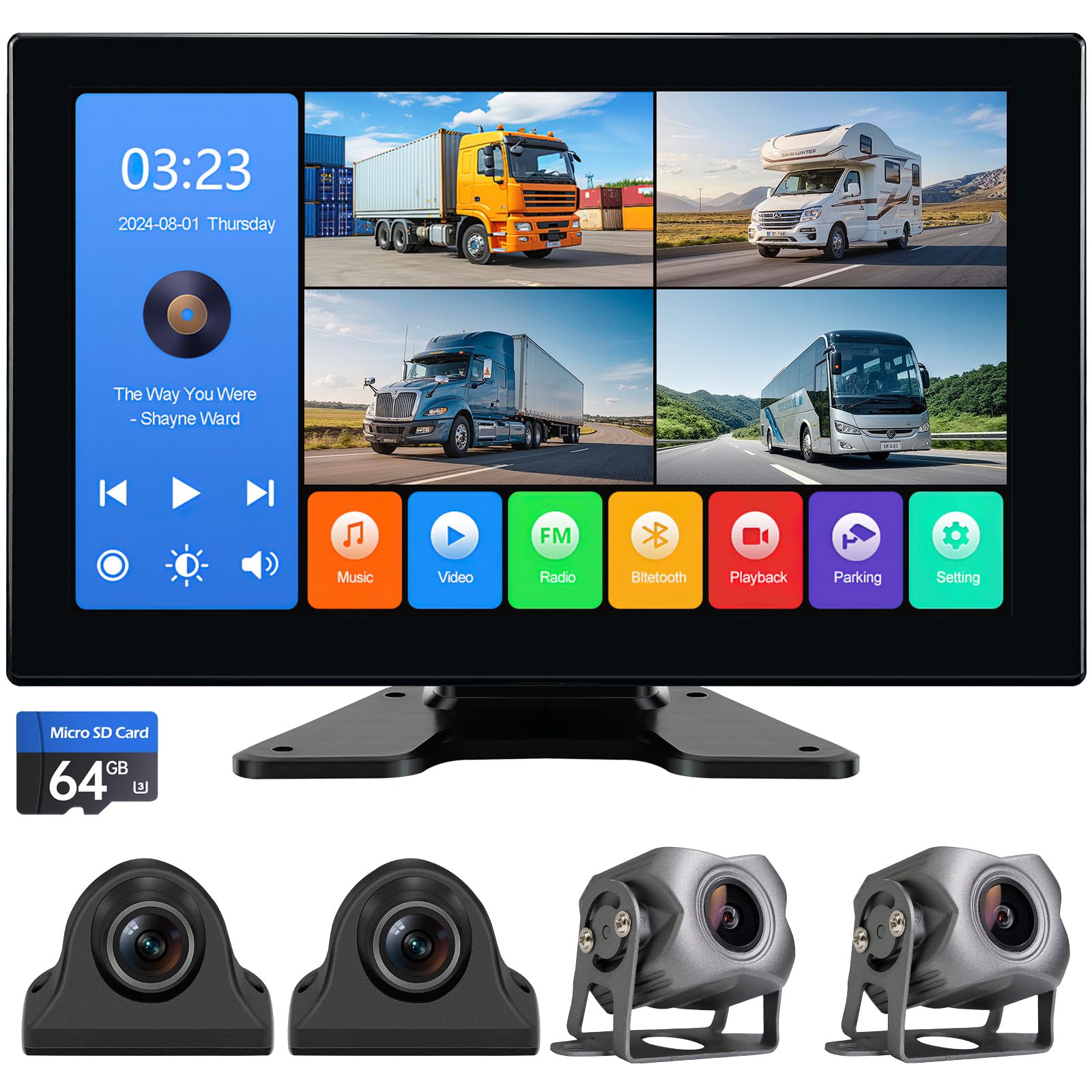
We recommend this if you need full, no-blind-spot coverage for an RV, truck, or van and want a simple install with solid video and playback.
Pros
- Covers front, back, left, right at once for real blind-spot peace of mind.
- Large 10.2″ screen with easy playback so we can check incidents quickly.
- Tough, weatherproof cameras that held up in rain and cold while we tested.
Cons
- Screen menu needs some getting used to and taps can be a bit fussy.
- Camera cables are long and take time to hide neatly on big rigs.
- No cloud backup — recordings stay local unless we copy them off.
We mounted this system on an RV and drove through tight campgrounds. Seeing all four views on the split screen felt safer right away. Zooming any camera to full screen helped when backing into tight spots.
The video quality gave clear images during the day and usable footage at night. The DVR playback on the monitor let us find clips without digging through an SD card on a laptop.
Installation was mostly plug-and-play, but routing cables on a big vehicle took patience. Bluetooth and USB playback were handy for road audio, and the IP69-rated housings handled heavy rain on a stormy drive.
Terunsoul 4K Dual Dash Cam
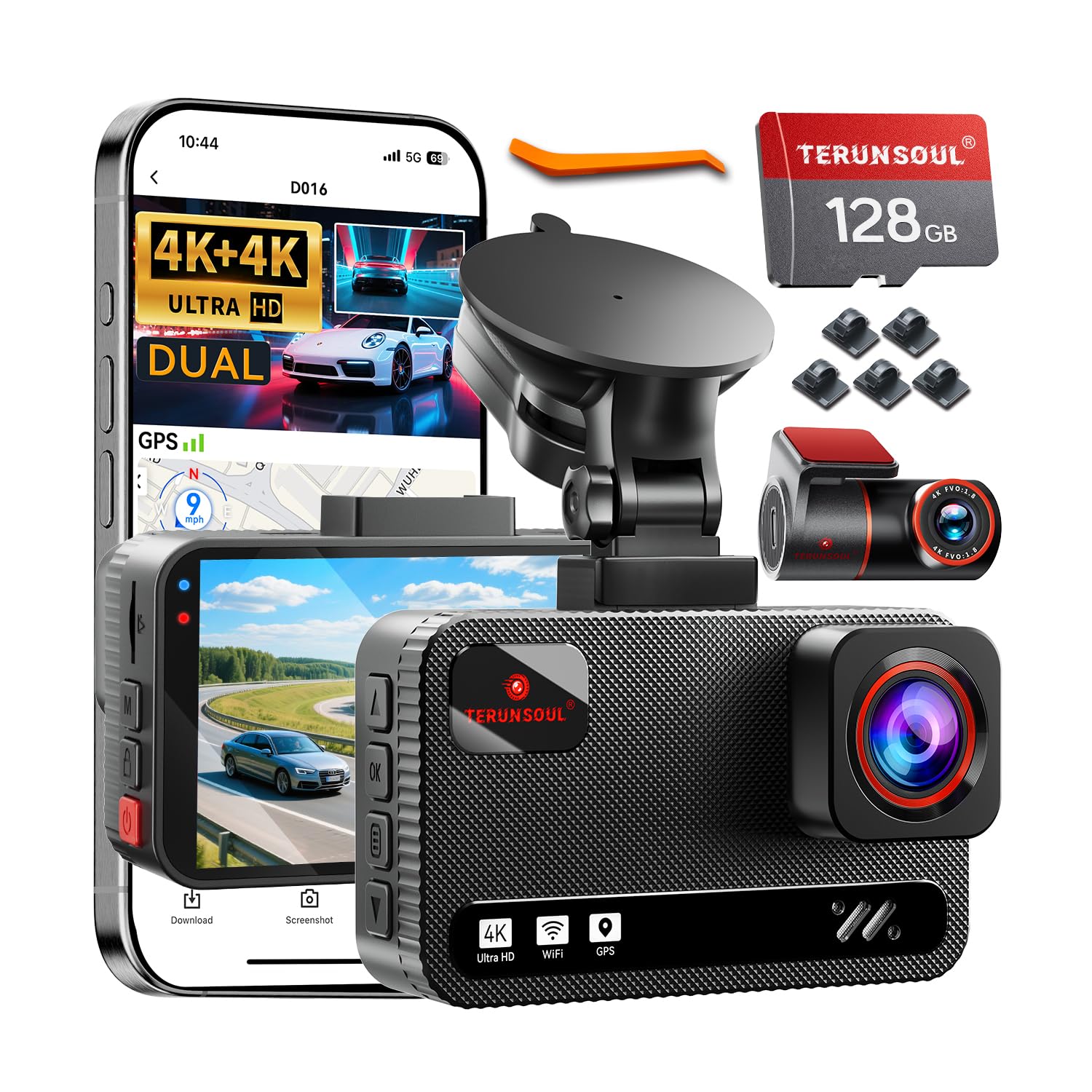
We recommend this dash cam if you want clear front and rear 4K video, solid night performance, and easy app access.
Pros
- True 4K front and rear gives very detailed footage.
- Starlight night vision and WDR improve low-light clarity.
- Fast Wi‑Fi and included 128GB card make file transfer simple.
Cons
- 24-hour parking needs a hardwire kit sold separately.
- Large unit and long rear cable take time to tuck neatly.
- Menu can feel busy the first time you set it up.
We mounted this unit on two company vehicles and used it for weeks. The video looks sharp even at highway speed, and we could read license plates more often than with other cameras we’ve tried.
The night mode cut through street glare and dim parking-lot scenes better than expected. We still saw some bright spots when headlights hit the lens, but overall the balance between bright and dark was steady.
App control and fast Wi‑Fi saved us time when collecting clips. Swapping files without removing the card made checks between shifts quicker for our fleet managers.
Parking mode recorded impacts reliably in our tests, though we had to order the hardwire kit to keep continuous power. Installation of the rear camera took patience to hide the long cable cleanly along trim.
Overall, this unit felt durable and well-made during daily use. It fits crews who need crisp evidence from both directions and want easy file access on a phone.
XYGCACO 4-Channel 360° Dash Cam
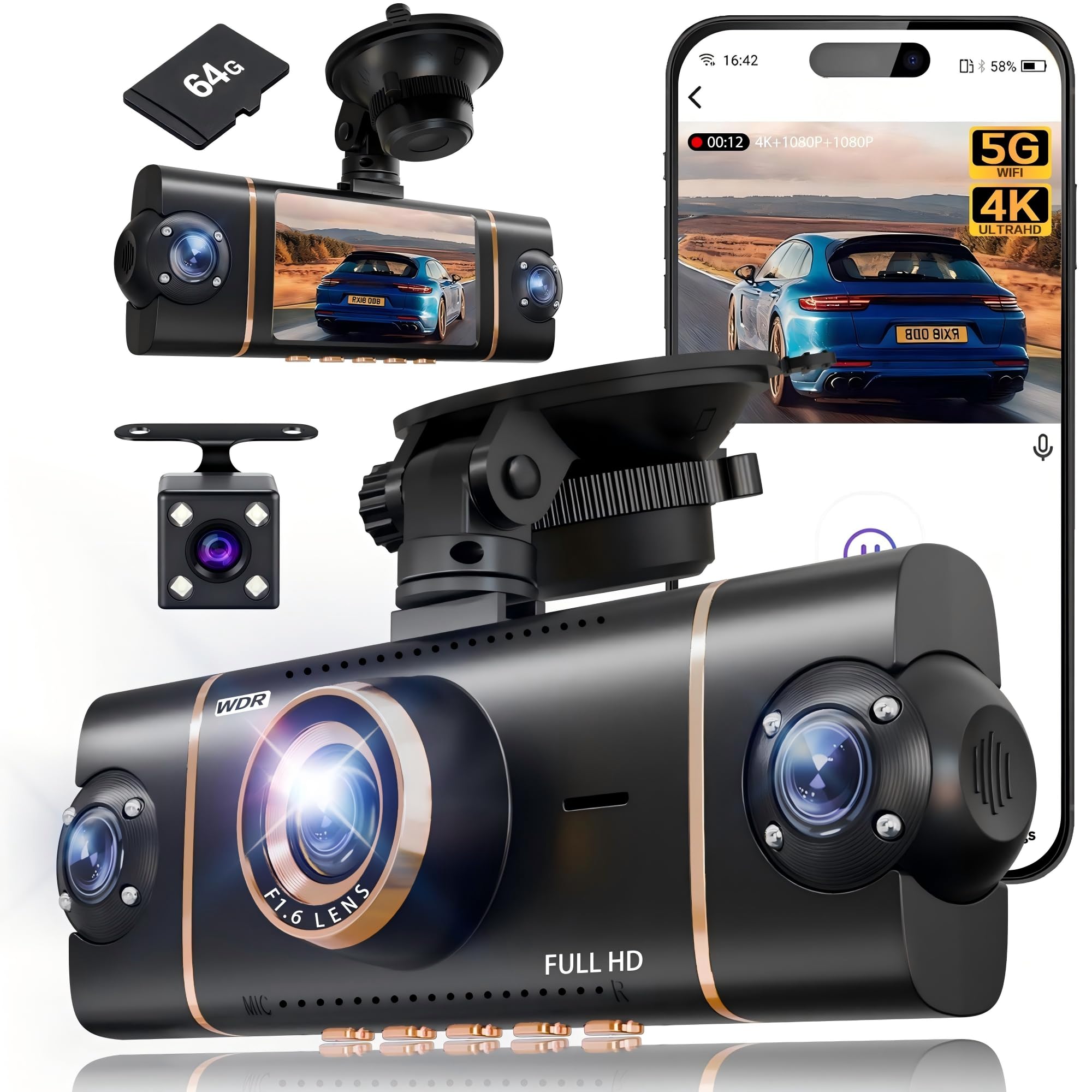
We recommend this unit if you need full vehicle coverage and clear daytime video at a reasonable price.
Pros
- Covers front, rear, and both sides for nearly no blind spots
- Clear daytime footage and easy app access over 5GHz WiFi
- Includes 64GB card and runs reliably in long sessions
Cons
- Parking mode needs a hardwire kit for true 24/7 use
- Setup and cable routing take time on larger vehicles
- Night clarity is good but not as sharp as daytime 4K
We mounted and used this set for several drives and a week of parking checks. The four-camera view filled in blind spots we usually miss. Swapping views on the 3″ screen felt instant and the app pulled files quickly over 5GHz.
Driving in town showed crisp front detail. The interior and side cameras caught license plates at close range and gave useful context for lane incidents. The G-sensor locked files automatically when we hit potholes, which saved footage we later reviewed.
Parking tests worked when the car was running, but true 24-hour protection needs the optional hardwire kit. Installation with the suction mount and cable trim took patience, especially hiding wires around the windshield and headliner.
We found the night mode usable for most situations thanks to WDR and IR lamps, but small details became softer after dark. Customer support and the 18-month guarantee made us more confident to keep it in fleet use.
Coolcrazy N8 4K Dash Cam
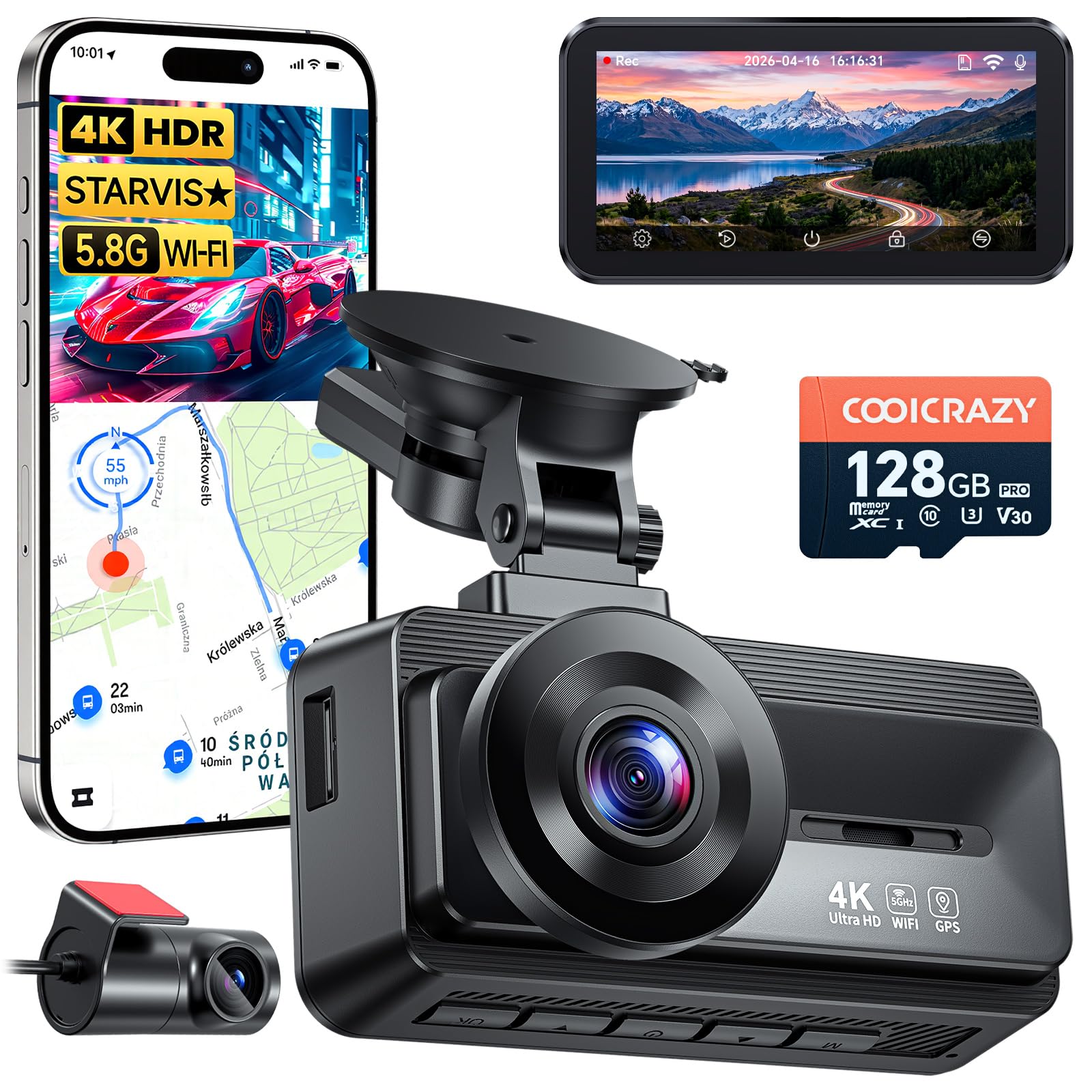
We recommend this if you want front-and-rear 4K footage with strong low-light performance and easy installation.
Pros
- Sharp daytime and night video that picked up plate details.
- Solid parking monitoring and collision lock that kept clips safe.
- Easy fit and long cables made installation straightforward.
Cons
- App connection can be fussy at times.
- Rear camera adhesive felt weak on two units we tried.
- Some small mounting hardware may be missing in rare cases.
We mounted this in a mid-size SUV and used it on city and highway drives. The front 4K image looked crisp and the rear camera gave useful coverage. Night drives in poorly lit areas showed more detail than older cams we’ve used.
We tested the parking monitor and felt more secure leaving the car in public lots. The G-sensor locked collision clips reliably when we tested sudden braking. Downloading clips over 5GHz WiFi was fast once the phone linked up.
Setup was simple and the long rear cable reached through trim on our vehicle without trouble. The app worked for live view and settings, though pairing took a couple attempts. Support responded to an email about a missing part, but that slowed our first-day experience.
Buy this if you need clear evidence-ready video and 24-hour monitoring without a high price. If you rely on flawless app pairing or prefer stick-on rear mounts without extra care, expect a bit of tinkering.
REDTIGER F17 3-Channel Dash Cam

We recommend this if you want wide coverage and clear day/night footage for fleet or family vehicles.
Pros
- Sharp 4K front footage and useful interior/rear views for full coverage.
- Strong low-light performance that kept details on dim roads.
- Fast 5GHz Wi‑Fi and GPS make downloads and route evidence simple.
Cons
- App Wi‑Fi setup can be finicky; we had to reconnect a couple times.
- Interior and rear cams are 1080p, not 4K, so distant detail is lower.
- Hardwire kit needed for full parking mode and true 24/7 protection.
We installed the F17 across two vans and a company car. The front STARVIS 2 sensor gave crisp daytime shots and handled glare better than older models we used. Night clips retained license plate detail more often than expected.
Inside the cab the camera fit cleanly behind the mirror and the interior view caught rider activity and driver interactions. The inside and rear cameras stayed usable at night, though they lack the fine detail of the front 4K channel.
Hardwiring unlocked the parking time‑lapse and G‑sensor events. Installation went smoothly with the included long cables, but the adhesive mount is sticky enough that removing and reusing it proved difficult.
We liked the 5GHz Wi‑Fi for quick transfers; pulling a three‑channel clip to our phone was much faster than older 2.4GHz units. GPS coordinates stamped to video helped when we reviewed trip routes after an incident.
Overall, this felt like a solid commercial dash cam for fleet use or families who want interior coverage, as long as you accept the tradeoff that only the front is 4K and you’ll likely add the hardwire kit for full parking protection.
RedTiger F7N Touch

We recommend this dash cam if you want clear 4K front footage, easy app access, and reliable parking monitoring for a fleet vehicle.
Pros
- Sharp daytime and good night video from the STARVIS 2 sensor.
- Simple touchscreen plus voice control cuts distraction while driving.
- Built-in GPS and fast 5.8GHz WiFi make sharing clips and routes quick.
Cons
- WiFi or app pairing can be flaky on some phones.
- Parking mode needs a hardwire kit to work properly.
- Suction mount feels less secure than a hard adhesive option.
We tested this unit on city and highway routes and liked how clean the 4K front footage looked. License plates and signs stood out in daylight, and the night images held up better than many 1080p cams we’ve used.
Setting up the touchscreen was straightforward and voice commands worked for basic tasks. The app made it fast to pull clips over 5.8GHz WiFi, though we had one phone that needed a couple of tries to connect.
We ran parking mode after installing a hardwire kit and found the time-lapse feature useful for long shifts. The G-sensor reliably locked crash clips, but remember the parking functions won’t run on constant battery power without hardwiring.
Overall, this feels like a solid commercial dash cam for fleets and drivers who want strong video and easy sharing, as long as you plan for the hardwire install and occasional app quirks.
Buying Guide
We look for durability first. A commercial dash cam must handle heat, vibration, and long hours of use. Check for metal housings, wide temperature ratings, and firm mounts.
We focus on video quality next. Choose at least 1080p resolution and a wide dynamic range for clear daytime and nighttime footage. Higher frame rates help capture fast events.
We value reliable storage and power. Prefer cameras with loop recording, robust SD card support, and options for hardwiring or an external battery. Look for clear power-fail behavior and protected files after a crash.
We check connectivity features. GPS, Wi‑Fi, and cellular options let us tag location, download clips, and stream in real time. Decide which of these we actually need to avoid extra cost.
We consider fleet management tools. If we manage vehicles, remote access, centralized storage, and device health reports save time. Confirm compatibility with third‑party systems.
We compare mounting and field of view. Single-lens, dual-lens, and multi-camera setups serve different needs. Pick lenses that cover the driver, the road, and any cargo areas we must monitor.
We review legal and privacy requirements. Ensure camera placement and policies follow local laws and protect employee privacy. Keep recorded data secure with encryption and access controls.
We set a budget and prioritize features. Make a checklist of must-haves versus nice-to-haves before buying. Test a unit in our vehicle when possible.
Editor’s Choice
We chose the top commercial dash cam based on reliability, video quality, and fleet features. Our pick balances clear daytime and nighttime footage with robust mounting and easy data access.
The camera records at 1080p or higher and uses wide-angle lenses to capture lanes and intersections. It stores files locally and can upload key clips over Wi‑Fi or cellular for quick review.
We value rugged design for daily use in trucks and vans. Shock- and vibration-resistant mounts plus a stable power connection reduce dropouts and accidental loss of footage.
Key features we looked for:
- High-resolution video (1080p+)
- Night-vision performance
- GPS and time-stamp for accurate tracking
- Cloud or mobile upload for incident management
- Durable mounting and power options
We also consider software. Good apps let managers tag incidents, export clips, and view locations without heavy training. Compatibility with fleet management platforms is a plus.
Cost matters, but uptime and evidence quality matter more. We recommend models with proven warranties and accessible support for fleets that rely on constant operation.
Conclusion
We recommend choosing a commercial dash cam that fits your fleet size, budget, and safety goals. A reliable device reduces dispute time, supports driver coaching, and can lower insurance costs when used correctly.
We prefer units with good daytime and nighttime video, GPS tracking, and durable mounting. Cloud features add remote access and easier incident review, but they cost more and need a data plan.
We suggest standardizing hardware and firmware across vehicles. That makes maintenance and training simpler. It also helps ensure consistent recordings for incidents and audits.
We advise pairing dash cams with clear policies for privacy, data retention, and driver consent. Follow local laws and communicate expectations to drivers. This protects your company and respects employees.
Key factors to compare:
- Video quality and field of view
- Storage method (local vs cloud)
- Installation and power options
- Analytics and alerts availability
We view dash cams as a tool, not a fix-all. When integrated with training and operations, they improve safety and accountability. We encourage testing a small set of vehicles before a full rollout.
FAQS
What is a commercial dash cam and why do we use one?
A commercial dash cam records video from vehicles used for business. We use them to document trips, improve safety, and resolve disputes.
How do we install and power a dash cam?
Most units plug into the vehicle’s 12V socket or hardwire to the fuse box. We can mount cameras on the windshield or rear window using adhesive or suction mounts.
Do dash cams record at all times?
Many models record while the vehicle runs. Some offer parking mode that records while parked using motion detection or a low-power connection.
How do we store and access footage?
Cameras save video to SD cards or internal memory. We can transfer files via USB, Wi‑Fi, or cloud services if the device supports it.
What features should we look for?
Key features include daytime and low-light image quality, wide field of view, GPS, and impact detection. We also value battery or hardwired parking mode and easy file export.
Are there legal or privacy concerns?
Laws vary by location. We must follow local rules about recording audio and where cameras can point. Always inform drivers and passengers when required.
How do we maintain dash cams?
We check mounts and lenses regularly and format memory cards per manufacturer guidance. We also update firmware when updates are available.

