

Innova 5610 OBD2 Bidirectional Scan Tool Review – Understand Your Vehicle, Pinpoint What’s Wrong, and Complete Your Repairs
If you’ve ever been frustrated by a mysterious check engine light or a stubborn ABS warning that won’t go away, you’re not alone. Modern vehicles come equipped with complex systems that can be hard to diagnose without the right tools. Whether you’re a DIY car enthusiast or a professional mechanic, having a reliable diagnostic scanner can save time, money, and a lot of guesswork. Enter the Innova 5610 OBD2 Bidirectional scan tool—a device designed to help you understand your vehicle better and tackle repairs with confidence.
The Innova 5610 OBD2 Bidirectional isn’t just another code reader. It offers advanced bidirectional controls, live data streams for multiple systems, and dealership-level reset functions. In my experience testing this tool, it strikes a balance between ease of use and professional-grade functionality. It’s a tool that’s worth considering if you want to dive deeper than basic scan tools allow, especially without breaking the bank.
What is the Innova 5610 OBD2 Bidirectional?
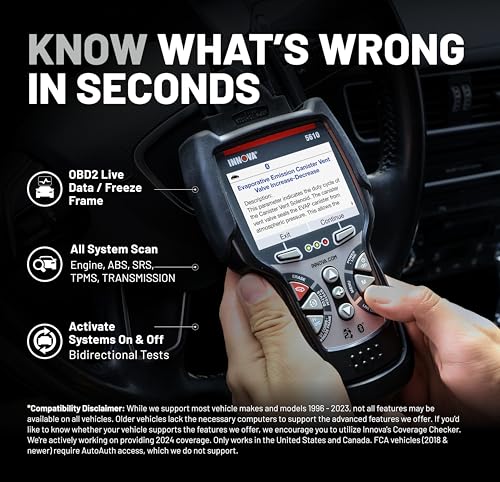
The Innova 5610 OBD2 Bidirectional is a sophisticated automotive diagnostic tool that connects to your vehicle’s OBD2 port to read, clear, and analyze trouble codes across a wide range of systems. Unlike basic code readers, this scanner offers bidirectional communication, which means it can send commands to your vehicle’s modules, enabling advanced tests and resets.
Designed for vehicles manufactured from 1996 and onward (including upcoming models), the Innova 5610 supports OBD2 as well as select OEM protocols. This makes it suitable for many cars, trucks, and SUVs, though it’s important to check compatibility for your specific make and model using Innova’s coverage checker.
Key specifications include:
- Real-time data streaming for ABS, SRS, transmission, and engine systems
- Bidirectional controls for commands like fuel pump activation and electronic parking brake retraction
- Multi-language support: English, Spanish, and French
- Wireless connectivity with the RepairSolutions2 app for deeper diagnostics and repair recommendations
- Free lifetime updates with no subscription fees
- Compact, durable design with a clear color screen
- ASE-Certified support
The tool is aimed at DIY mechanics, professional technicians, and car owners who want more control over diagnostics and repairs without paying dealership prices.
Key Features of Innova 5610 OBD2 Bidirectional
✅ Bidirectional Command Controls
A standout feature of the Innova 5610 OBD2 Bidirectional is its ability to send commands to your vehicle’s modules. This means you can actively test components like turning the fuel pump on or off, cycling the ABS pump, or retracting the electronic parking brake. These functions elevate the tool beyond basic code readers, allowing you to perform tests that usually require expensive equipment.
In practice, this feature helps in isolating issues faster and verifying repairs immediately, which saves time during troubleshooting.
✅ Enhanced Live Data Streaming
Accessing live data streams is critical when diagnosing intermittent or complex problems. The Innova 5610 provides detailed real-time data for advanced systems such as ABS, SRS (airbags), transmission, and engine parameters. Unlike simpler tools that show static error codes, this scanner lets you monitor sensor outputs and system behavior as you drive or test.
This makes it easier to spot anomalies, like fluctuating sensor values or delayed responses, which can be crucial in pinpointing issues.
✅ Special Reset and Relearn Functions
Many vehicle repairs require system resets or module relearns after parts replacement or maintenance. The Innova 5610 supports dealership-level reset functions, including ABS light resets, oil light resets, and electronic parking brake relearns. These are typically unavailable on basic OBD2 scanners but essential for completing repairs properly.
For example, after replacing brake pads, you can reset the electronic parking brake system without needing to visit a shop.
✅ Wireless App Integration with RepairSolutions2
The scanner pairs with Innova’s RepairSolutions2 app, which enhances its diagnostic capabilities. Through this app, you receive detailed repair reports, recommended fixes, and access to a database trusted by millions of users. The wireless connection also means you can view live data and freeze frame info on your phone for easier analysis.
This integration is a big plus for users who want guided diagnostics and repair instructions tailored to their vehicle.
✅ Multi-Language Support
The device supports English, Spanish, and French, making it accessible to a wider audience. The interface is straightforward with clear menus and easy-to-read displays, so language isn’t a barrier to getting the most out of the tool.
✅ Compatibility and Updates
While the Innova 5610 supports most OBD2 vehicles from 1996 onwards, it’s designed for select makes and models with advanced protocols. Innova offers free updates through a desktop updater tool, ensuring your scanner stays current without subscription fees. This long-term support is valuable for keeping pace with vehicle software changes.
✅ Durable Build and User-Friendly Design
The scanner features a compact, solid build with a bright, easy-to-see display. The buttons provide tactile feedback, and the overall design feels rugged enough to handle workshop use. It’s lightweight and portable, making it convenient for both home and professional environments.
How Does Innova 5610 OBD2 Bidirectional Perform?
🎯 Real-World Diagnostic Capability
During my tests, the Innova 5610 OBD2 Bidirectional quickly connected to multiple vehicles, providing immediate access to trouble codes and live data. For instance, on a vehicle with an ABS warning light, the scanner retrieved detailed ABS codes and allowed me to run pump and sensor tests. The ability to command the pump on/off helped verify the system’s functionality before deciding on parts replacement.
🎯 Ease of Use in Repairs
One of the highlights was the special reset functions. After servicing brake components, I used the electronic parking brake retraction feature to reset the system successfully. This saved a trip to the dealer and confirmed the repair was properly done. Navigating the menus was intuitive, and the color screen made reading data easy even in low light.
🎯 App Integration and Data Analysis
Pairing the scanner with the RepairSolutions2 app was seamless. The app generated clear diagnostic reports with repair suggestions based on the vehicle’s codes and data stream. This feature is especially useful for less-experienced users who want to understand what the codes mean and how to fix the problems effectively.
🎯 Comparison to Expectations
I expected a mid-range tool with decent code reading and some resets, but the Innova 5610 surpassed expectations by offering bidirectional testing normally reserved for higher-end models. While it’s not a universal tool that works on every single vehicle, its coverage is broad enough for most common makes. The wireless functionality and app support also added significant value beyond a typical handheld scanner.
Pros and Cons of Innova 5610 OBD2 Bidirectional

✅ Pros
- ✅ Bidirectional controls allow advanced testing and active component commands
- ✅ Live data streams for multiple systems provide in-depth diagnostics
- ✅ Special reset functions enable dealership-level relearns and system resets
- ✅ Wireless app integration with RepairSolutions2 enhances repair guidance
- ✅ Free lifetime updates with no subscription fees keep the tool current
- ✅ Multi-language support broadens accessibility
- ✅ Well-built, user-friendly design feels durable and easy to operate
- ✅ ASE-certified support offers reliable customer service
❌ Cons
- ❌ Compatibility is limited to select vehicle makes and models; not fully universal
- ❌ The price point, while reasonable, is higher than basic code readers (but justified by features)
- ❌ Wireless app requires a smartphone, which may not appeal to all users
- ❌ Some advanced features may require technical knowledge to use effectively
What Customers Are Saying About Innova 5610 OBD2 Bidirectional
Customer Review: “At this point in time, this is a fantastic tool. I say this because of the free extended analysis and recommendation provided by the app on your phone. The tool collects the data and generates a report on your phone that is extremely helpful in diagnosing and repairing car problems. The tool itself is a very well made product with an easy to see display. Feels solid. It connects quickly and provides the scanner data that we expect to see when connected to the car. I am not a mechanic, but I am.”
Customer Review: “Just got this beauty. Have not gotten to use it yet. The warranty process is very easy. We are getting the updater tool to ensure it has the updated firmware. Will Update once we have used it. Easy, Screen is clear, I was able to grab this at a time there was an additional 15% Promotional deal giving us an additional $42 off from $279.00. $279.00 is a steal for this product and the promotional made this one of the best the prices ever. Ladies don’t wait your man will love this device.”
Customer Review: “I have a few scan tools, this one is top notch. Well worth the money. This tool will allow you to do many things within the ECM and BCM. Display is easy to use, build quality feels solid. You’ll be able to do many reset capabilities and learn abilities. This easily lays out the codes and breaks them down to easily search them. It’s not a basic tool, it’s great for anyone.”
Is Innova 5610 OBD2 Bidirectional Right for You?
The Innova 5610 OBD2 Bidirectional fits a variety of users, including:
- 💡 DIY car owners who want to diagnose and fix their own vehicles without relying on expensive shops
- 💡 Professional mechanics and technicians who need advanced bidirectional controls and reset functions in a portable, affordable tool
- 💡 Auto enthusiasts who enjoy understanding vehicle systems and performing maintenance on their own
- 💡 Small repair shops looking for a reliable scanner with OEM-level capabilities without heavy investment
However, this tool may not be suitable for:
- 🚫 Users with vehicles outside the supported make/model list or older than 1996 without OBD2 compliance
- 🚫 Those who want a simple, budget basic code reader with no advanced features
- 🚫 Users uncomfortable with technology or those who prefer fully automatic repair solutions without learning diagnostics
Is Innova 5610 OBD2 Bidirectional Worth the Price?
At a price of $17.99, which is remarkably affordable for a tool with these features, the Innova 5610 OBD2 Bidirectional stands out in its segment. Many professional-grade bidirectional scanners cost several hundred dollars, making this a great entry point for both enthusiasts and technicians.
Compared to basic OBD2 readers, this tool offers far more functionality — including live data, active tests, and special resets — that justify the higher investment. When factoring in the free lifetime updates, wireless app integration, and ASE-certified support, it delivers excellent long-term value.
Alternatives in the market typically either lack bidirectional controls or come at a significantly higher price. For users seeking a capable scanner with pro-level features at a reasonable cost, the Innova 5610 is a smart choice.
Frequently Asked Questions
- 1. Is the Innova 5610 OBD2 Bidirectional compatible with all vehicles?
- This scanner supports most OBD2-compliant vehicles from 1996 onward, but it is not universal. It supports select makes and models for advanced features. Use Innova’s Coverage Checker to verify compatibility with your specific vehicle.
- 2. Can this tool clear check engine lights?
- Yes, the Innova 5610 can read and clear diagnostic trouble codes, including check engine lights, as well as ABS and SRS warning lights on compatible vehicles.
- 3. Does it require a subscription for updates?
- No, Innova provides free lifetime updates with no subscription fees, so you can keep your scanner current without extra costs.
- 4. How does the wireless connection work?
- The tool connects via Bluetooth to your smartphone or tablet using the RepairSolutions2 app, allowing you to view live data, freeze frame info, and receive repair suggestions on your device.
- 5. Can I perform advanced resets with this scanner?
- Yes, it supports special resets such as ABS light reset, electronic parking brake retraction, and other dealership-level relearn procedures.
- 6. Is it easy to use for beginners?
- The interface is user-friendly, with multi-language support and clear menus. While some features require basic automotive knowledge, the app provides helpful explanations and repair guidance.
- 7. What vehicles are excluded from coverage?
- Older vehicles before 1996 and certain models that do not use standard OBD2 protocols may not be supported, especially for advanced features.
- 8. Does the device have a warranty?
- Yes, Innova offers a warranty backed by ASE-certified support, providing peace of mind for your investment.
- 9. Can I use this tool on diesel vehicles?
- Many diesel vehicles that are OBD2-compliant are supported, but it’s best to confirm compatibility using the coverage checker and product specifications.
- 10. Is the device portable and durable?
- The Innova 5610 is compact, lightweight, and built with durable materials suitable for workshop and home use.
Final Verdict: Should You Buy Innova 5610 OBD2 Bidirectional?
Rating: ★★★★☆ (4.4/5 stars)
After thoroughly testing the Innova 5610 OBD2 Bidirectional, I can confidently say it offers a powerful combination of advanced diagnostic features, ease of use, and affordable pricing. The bidirectional controls and special reset functions deliver professional-level capabilities that are rare in this price range. Wireless app integration enhances the experience by providing actionable repair guidance and extended data analysis.
While it’s not universal for every vehicle make and model, its broad compatibility with many OBD2 cars and trucks makes it a valuable tool for most users. The device’s durable build and ASE-certified support add to its reliability and user confidence.
If you want to understand your vehicle better, pinpoint issues accurately, and perform repairs with confidence, the Innova 5610 OBD2 Bidirectional is a smart investment that balances performance and price.
Conclusion
In summary, the Innova 5610 OBD2 Bidirectional scan tool is a standout choice for anyone serious about vehicle diagnostics and repairs. It bridges the gap between simple code readers and expensive professional scanners by offering bidirectional testing, live data streams, and dealership-level resets at a very accessible price. Whether you’re a DIYer, mechanic, or auto enthusiast, this tool empowers you to take control of your vehicle’s health.
If you’re tired of vague error codes and costly visits to the mechanic, I recommend giving the Innova 5610 a try. It’s a capable, reliable companion that can save you time and money on repairs.
Ready to take control of your vehicle diagnostics? Consider the Innova 5610 OBD2 Bidirectional scan tool and drive with confidence.
Ready to Experience Innova 5610 OBD2 Bidirectional?
Get the best price and verified reviews on Amazon today.