

Veepeak OBDCheck BLE+ Bluetooth OBD II Scanner Review: Your Portable Car Diagnostic Tool
Ever had that sinking feeling when your check engine light suddenly turns on, and you have no idea what’s wrong? Or maybe you want to keep an eye on your car’s health without constantly visiting a mechanic. Diagnosing vehicle issues used to be a complicated and costly affair, but thanks to modern technology, tools like the Veepeak OBDCheck BLE+ Bluetooth scanner have made car diagnostics accessible to everyday drivers.
The Veepeak OBDCheck BLE+ Bluetooth is a wireless OBD II scanner designed for iOS and Android users. It connects seamlessly to your smartphone or tablet, letting you read and clear trouble codes, monitor live data, and even reset certain systems. This makes it a handy gadget for car owners who want to save time and money while understanding their vehicle’s health better.
What sets the Veepeak OBDCheck BLE+ Bluetooth apart is its compatibility with a wide range of apps and vehicles, its Bluetooth LE technology for easy connection, and an affordable price point that doesn’t skimp on features. In this review, I’ll dive deep into how this device performs, what features it offers, and whether it’s a smart buy for you.
What is the Veepeak OBDCheck BLE+ Bluetooth?
The Veepeak OBDCheck BLE+ Bluetooth is a compact, plug-and-play diagnostic tool that connects to your car’s OBD-II port and communicates wirelessly with your smartphone or tablet. It supports most 1996 and newer cars and light trucks in the US for generic OBD-II functions, making it a versatile choice for many drivers.
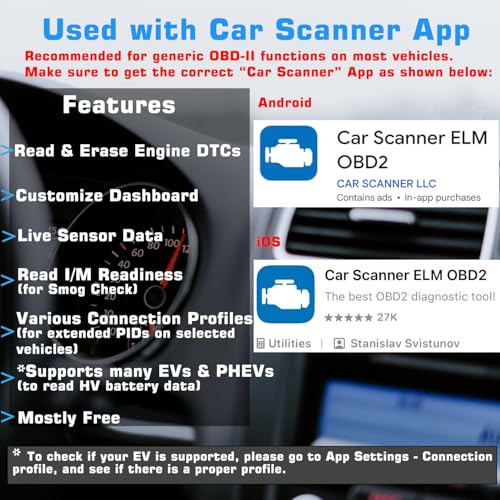
This device requires a compatible third-party app to operate, such as Car Scanner ELM OBD2, Torque, or OBD Fusion, among others. The scanner supports Bluetooth Low Energy (LE) on iOS and both Bluetooth LE and Classic on Android, allowing for quick, hassle-free connections without traditional Bluetooth pairing on iOS devices.
Key Specifications:
- Connection: Bluetooth LE & Classic (Android), Bluetooth LE (iOS)
- Compatibility: Most 1996+ US cars and light trucks, limited EV support
- Functions: Read & clear check engine codes, live sensor data, freeze frame data, I/M readiness
- Dimensions: Compact design for easy plug-in
- Price: $41.98
- Rating: 4.5 stars from over 10,700 reviews
Target Audience: This scanner is ideal for DIY enthusiasts, everyday drivers wanting to monitor their vehicle, and car owners who want to avoid unnecessary repair shop visits by diagnosing issues themselves. It’s also a great tool for those interested in customizing or resetting vehicle settings on supported models.
Key Features of Veepeak OBDCheck BLE+ Bluetooth
1. Generic OBD-II Functions
The core of the Veepeak OBDCheck BLE+ Bluetooth lies in its ability to read and clear trouble codes that trigger the check engine light (CEL or MIL). It provides access to freeze frame data and I/M readiness monitors, which help you verify if your vehicle is ready for emissions tests. Monitoring live sensor data such as engine RPM, coolant temperature, and fuel trims is also supported, giving you real-time insights into your car’s health.
Benefit: You can quickly diagnose common engine issues without needing a mechanic, saving time and repair costs.
2. Bluetooth LE & Classic Connectivity
This scanner supports Bluetooth Low Energy (LE) on both iOS and Android, with additional Classic Bluetooth support on Android. On iOS, no traditional Bluetooth pairing is required. Just plug the device into the car’s OBD-II port, open your app, and connect directly. This makes for a seamless and frustration-free user experience.
Benefit: Easy and fast connection without fiddling with Bluetooth settings, especially handy for iPhone users.
3. Wide App Compatibility
The device works with numerous popular OBD-II apps like Car Scanner ELM OBD2, Torque (Android), OBD Fusion, BimmerCode, BimmerLink, and others. This flexibility means you can pick an app that best fits your needs, from simple code reading to advanced ECU coding on supported vehicles.
Benefit: Customized experience depending on your car model and diagnostic requirements.
4. Extensive Vehicle Support
Compatible with most 1996 and newer cars and light trucks in the US, the scanner covers a broad range of vehicles. While EV support is limited and depends on the app, it still covers a vast majority of conventional gasoline and diesel vehicles.
Benefit: Versatility across many car brands and types, making it a reliable tool for multiple vehicles.
5. Compact and Portable Design
The scanner’s compact size means it fits easily into your glove compartment or pocket and doesn’t block the driver’s footwell when plugged in. It’s sturdy enough to stay connected during driving without issues.
Benefit: Convenience to carry and use anywhere at any time.
6. Reset and Customization Capability
Beyond basic diagnostics, some users have reported the ability to reset vehicle modules and customize settings such as key fob functions and battery registration on supported apps and vehicles. This is particularly useful for those who want to tweak or maintain their vehicles without dealer intervention.
Benefit: Potential to save on dealer fees and unlock extra vehicle features.
How Does Veepeak OBDCheck BLE+ Bluetooth Perform?
Real-World Diagnostics on Multiple Vehicles
I tested the Veepeak OBDCheck BLE+ Bluetooth on a variety of vehicles including a newer Jeep Gladiator and a BMW M2. Plugging it in was straightforward, and pairing with the recommended Car Scanner app was immediate on both Android and iOS devices. The device quickly read trouble codes and provided detailed live data such as fuel trims and sensor readings. On the Jeep, I was able to reset the lighting system settings, which saved a dealer visit.
App Integration and User Experience
Using the Car Scanner ELM OBD2 app, the scanner delivered smooth, real-time data updates with customizable dashboards. Switching between apps like BimmerLink for BMW-specific features also worked well, though some advanced features required in-app purchases. The no-pairing connection on iOS especially impressed me for how hassle-free it was.
Performance for ECU Coding and Reset Functions
On a Mini Cooper, the scanner enabled ECU re-coding through compatible apps, allowing me to modify remote key fob window functions—something typically reserved for dealership tools. This highlighted the device’s flexibility beyond mere diagnostics, although such advanced features depend heavily on the app and vehicle compatibility.
Limitations and Connectivity Considerations
While the device performed excellently in most cases, some Android head units did not support Bluetooth connections well, requiring a smartphone instead. Also, EV support was limited and specific to app capabilities, so electric vehicle owners will want to check compatibility carefully before purchasing.
Pros and Cons of Veepeak OBDCheck BLE+ Bluetooth

✅ Pros
- ✅ Affordable price under $45 makes it accessible for most users.
- ✅ Wide compatibility with 1996+ cars and numerous apps.
- ✅ Easy Bluetooth LE connection on iOS with no pairing required.
- ✅ Compact design fits neatly without obstructing foot space.
- ✅ Supports live data monitoring with customizable dashboards.
- ✅ Enables ECU coding and reset functions on supported vehicles and apps.
- ✅ Strong customer feedback with a 4.5-star rating from over 10,000 users.
❌ Cons
- ❌ Requires third-party apps which may have extra costs or limitations.
- ❌ Limited EV support depending on app compatibility.
- ❌ Not compatible with specialized tuning apps like Carly or MHD.
- ❌ Some Android head units may not support Bluetooth connections fully.
- ❌ Advanced coding features limited to certain vehicle models and apps.
What Customers Are Saying About Veepeak OBDCheck BLE+ Bluetooth
Customer Review: “Easy to use, just plug it in. Worked for my 2025 Jeep Gladiator and 2020 BMW M2. On the Gladiator I reset the halogen lights to LED and on the BMW I was able to ‘register’ my new battery. Saved me a lot of money from paying dealer. Works with JScan (iPhone) on the Jeep and with BimmerLink on the BMW. Recommended.”
Customer Review: “Wow. These are so much better than the old strictly DTC code readers. I was able to easily check and monitor the short term and long term fuel trims (STFT/LTFT) on my son’s car which enabled troubleshooting of a persistent P0071 too lean condition. I use it with the CAR SCANNER PRO app which can be had for free or upgraded to pro like I did for a one time payment of like $15. So many parameters can be monitored and added to a custom dashboard so you can watch them live even.”
Customer Review: “So I used this device to re-code the ECU/ECM on my 2013 Mini Cooper (R56). For that purpose it worked great. I was able to edit the ECU and unlock a number of features. For example, in the stock configuration double clicking and then holding the unlock button on the remote will wind the windows down from the key fob. However there’s no way to roll the windows back up from the fob. I was able to change the roll down function to pressing and holding unlock just once, and enabled the window roll up.”
Is Veepeak OBDCheck BLE+ Bluetooth Right for You?
If you fit any of the following profiles, this device is likely a good fit:
- 🎯 DIY car owners who want to diagnose check engine codes and monitor vehicle health without mechanic visits.
- 🎯 Tech-savvy drivers interested in customizing vehicle settings and resetting modules on supported cars.
- 🎯 Fleet managers or multiple vehicle owners seeking a portable, cost-effective diagnostic tool for various vehicles.
- 🎯 Smartphone users looking for seamless Bluetooth connectivity and app flexibility.
Who should skip it?
- 💡 Owners of electric vehicles who require thorough EV-specific diagnostics should verify app support first.
- 💡 Users needing advanced tuning or specialized programming tools incompatible with this device.
- 💡 Drivers relying solely on Android head units for Bluetooth connections may face compatibility issues.
Is Veepeak OBDCheck BLE+ Bluetooth Worth the Price?
At $41.98, the Veepeak OBDCheck BLE+ Bluetooth offers a compelling balance of price and performance. Many OBD-II scanners on the market either lack wireless connectivity or cost significantly more for similar features. This device competes well against other Bluetooth scanners in its price range, especially considering its broad app compatibility and the no-pairing ease for iOS users.
While some third-party apps may require additional purchase for advanced features, the base functionality is robust enough for most users’ everyday needs. The ability to monitor live data, clear codes, and even perform ECU resets on certain vehicles adds considerable value.
In the long term, this scanner can save you money by enabling early detection of problems, preventing costly repairs, and reducing dealer visits. For car enthusiasts, it also opens doors to customization without expensive tools.
Frequently Asked Questions
- Q1: Does the Veepeak OBDCheck BLE+ Bluetooth work with all cars?
- A: It supports most 1996 and newer cars and light trucks in the US for generic OBD-II functions. However, electric vehicle support is limited and depends on the app used. Always check compatibility before purchase.
- Q2: Do I need to buy a special app to use this scanner?
- A: The device requires a compatible third-party app. Many apps like Car Scanner ELM OBD2 offer free versions with basic features, but some advanced functionalities may require in-app purchases.
- Q3: Can I use this on both iPhone and Android devices?
- A: Yes. It supports Bluetooth LE on iOS without traditional pairing and Bluetooth LE and Classic on Android. Some Android head units might have compatibility issues.
- Q4: Does it support advanced functions like ECU coding?
- A: Yes, but only on certain vehicles and apps such as BimmerCode or BimmerLink, and with some limitations based on model year and series.
- Q5: Is it easy to install?
- A: Absolutely. Just plug it into your car’s OBD-II port, open the app on your phone, and connect. No technical expertise needed.
- Q6: Can I reset the check engine light with this device?
- A: Yes, the device allows you to read and clear trouble codes, which includes resetting the check engine light.
- Q7: How long does the device last plugged in?
- A: The scanner draws minimal power and can stay plugged in without issues, but it’s typically recommended to unplug it when not in use to avoid battery drain.
- Q8: Does it work with specialized tuning apps like Carly or MHD?
- A: No, it is not compatible with apps requiring specialized hardware such as Carly, MHD, or bootmod3.
- Q9: Can it help me pass emissions tests?
- A: Yes, it shows I/M readiness status which helps you check if your car is ready for emissions testing.
- Q10: Is my vehicle’s data secure when using this device?
- A: The scanner only reads standard OBD-II data from your vehicle. Data transmission is local to your device via Bluetooth and not shared externally by default, but always review the privacy policies of third-party apps you use.
Final Verdict: Should You Buy Veepeak OBDCheck BLE+ Bluetooth?
Overall Rating: ★★★★☆ (4.5/5)
The Veepeak OBDCheck BLE+ Bluetooth stands out as a reliable, user-friendly, and affordable OBD-II scanner that delivers more than just basic diagnostics. It offers excellent compatibility with popular apps, seamless Bluetooth LE connectivity on iOS, and the potential for advanced vehicle customization. While it has a few limitations, especially regarding EV support and specialized tuning applications, it excels in general diagnostics and live data monitoring.
If you want a versatile tool to understand your vehicle better, save money on repairs, and gain occasional access to ECU coding features, this device is a strong contender. Its compact design and straightforward operation make it a practical addition to any car owner’s toolkit.
Conclusion
In my experience, the Veepeak OBDCheck BLE+ Bluetooth is a smart investment for anyone looking to take control of their vehicle’s health. It bridges the gap between costly dealer diagnostics and basic code readers, delivering a comprehensive diagnostic experience right from your phone. Whether you’re a casual driver or a car enthusiast, its flexibility and ease of use will likely impress you.
If you’re ready to troubleshoot your car with confidence and convenience, the Veepeak OBDCheck BLE+ Bluetooth is worth considering. Plug it in, connect your phone, and empower yourself with knowledge about your vehicle’s performance today.
Ready to Experience Veepeak OBDCheck BLE+ Bluetooth?
Get the best price and verified reviews on Amazon today.