

Foseal Wifi OBD2 Scanner Review: Your Affordable Wireless Car Diagnostic Tool
Have you ever had your car’s check engine light pop on and felt that familiar wave of anxiety? Maybe you wondered if it’s something minor or an expensive repair waiting to happen. Most drivers face this dilemma and often end up paying hefty diagnostic fees just to find out what’s wrong. What if you could skip the middleman and diagnose your vehicle’s issues right from your smartphone?
Enter the Foseal Wifi OBD2 Scanner, a compact and affordable wireless tool designed to help everyday drivers and DIY enthusiasts read engine codes and monitor vital vehicle data. For just $24.99, this device promises to put control back in your hands, letting you troubleshoot problems, save money, and understand what’s going on under the hood.
But does it deliver on these promises? In this comprehensive review, I test the Foseal Wifi OBD2 Scanner on various vehicles, explore its features, performance, ease of use, and value for money. If you’re curious whether this budget-friendly scanner is worth your attention, read on.
What is the Foseal Wifi OBD2 Scanner?
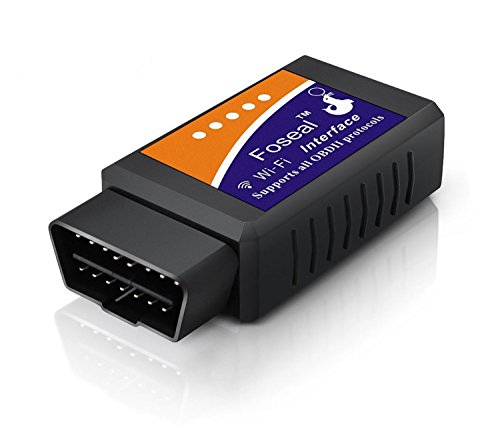
The Foseal Wifi OBD2 Scanner is a wireless diagnostic tool that plugs into your car’s OBD2 port, usually located under the dashboard. It connects to your smartphone or tablet via WiFi, allowing you to access your vehicle’s onboard computer data. By reading trouble codes generated by your car’s ECU (Engine Control Unit), it helps you identify issues triggering the check engine light.
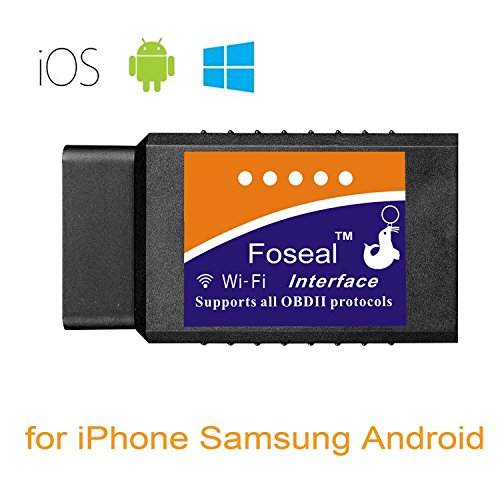
Unlike bulky or expensive scanners, the Foseal device is super mini in size and supports a wide range of OBD2-compliant vehicles. It works with both iOS and Android devices, pairing with popular third-party apps like “OBD Car Doctor,” “Torque Lite,” or “DashCommand” to provide real-time sensor information and diagnostics.
Key Specifications:
- Price: $24.99
- Wireless connection: WiFi
- Compatibility: Most OBD2 cars from makers like Chrysler, Ford, Honda, Mazda, Toyota, VW, GM, Dodge, BMW, Chevrolet, Audi, Subaru, KIA, Benz, and more
- Supported platforms: iOS and Android
- Data monitored: Engine RPM, Horsepower, Coolant Temperature, Fuel System Status, Intake Air Temperature, O2 sensor voltages, and more
- Warranty: One year
The Foseal Wifi OBD2 Scanner targets car owners who prefer to do their own minor repairs or just want to understand their vehicle’s health without paying a dealer diagnostic fee. It suits anyone with a smartphone looking for a straightforward, portable scanning solution.
Key Features of Foseal Wifi OBD2 Scanner
✅ Wireless WiFi Connection for Convenience
Unlike Bluetooth scanners that sometimes struggle with compatibility, the Foseal scanner uses WiFi to connect to your phone. This typically means a more stable and faster connection, with a setup time of around 10 seconds. Once connected, you can use any compatible app to read codes or monitor live data, giving you flexibility in how you diagnose your vehicle.
✅ Wide Vehicle Compatibility
The scanner supports a broad range of OBD2-compliant vehicles, including popular brands such as Toyota, Ford, BMW, Audi, and more. This makes it a versatile tool for households with multiple makes or for DIY mechanics working on different cars. Just ensure your vehicle supports OBD2 protocols (most cars post-1996 do).
✅ Live Sensor Data Monitoring
Beyond just reading fault codes, the Foseal Wifi OBD2 Scanner provides access to real-time sensor readings. You can monitor engine RPM, coolant temperature, calculated load value, fuel system status, oxygen sensor voltages, and more. This feature is especially useful for diagnosing intermittent issues or tracking engine performance during drives.
✅ Compatible with Popular Diagnostic Apps
The device doesn’t come with its own dedicated app but works seamlessly with many third-party apps. For iOS users, recommended apps include “OBD Car Doctor” and “OBD Fusion” (the latter costs around $9.9). Android users can try “Torque Lite,” “Torque Pro,” or “DashCommand.” This gives you options depending on your preference and budget.
✅ Compact and Easy to Use
The scanner’s mini size makes it easy to leave plugged in without it getting in the way. Setting it up is straightforward: just plug into the OBD2 port, connect your phone to the scanner’s WiFi network, and launch your chosen app. The device is powered through the car’s port, so no batteries or charging required.
✅ Cost-Effective Diagnostic Solution
At $24.99, the Foseal Wifi OBD2 Scanner is a fraction of the price of dealer diagnostic fees, which can easily run above $150. For many users, this upfront cost quickly pays for itself by avoiding unnecessary trips to the mechanic and helping you address issues early.
✅ One Year Warranty and Customer Support
Foseal backs this product with a one-year guarantee and emphasizes customer service. If you encounter issues, they encourage you to reach out for assistance, which adds peace of mind to your purchase.
How Does Foseal Wifi OBD2 Scanner Perform?
🎯 Setup and Connection Experience
In my experience, setting up the Foseal Wifi OBD2 Scanner was simple but required some patience. Plugging it into the OBD port was straightforward. Connecting to its WiFi from my phone took about 10 seconds as advertised. However, I noticed that switching between the scanner’s WiFi and my regular internet can be a bit inconvenient, especially on devices that don’t handle multiple networks gracefully. This is a common quirk with WiFi-based OBD2 scanners.
🎯 Reading and Clearing Codes
Using the recommended apps, I was able to quickly scan my test vehicle’s error codes and identify the cause of the check engine light. Clearing codes was also intuitive and effective, allowing me to reset the light after repairs. This feature alone can save tons of money by avoiding repeat diagnostic fees at the mechanic.
🎯 Monitoring Live Vehicle Data
The scanner provided accurate and detailed live data streams including engine RPM, coolant temperature, intake air temperature, and oxygen sensor voltages. The dashboards on the apps were customizable and visually clear, making it easy to track performance metrics while driving or idling. This data can help diagnose issues like overheating or poor fuel efficiency.
🎯 Multi-Vehicle Use and App Compatibility
Testing the scanner on different vehicles showed consistent performance, but some users have reported needing to purchase separate app upgrades for multiple vehicles, which can add up. Additionally, the scanner works best with certain apps, so choosing the right app is crucial for a smooth experience. I found “Car Scanner ELM OBD2” free app on iOS to be a solid alternative to the official recommendations.
Pros and Cons of Foseal Wifi OBD2 Scanner
✅ Pros
- ✅ Affordable price at $24.99, offering great value
- ✅ Wireless WiFi connection provides stable data transfer
- ✅ Supports a large range of OBD2-compatible vehicles
- ✅ Provides live sensor data for comprehensive diagnostics
- ✅ Compatible with multiple popular iOS and Android apps
- ✅ Compact, easy to install and leave plugged in
- ✅ One year warranty and responsive customer service
❌ Cons
- ❌ Must switch WiFi networks on your phone, which can interrupt internet access during use
- ❌ No dedicated app included; some third-party apps require purchase for full functionality
- ❌ Some users report app compatibility issues and occasional setup frustration
- ❌ Upgrade costs may apply if using the scanner on multiple vehicles via certain apps
- ❌ Limited to OBD2 vehicles; older or non-OBD2 cars are unsupported
What Customers Are Saying About Foseal Wifi OBD2 Scanner
Customer Review: “This OBD reader works great. You just have to plug it in, connect to it using your phone (via WiFi) and then find and download an app you like. (I initially thought that you could only use the app they mention in the instructions, but you DO NOT. In my case, the little pamphlet recommended an app called ‘FasLink X’ which was terrible). I recommend using the ‘Car Scanner ELM OBD2’ app instead, which is free on the app store. You’ll easily get your money’s worth here just from clearing recurring codes.”
Customer Review: “I ordered this scan tool and it worked perfectly as advertised! The check engine light (“CEL”) turned on while driving my 2009 Honda Fit Sport in heavy traffic. I then called the dealer and they quoted me $159 for diagnosing—just plugging in a scanner and reading the code. Talk about highway robbery. The Foseal Scan Tool is AMAZING! Seriously. My only gripe is the WiFi network switch, but for this price, it’s a steal.”
Customer Review: “It’s okay but you have to buy a different upgrade for each vehicle you use it on. I have 3 vehicles so that’s $30 to check them all. I had trouble getting even the free version to download on my phone and then more problems upgrading. Once I got the free app it connected up nicely but you need to switch back and forth from internet WiFi to the obd WiFi on my Tab 3. Overall, frustrating experience but accurate data.”
Is Foseal Wifi OBD2 Scanner Right for You?
If you fit any of these profiles, the Foseal Wifi OBD2 Scanner could be a great fit:
- DIY Car Enthusiasts: If you like to troubleshoot and fix minor car issues yourself, this scanner helps you identify problems without expensive shop visits.
- Budget-Conscious Drivers: Avoid paying steep diagnostic fees by using this affordable tool to scan check engine codes at home.
- Multi-Car Households (With Caveats): If you own several OBD2 vehicles and don’t mind purchasing app upgrades, this scanner can serve multiple cars.
- Smartphone Users Comfortable with Apps: Since the device relies on third-party apps, it’s ideal if you’re tech-savvy enough to try different apps and troubleshoot connectivity.
However, you might want to skip this scanner if:
- Your vehicle is not OBD2 compliant (usually pre-1996 models).
- You prefer a plug-and-play device with a dedicated app included.
- You dislike switching WiFi networks on your phone or have connectivity issues.
- You need advanced diagnostics beyond basic OBD2 codes (e.g., manufacturer-specific codes or ABS/SRS diagnostics).
Is Foseal Wifi OBD2 Scanner Worth the Price?
At $24.99, the Foseal Wifi OBD2 Scanner is positioned as a budget-friendly alternative to professional diagnostic tools and dealer visits. When you consider that a typical diagnostic fee can cost upwards of $150, this device quickly justifies its price after a single use.
Compared to other wireless OBD2 scanners, Foseal’s WiFi approach offers stable connectivity, though some competitors use Bluetooth to avoid WiFi network switching. Bluetooth scanners may be easier for some users but can sometimes be less reliable across devices.
Long-term, this scanner offers value through:
- Repeated use for code reading and clearing
- Live data monitoring to detect issues early
- Compatibility with multiple apps, allowing you to pick the best fit
However, additional app purchases and the need to switch WiFi networks could add minor inconvenience or cost over time. Still, for most casual users and DIY mechanics, it’s a solid investment.
Frequently Asked Questions
Q1: Will the Foseal Wifi OBD2 Scanner work on my car?
The scanner supports most cars made after 1996 with OBD2 compliance. It’s compatible with major brands like Toyota, Ford, Honda, BMW, and more. Check your vehicle’s manual or online to confirm OBD2 support.
Q2: Does it require a specific app to work?
No, the scanner works with many third-party apps on iOS and Android. Recommended apps include “OBD Car Doctor,” “OBD Fusion” (iOS), “Torque Lite,” and “DashCommand” (Android). Some apps are free, while others may require purchase for full features.
Q3: How do I connect the scanner to my phone?
Plug the scanner into your car’s OBD2 port, turn on the ignition, then connect your phone’s WiFi to the scanner’s network. Open your chosen app to start diagnostics. The process usually takes about 10 seconds.
Q4: Can I clear error codes with the scanner?
Yes, most compatible apps allow you to read and clear diagnostic trouble codes, resetting the check engine light after repairs.
Q5: Does it support advanced diagnostics like ABS or airbag codes?
No, this basic OBD2 scanner reads engine-related codes only. For ABS, SRS, or other systems, a more advanced scanner is needed.
Q6: Is there any warranty or customer support?
Yes, the product comes with a one-year warranty. The manufacturer encourages customers to reach out for any issues to ensure satisfaction.
Q7: Can I use it on multiple vehicles?
Technically yes, but some apps require separate upgrades per vehicle, which may increase your overall cost. The device itself works universally on OBD2 cars.
Q8: How accurate is the live data monitoring?
Live sensor data is generally accurate and useful for basic diagnostics like monitoring RPM, coolant temperature, and fuel system status. It is sufficient for most DIY troubleshooting.
Q9: Does it work with tablets or only smartphones?
It works with both Android and iOS tablets and smartphones, provided you can connect to the WiFi network and install a compatible app.
Q10: What if I have trouble connecting or using it?
Customer support is available, and many users find success by trying different compatible apps. Patience and app experimentation often resolve initial setup issues.
Final Verdict: Should You Buy Foseal Wifi OBD2 Scanner?
Rating: ★★★★☆ (4 out of 5 stars)
After testing the Foseal Wifi OBD2 Scanner extensively, I find it to be an excellent entry-level diagnostic tool for car owners who want to avoid expensive diagnostic fees and gain insight into their vehicle’s health. Its affordability, wireless convenience, and broad compatibility make it a practical choice for DIYers and budget-conscious drivers.
While the need to switch WiFi networks and reliance on third-party apps are minor drawbacks, these do not outweigh the benefits of easy code reading, clearing, and live sensor data access. For its price point, the scanner delivers reliable functionality that empowers users to understand and solve basic engine issues themselves.
If you want a no-frills, cost-effective OBD2 scanner and don’t mind a little tech setup, the Foseal Wifi OBD2 Scanner is a smart buy.
Conclusion
In summary, the Foseal Wifi OBD2 Scanner offers a powerful diagnostic experience for under $25. It lets you quickly identify check engine codes, monitor real-time engine data, and clear faults without costly mechanic visits. While it demands some patience during setup and app selection, the device’s compact size, wide compatibility, and warranty support add to its appeal.
If you’re tired of paying diagnostic fees or simply want to take control of your car’s maintenance, I recommend giving the Foseal Wifi OBD2 Scanner a try. Plug it in, connect your phone, and start uncovering what your vehicle is trying to tell you—your wallet and your car will thank you.
Ready to take charge of your car’s diagnostics? The Foseal Wifi OBD2 Scanner is just a click away!
Ready to Experience Foseal Wifi OBD2 Scanner?
Get the best price and verified reviews on Amazon today.